
Preview




Description
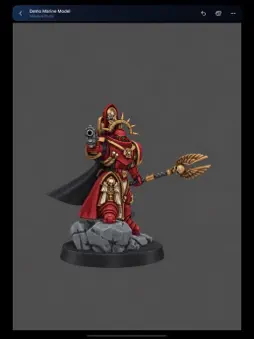
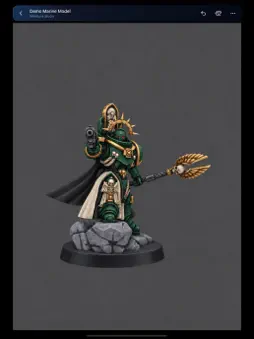
Your miniature painting desk, wherever you are. Miniature Studio brings freehand miniature painting to iPhone and iPad. Try a new colour scheme, practise your highlights or enjoy a painting session when your hobby desk is out of reach. PAINT DIRECTLY ON YOUR MODEL Rotate, zoom and paint with touch or Apple Pencil on a compatible iPad. Build up basecoats and layers, deepen recesses with washes and contrast-style effects, and bring out raised details with drybrushing. Adjust drybrush coverage from a light touch on the edges to broader coverage over raised surfaces. BUILD YOUR PAINTING IN LAYERS Keep different parts of your painting on separate layers. Adjust opacity, change their order, hide, duplicate or merge them as your scheme develops. Use Alpha Lock to recolour existing paint, or add a clipping layer to paint within the shape of the layer below. Layer masks let you hide and reveal paint without deleting it. BRING YOUR OWN MINIATURES Start with the included demo model, prepare an STL for painting or open a supported USDZ. STL preparation happens on your device, adding a paintable UV layout and primer. FIND YOUR COLOURS Browse paint-name and colour references from Citadel, The Army Painter, Vallejo and Pro Acryl by Monument Hobbies. Search by name or product code, explore paint ranges and save your favourites. MAKE YOUR OWN MIXES Combine up to four supported paints in different ratios—even across brands. Name and save your mixtures, and keep the proportions in your painting recipe. MAKE ROOM TO CREATE Move the floating paint controls wherever they feel comfortable, or hide them for an uninterrupted view of your miniature. Paint with your finger on iPhone and iPad, or use Apple Pencil with finger gestures for navigation on a compatible iPad. PICK UP ON ANOTHER DEVICE Enable optional iCloud Projects to keep your saved models and paintings available across your iPhone and iPad using the same Apple Account. Saved changes sync after you close the model and return to the library, keeping syncing out of your painting session. Downloaded projects remain available offline. Paint while travelling, then reconnect to sync your saved work. SAVE AND SHARE YOUR WORK Save manually whenever you choose. Automatic saving runs every five minutes and when leaving the project or moving the app into the background. Export painted models as USDZ or an OBJ package with materials and textures, export geometry as STL, or keep an editable project backup. THINGS TO KNOW • Digital colours, mixtures and brush effects are approximations, not guaranteed matches to physical paints. • Very dense models may require a lighter working mesh. Fine details can change during preparation. • Layer capacity depends on your device’s available memory and the model’s texture resolution. • iCloud syncing requires an internet connection, available iCloud storage and the same Apple Account. Open the app on each device to receive updates. • Download source files and projects before travelling to use them offline. • OBJ colour exports include accompanying material and texture files. STL exports contain geometry only. • Colour 3D printing requires compatible software and hardware. Check exported models in your slicer before printing. • Only import, share or print models you have permission to use. • Apple Pencil is optional and requires compatible hardware. Miniature Studio is an independent app by EllisGaming. It is not affiliated with, endorsed by or sponsored by Games Workshop, The Army Painter, Vallejo or Monument Hobbies. Third-party paint names and trademarks belong to their respective owners.
What's New
Version 1.7 2026-11-06
More control over your painting, and an easier way to pick up where you left off. • Paint in separate layers, with adjustable opacity, reordering, duplication ...More control over your painting, and an easier way to pick up where you left off. • Paint in separate layers, with adjustable opacity, reordering, duplication and merging. • Use Alpha Lock and clipping layers to keep new colours inside existing painted areas. • Hide and reveal parts of a layer with editable masks. • Browse Pro Acryl paints alongside Citadel, The Army Painter and Vallejo. • Keep projects across your iPhone and iPad with optional iCloud syncing. Downloaded projects still work offline. • Save whenever you want with the new Save button. Automatic saves now run every five minutes and when leaving your project. • iCloud syncing waits until you close the model, reducing background work while you paint. • Improved painting performance and layer memory handling, with fixes for repeated iCloud conflict copies and deletions across devices. “Undo saved step” returns to the previous save point. Tap Save before a change you want to be able to undo separately. Technical Analysis
Package Overview Basic metadata
Bundle ID
com.jakeellis.MiniatureStudio Current Version 1.7
Minimum iOS 18.0
Package Size App Store Size
Package Metadata 0 / 0 version records
Detailed binary, privacy manifest, framework, and Info.plist results have not been indexed for this package yet. The verified App Store and archive metadata above remains available.
Developer Information
Known Version Records
0 version records with stored package metadata
Stored metadata does not guarantee a package is currently available to download.
| Details | Version / IDs | Version date | Action |
|---|