
Preview




Description
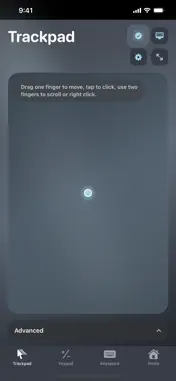
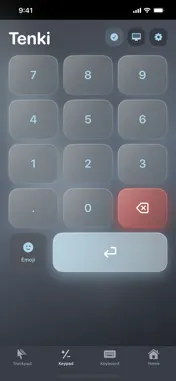
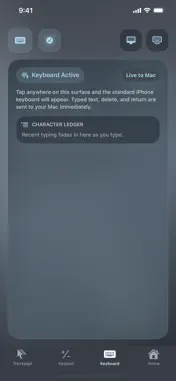
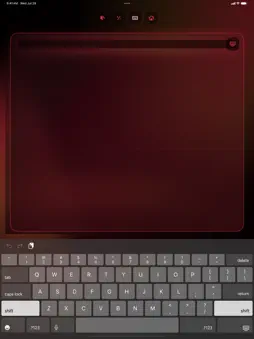
GET THE FREE MAC COMPANION Tenki requires TenkiMac on your computer running macOS. Download it at: https://cposeley2.github.io/tenki-support/#download Open the link on your computer, or tap App Support on this listing for the download and setup instructions. Tenki turns the iPhone or iPad beside you into a tactile wireless numpad for your computer. Choose a classic ten-key layout or switch to the spreadsheet layout for quick access to Tab, equals, clear, operators, and Enter. Tenki is more than a number pad. Move the computer pointer with a full trackpad, scroll with two fingers, click or right-click, and type remotely using the iOS keyboard or dictation. BUILT FOR FAST INPUT - Classic ten-key and spreadsheet-first layouts - Portrait and landscape controls - Haptic feedback for confident key presses - Selectable modern and vintage key sounds - Full trackpad with pointing, clicking, dragging, and scrolling - Remote keyboard and dictation input - Multiple visual themes with synchronized MacOS and iOS styling LOCAL BY DESIGN Tenki connects your devices over the local network. It requires no account and uses no ads, analytics, tracking, cloud sync, or cloud service. HOW IT WORKS 1. Download the free TenkiMac companion at https://cposeley2.github.io/tenki-support/#download. Move it to Applications and open it on your Mac. 2. Allow Accessibility access so TenkiMac can send the input you request. 3. Keep both devices on the same Wi-Fi network. Allow Local Network access on your iPhone or iPad, then open Tenki and choose your Mac. 4. Start entering numbers, moving the pointer, or typing. Tenki requires a computer running MacOS and an iPhone or iPad on the same local network.
What's New
Version 1.0.1 2026-10-18
Getting started with your Mac is now easier. - A simple setup guide walks you through installing TenkiMac, enabling Accessibility, and connecting your devices....Getting started with your Mac is now easier. - A simple setup guide walks you through installing TenkiMac, enabling Accessibility, and connecting your devices. - Find the free Mac companion from Home, Choose Mac, and connection help. - Share the download link through Messages or AirDrop, or copy it to open on your Mac. - A gentle reminder helps you find the Mac app when you are still disconnected after 30 seconds. Technical Analysis
Package Overview Basic metadata
Bundle ID
com.jposeley.tenki.ios Current Version 1.0.1
Minimum iOS 18.0
Package Size App Store Size
Package Metadata 0 / 0 version records
Detailed binary, privacy manifest, framework, and Info.plist results have not been indexed for this package yet. The verified App Store and archive metadata above remains available.
Developer Information
Known Version Records
0 version records with stored package metadata
Stored metadata does not guarantee a package is currently available to download.
| Details | Version / IDs | Version date | Action |
|---|