Preview


Description
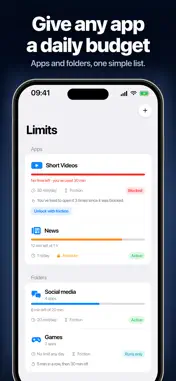
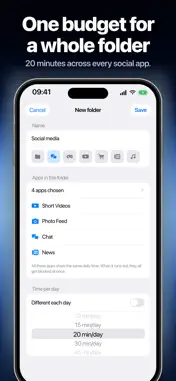
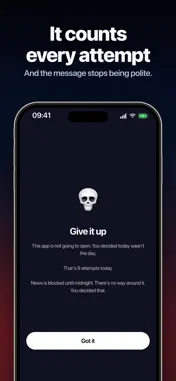
You already know how much time you want to give an app. Free Full Usage Limiter is what makes that decision stick. Pick an app, give it a daily budget, and when the budget runs out the app stops opening. That's it. No streaks, no coaching, no account to create. SET LIMITS THE WAY YOU ACTUALLY THINK • Per app — give one app its own daily budget. • Per folder — group several apps together and give them a single shared budget. Twenty minutes across all your social apps, however you split it. When the budget is gone, they all lock at once. TWO WAYS TO BE STOPPED Friction mode leaves a door, but makes you work for it. To buy back a few minutes you type out a full sentence by hand — pasting is rejected — and then sit through a countdown that restarts if you leave the app. Most of the time you'll close it instead. That's the point. Absolute mode has no door. When the time is gone, it's gone until midnight. An absolute limit also can't be loosened or deleted afterwards; you can only make it stricter. Choose it when you already know you'll negotiate with yourself later. IT NOTICES WHEN YOU KEEP TRYING Every time you hit the lock screen, the message changes. The first one is a gentle nudge. By the tenth it isn't gentle, and it tells you how many times you've tried today. Seeing that number is usually what breaks the loop. SEE WHAT YOU GOT BACK A weekly report shows how much less you used your phone compared to the same point last week — overall and app by app. Not a guilt chart. Just the hours you took back. BUILT TO BE BORING ABOUT YOUR DATA No account. No sign-up. No subscription. No ads. No analytics. No third-party code of any kind. There is no server, because there is nothing to send anywhere. Your limits live on your iPhone and nowhere else. Your usage numbers are read inside an isolated system extension that Apple does not let apps read from — which means even this app cannot see them. That's also why the main screen shows a progress bar rather than a live countdown: iOS genuinely does not allow it. HONEST LIMITATIONS • Requires Screen Time permission. It's what makes blocking possible. • Blocks can take up to a minute to appear after your time runs out. That's how iOS reports usage. • Deleting this app removes every block, including absolute ones. Apple does not allow that door to be closed, and we'd rather tell you than pretend otherwise. Free, completely. There is no paid tier to upsell you to.
What's New
Version 1.2 2026-09-04
Now in Spanish, all of it: every screen, the lock screen, notifications and the weekly report. If your iPhone is in Spanish, so is the app. Time in a row gets ...Now in Spanish, all of it: every screen, the lock screen, notifications and the weekly report. If your iPhone is in Spanish, so is the app. Time in a row gets a second look. iOS reports usage late, so a run could overshoot while you were mid-something. The app now sets a wake-up for the moment the run should be spent and asks iOS to re-check right then. The Report page scrolls when you drag on the charts. The weekly notification opens the Report. And if a change can't be saved because the limit is blocked, the editor says so instead of quietly closing. Technical Analysis
Package Overview Basic metadata
Bundle ID
com.rackslabs.applimiter Current Version 1.2
Minimum iOS 17.4
Package Size App Store Size
Package Metadata 0 / 0 version records
Detailed binary, privacy manifest, framework, and Info.plist results have not been indexed for this package yet. The verified App Store and archive metadata above remains available.
Known Version Records
0 version records with stored package metadata
Stored metadata does not guarantee a package is currently available to download.
| Details | Version / IDs | Version date | Action |
|---|