Preview





Description
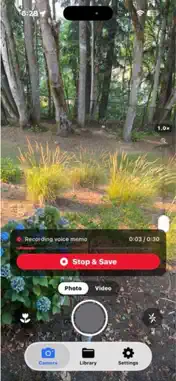
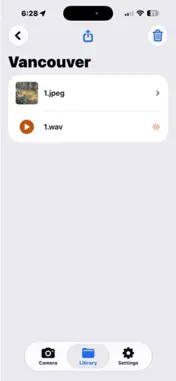
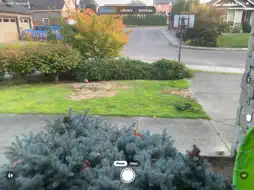
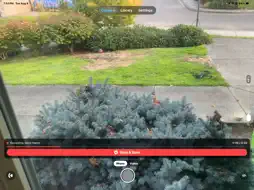
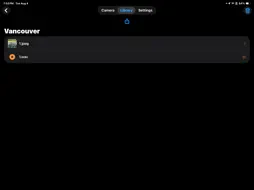
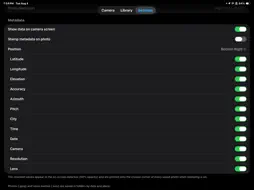
Camera Voice Memo brings back a feature great cameras used to have: press the shutter, then say what you're looking at. Your voice note is saved right next to the photo, so the context never gets lost. Perfect for job sites, inspections, real estate, field research, surveying, insurance claims, contractors, and anyone who takes photos they'll need to explain later. HOW IT WORKS Take a photo, and recording starts immediately. Speak your note — up to 15, 30, 45, or 60 seconds, whichever limit you choose. Recording stops on its own at the limit, or tap Stop & Save when you're done. The photo and the audio are saved as a matching pair: 1.jpeg 1.wav 2.jpeg 2.wav Simple, numbered, and readable by any computer. ORGANIZED AUTOMATICALLY Every capture is filed by date, then by city — worked out from your GPS position, so you never have to name anything. Hold down on any folder for two seconds to rename it after the fact, like "Maple Street Project" or "1420 Oak Ave." GET YOUR FILES OUT Your photos and recordings are plain .jpeg and .wav files in ordinary folders. Plug your iPhone into a computer and open Finder on a Mac or the Apple Devices app on Windows, then drag the folders straight off. The same folders appear in the Files app on your iPhone, so you can copy them to iCloud Drive, Dropbox, or anywhere else. You can also share photos with their audio directly from the app. A REAL CAMERA - Smooth zoom slider along the side of the screen - Tap anywhere to focus and set exposure - Macro mode for close-up detail work - Flash on or off, and a torch while filming - Photo or Video mode — videos record with sound - High (24MP) or Medium (12MP) resolution - Works in portrait and landscape, with photos always coming out upright STAMP THE DETAILS ONTO YOUR PHOTOS Turn on the metadata stamp and choose a corner — top or bottom, left or right. Then pick exactly what gets printed: - Latitude and longitude - Elevation and accuracy - Compass azimuth and device pitch - City name - Time and date - Camera model, resolution, and lens The same readings can appear live on the camera screen while you shoot, so you can confirm everything before you press the shutter. GPS coordinates are written into each photo's EXIF data too. YOUR FILES STAY YOURS No account. No sign-up. No subscription. No ads. Nothing is uploaded to us — every photo and recording stays on your iPhone until you choose to copy or share it.
Technical Analysis
Package Overview Basic metadata
Bundle ID
CVM.Camera-Voice-Memo Current Version 1.4
Minimum iOS 18.6
Package Size App Store Size
Package Metadata 1 / 1 version records
Detailed binary, privacy manifest, framework, and Info.plist results have not been indexed for this package yet. The verified App Store and archive metadata above remains available.
Known Version Records
1 version record with stored package metadata
Stored metadata does not guarantee a package is currently available to download.
| Details | Version / IDs | Version date | Action |
|---|---|---|---|
| 2.25 MB | v1.4 App Store ID: 889314088Build: 1.4 | 2026-08-20 23:51:21 | Paid / Arcade |