
Preview



Description
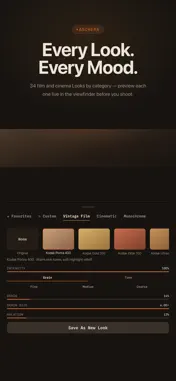
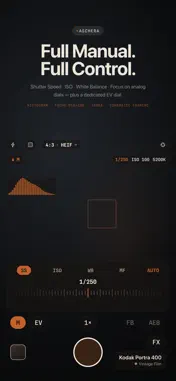
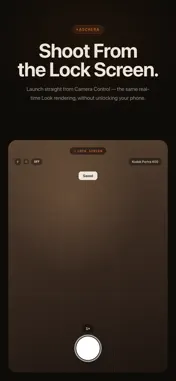
Real film Looks. Rendered live. No menus, no waiting. Aschera is a premium camera built around one idea: film simulation should happen in the viewfinder, not after the fact. Every Look is rendered in real time as you frame your shot — what you see is what gets saved. CAMERA CONTROL, REIMAGINED On iPhone 16 and later, Aschera goes deeper into the Camera Control button than any other camera app. Swipe to flip through film Looks live, adjust zoom and exposure with the same physical dial — all without touching the screen. On iPhone 14 Pro through 15 series, the same Look switching and zoom/exposure control works by touch. 34 LOOKS, FIVE CATEGORIES * Vintage Film — Kodak Portra 400, Kodak Gold 200, Kodak Ektar 100, Fuji Velvia 50, Fuji Provia 100, Agfa Vista 200, and more * Cinematic — Teal & Orange, Bleach Bypass, Golden Hour, Cold Chrome, Day for Night, Emerald Noir * Monochrome — Silver Gelatin, High Contrast B&W, Cyanotype, Infrared Film, and more * Vibrant & Pop — Vivid Landscape, Neon Glow, Tropical, Chrome, Candy, CCD Classic * Muted / Pastel — Matte Fade, Nordic Mist, Expired Kodachrome, Dusty Rose, Digital Compact Lo-Fi Every Look ships with a real film or process reference, plus Intensity, Grain, Grain Size, and Halation sliders so you can push it exactly where you want. CCD Classic and Digital Compact Lo-Fi bring back the early-2000s digital point-and-shoot look, sensor grain and all. Push further with advanced tone grading — Contrast, Saturation, Shadows, and Highlights — or tap a Grain preset (Fine, Medium, Coarse) for a one-tap starting point. Save your adjustments as up to 20 custom presets, and update them anytime. LENS CHARACTER, ON DEMAND Layer Fisheye, Pincushion, Vignette, Chromatic Aberration, or Swirl on top of any Look — from a subtle edge vignette to full analog-lens distortion. FULL MANUAL CONTROL * EV, Shutter Speed, ISO, White Balance, and Focus — five dials in one compact panel * Live exposure readout — shutter speed, ISO, and white balance always on screen; tap any value to jump straight to its dial * AEB (Auto Exposure Bracketing) — one tap captures three shots at -2/0/+2 EV in Program mode * Focus Bracketing — one tap captures five shots around your focus point in Program mode, ready to stack in your favorite editor * Real-time histogram, focus peaking, and zebra stripes so you can see exposure before you shoot * Look A/B Compare — split the viewfinder to see your original frame next to the processed Look, live * Cinematic Framing overlays — Rule of Thirds, Golden Frame, Anamorphic 2.35:1 letterbox SHOOT FROM THE LOCK SCREEN Launch Aschera straight from Camera Control or Control Center — no unlock required. Same live Looks, Lens Effects, and CCD Emulation. EVERYTHING ELSE YOU'D EXPECT * ProRAW (DNG) capture on Pro models (iPhone 14 Pro and later), for full manual edits in your favorite RAW app * HEIF or TIFF capture — switch format, aspect ratio, Live Photo, and self-timer from one quick menu * Live Photo and burst shooting * Self-timer, grid overlays, and a built-in level * 4:3, 3:2, 16:9, and 1:1 aspect ratios, with the cropped area dimmed live in the viewfinder * 35mm-equivalent focal length shown at every lens * Silent shutter, where local regulations allow * Film-style date imprint and an optional watermark * Saves to a dedicated "Aschera" album in Photos — no account, no cloud FREE TO START Shoot with the None Look and full auto (P) mode at no cost. Full Access unlocks the entire Look library, custom presets, every manual control and tone tool, Lens Effects, AEB and Focus Bracketing, A/B Compare, Pro overlays, Cinematic Framing, date imprint and watermark, Camera Control Look Swipe Preview, Looks on the Lock Screen camera, ProRAW, Live Photo, burst, and TIFF — as a one-time purchase or a subscription, your choice. No ads. No tracking. Terms of Use (EULA): https://www.apple.com/legal/internet-services/itunes/dev/stdeula/
What's New
Version 1.9.0 2026-11-16
See every Look before you unlock. • Preview any Look live in the viewfinder — tap it in the Look library, or swipe the viewfinder on iPhone 14 Pro–15. Full A...See every Look before you unlock. • Preview any Look live in the viewfinder — tap it in the Look library, or swipe the viewfinder on iPhone 14 Pro–15. Full Access is needed only when you save a photo with it, and a PREVIEW badge shows while you try one • More accurate Look color — Looks now follow their film profiles precisely, with smoother midtones and no clipping in deep shadows or bright highlights. None (original) is closer to the scene too • Landscape photos now keep the same color as portrait shots • Clearer camera screen — a lock icon on the manual lens lock, a larger Look name with a category color dot, and one LIVE indicator • VoiceOver labels for the main camera controls • Lower memory use for Looks, plus bug fixes and improvements Technical Analysis
Package Overview Basic metadata
Bundle ID
com.hoons.labs.brann Current Version 1.9.0
Minimum iOS 18.6
Package Size App Store Size
Package Metadata 0 / 0 version records
Detailed binary, privacy manifest, framework, and Info.plist results have not been indexed for this package yet. The verified App Store and archive metadata above remains available.
Known Version Records
0 version records with stored package metadata
Stored metadata does not guarantee a package is currently available to download.
| Details | Version / IDs | Version date | Action |
|---|