Preview



Description
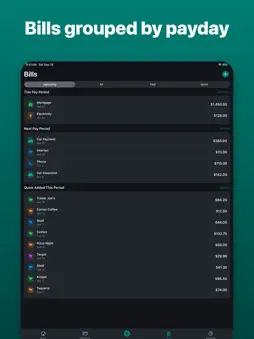
WageWindow is a budgeting app built around how you're actually paid — not a generic monthly calendar. Reconcile each paycheck as it arrives, set rules for where extra income goes, and let WageWindow sweep money into savings Funds automatically on payday. Irregular deposits and side income fit right in alongside your regular pay. • See bills grouped by pay period, with reminders before they're due • Track spending by category against your actual income, not a guess • A forecast view shows what's coming before it arrives • Savings Funds for the goals you're setting money aside for • A home-screen widget for an at-a-glance balance • Face ID lock keeps your numbers private Everything is stored on your device — WageWindow doesn't link to your bank or send your financial data anywhere. Try WageWindow free for 7 days. After that, continue with a subscription — $8.99 per month or $29.99 per year — or pay once for $39.99 lifetime access. Subscriptions renew automatically unless cancelled at least 24 hours before the end of the current period, and you can manage or cancel them in your Apple ID settings. Prices may vary by region. Terms of Use: https://www.apple.com/legal/internet-services/itunes/dev/stdeula/ Privacy Policy: https://baldwalnutz.github.io/blueprintandbolt-legal/wagewindow/
What's New
Version 1.1 2026-10-20
Add bills and income by scanning them. Tap Scan Receipt or Photos from Quick Spend or Money Arrived to snap a photo and auto-fill the merchant, amount, and date... Technical Analysis
Package Overview Basic metadata
Bundle ID
com.blueprintandbolt.WageWindow Current Version 1.1
Minimum iOS 17.0
Package Size App Store Size
Package Metadata 0 / 0 version records
Detailed binary, privacy manifest, framework, and Info.plist results have not been indexed for this package yet. The verified App Store and archive metadata above remains available.
Developer Information
Known Version Records
0 version records with stored package metadata
Stored metadata does not guarantee a package is currently available to download.
| Details | Version / IDs | Version date | Action |
|---|