Preview





Description
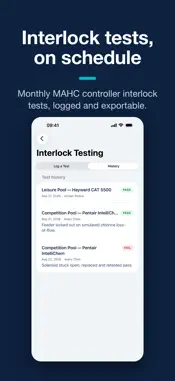
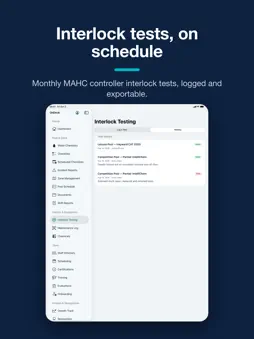
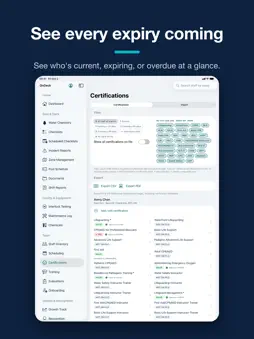
OnDeck brings your entire aquatics operation into one place — chemical logging, MAHC compliance, staff certifications, incident reports, and lifeguard evaluations — built for the people on the pool deck, not a back office. No paper. No lost logs. No shared logins. Every chemical reading, every incident report, every checklist is digital, searchable, and tied to a verified staff member — so when an inspector asks who did what and when, you have the answer. WHY AQUATICS TEAMS RUN ON ONDECK Digital chemical logs Replace the clipboard. Record chlorine, pH, alkalinity, temperature and more with timestamp-verified entries, a built-in dosing calculator, and instant alerts when a reading falls out of range — so you act before it becomes a safety or compliance problem. Built for compliance Designed around real health-department and Model Aquatic Health Code (MAHC) requirements, including monthly controller interlock testing. Exportable logs and audit trails are formatted for inspections, so nothing slips through the cracks. Every entry has an owner Staff identity is verified on every submission — on a personal iPhone or a shared pool-deck iPad. No anonymous entries, no shared credentials. Directors can trace any record back to the person, device, and time it was created. Certifications that don't lapse Track lifeguard, CPR, and first-aid certifications with expiration tracking, so you know who's current and who's coming due before it's a staffing problem. Incidents, evaluations, and zones Log incident reports, run lifeguard skill evaluations with a built-in stopwatch, and manage zone coverage — all from your phone or iPad. Director-ready reporting A real-time view of facility activity, out-of-range alerts, and one-tap exports formatted for health-department inspections. BUILT FOR IPHONE AND IPAD A native, adaptive interface: a focused stack on iPhone, a sidebar-and-detail layout on iPad. Sign in once with a secure magic link and unlock with Face ID or Touch ID. Keep working when the signal drops — entries queue offline and sync automatically when you reconnect. SECURITY FIRST No passwords to share or forget — sign in with a single-use magic link. Your data is encrypted in transit and at rest. Role-based access means directors see everything and staff see only their own work. Built for the teams that run pools — YMCAs, parks & recreation departments, waterparks, swim schools, camps, and university aquatics. OnDeck is a multi-tenant platform for aquatics facilities. Your records belong to your organization. An OnDeck account, provided by your facility, is required to sign in.
What's New
Version 1.5.0 2026-11-11
Incident reports, in the app File, review and follow up on an incident without going to the web. The form is the same on every device, lifeguard rescues includ...Incident reports, in the app File, review and follow up on an incident without going to the web. The form is the same on every device, lifeguard rescues included. Reviewers can change severity, close or reopen a report, assign follow-ups and add an addendum. Start a first notice in a few taps: the supervisor hears about it right away, and a mis-tap can be withdrawn. Work orders, equipment and vendors Report a problem with photos, assign it to a person or a vendor, and follow it until it's closed. Preventive schedules open the next job on their own. Equipment carries expiry dates such as AED pads, contracts carry renewal dates, and a work order can close a pool. Build your own checklists Make a checklist for any part of the building, or start from one of six starters: AED, first-aid kit, playground, childcare room, fitness floor and locker room. Your checklists work everywhere a checklist works. Scheduling - Change many shifts at once on iPad, and undo the change. - Templates of a week or two, applied to any dates. - Commitments, such as a weekend shift every weekend, with your progress on My shifts. - A call-out asks why, and OnDeck suggests who to ask for cover. - Rank your preferred times 1st, 2nd and 3rd. - My record: your commitment, pickups, hours and certifications coming due. Deck kiosk One paired iPad for swim tests, chemistry, the pool schedule and your incident form. Staff training schedule Pick one staff training a month. Managers see the year, which sessions are short of instructors, and who hasn't picked. A missed training is recorded. Also in this update - Stay signed in for 90 days, and Face ID comes up on its own for a saved passkey. - Type the 6-digit code from a sign-in email instead of tapping the link. - Stock counts: count blind, scan a filled-in count sheet, or tap a closet sticker. - Certifications show accepted substitutes, and the PDF groups by certification. - Set the day a closed pool reopens. - "No pool duties" for staff who only need access. - Unsubmitted shift reports and checklists can be found and finished. - Gear requests can be edited by anyone who can edit uniforms: size, quantity, reason or note. - Zone Management on iPad: a full-size drill sheet with the zone map. - Shift report photos can be viewed. Technical Analysis
Package Overview Basic metadata
Bundle ID
com.ondeckaquatics.app Current Version 1.5.0
Minimum iOS 26.0
Package Size App Store Size
Package Metadata 1 / 2 version records
Detailed binary, privacy manifest, framework, and Info.plist results have not been indexed for this package yet. The verified App Store and archive metadata above remains available.
Developer Information
Known Version Records
1 version record with stored package metadata • 2 known version records
Stored metadata does not guarantee a package is currently available to download.
| Details | Version / IDs | Version date | Action |
|---|---|---|---|
| 18.91 MB | v1.3.0 App Store ID: 888426886Build: 1.3.0 | 2026-09-23 04:29:26 | Get Version |
| Not archived | App Store ID: 887010487 | Unknown | Request Version |