
Preview





Description
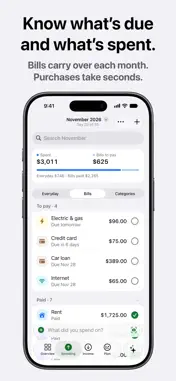
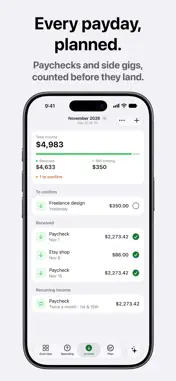
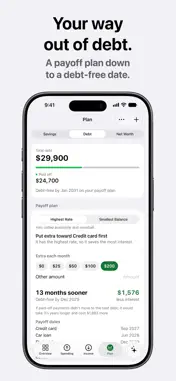
Private budgeting. No subscription. Left. puts your income, bills, purchases and savings in one ring, so you always know what’s really left to spend this month. No sign-up, no bank login, no tracking, no ads. KEEP YOUR MONEY PRIVATE Left. never sees what you spend, earn or owe. There’s no sign-up, so it doesn’t even know your name. Left. has no servers of its own: your data stays on your iPhone and Apple Watch and syncs through your own iCloud. Turn on Airplane Mode and it keeps working. Check App Privacy below: Data Not Collected. JUST SAY IT Left Assist logs purchases, answers questions and gives advice about your money, right on your iPhone. • Tap the mic and say “coffee 4.50”, then add it with a tap. • Ask “Am I on track this month?” or “What bills are coming up?” and get an answer worked out from your own numbers. • Ask for advice and get up to three things to do this month. • Change or delete a purchase just by asking: “make that 5.50” or “delete that”. • Your voice never leaves your iPhone, and nothing changes until you tap to confirm. YOUR WHOLE MONTH IN ONE RING • See what you’ve spent, the bills still to pay, what you’ve saved and what’s left to spend. • Spending pace shows where your everyday spending is heading before the month ends. • Up next shows the bills due soon and your next paycheck. Tap the circle to mark a bill paid. LOG A PURCHASE IN SECONDS Logging a purchase yourself makes you notice it. Left. makes it take seconds. • Type one line, like “coffee 4.50 yesterday”, and the amount, category and date fill in. • Your usual purchases wait above the keyboard, with what you paid last time. • Scan a receipt and Left. fills in the store, total and date. • Add purchases from a widget, Control Center, the Action Button, Siri, your Apple Watch or the built-in calculator. BILLS AND PAYCHECKS • Copy a bill into a new month once, and it carries over on its own after that. • Set up your paycheck once. Left. counts it before payday, and you confirm it with a tap when it lands. • Side gigs and one-time income count too. • Search finds any purchase or bill by name or amount. SEE WHERE IT GOES • Categories shows where your money goes, from Food & Groceries to Gifts & Donations, and how each compares with the same point last month. • Set a limit on any category and see how much room is left as you spend. • Savings goals show the month you’re on pace to reach them. ON YOUR HOME SCREEN AND WRIST • Widgets show what’s left on your Home Screen and Lock Screen. • The Apple Watch app shows the same ring, with Quick Add and complications for your watch face. • Ask Siri “How much is left in Left” without opening the app. On a locked iPhone, Siri asks you to unlock before saying any figures. LEFT. PRO, ONE TIME Budgeting is free. Left. Pro is a one-time purchase, never a subscription. • Debt payoff plan: see which debt to pay first, by highest rate or smallest balance, and your debt-free date. When one debt is paid off, its payment moves to the next, and you can see what a little extra each month saves. • Net worth: your accounts and debts in one place, and your net worth over time. Works in your local currency. Designed for VoiceOver, larger text sizes and Increase Contrast. Requires iOS 26.1 or later. Left. and its voice input are in English. Most Left Assist answers are calculated from your own figures on any supported iPhone; open-ended questions need Apple Intelligence.
What's New
Version 3.2.1 2026-11-12
Left Assist got smarter. Ask “What should I do this month?” and get up to three ideas, worked out on your iPhone from your own numbers. Also new: Left. fits iP...Left Assist got smarter. Ask “What should I do this month?” and get up to three ideas, worked out on your iPhone from your own numbers. Also new: Left. fits iPhone Duo, plus small fixes. Technical Analysis
Package Overview Basic metadata
Bundle ID
com.leftapp.Left Current Version 3.2.1
Minimum iOS 26.1
Package Size App Store Size
Package Metadata 0 / 6 version records
Detailed binary, privacy manifest, framework, and Info.plist results have not been indexed for this package yet. The verified App Store and archive metadata above remains available.
Developer Information
Known Version Records
0 version records with stored package metadata • 6 known version records
Stored metadata does not guarantee a package is currently available to download.
| Details | Version / IDs | Version date | Action |
|---|---|---|---|
| Not archived | App Store ID: 887267769 | Unknown | Request Version |
| Not archived | App Store ID: 887004237 | Unknown | Request Version |
| Not archived | App Store ID: 886594506 | Unknown | Request Version |
| Not archived | App Store ID: 886404083 | Unknown | Request Version |
| Not archived | App Store ID: 886253626 | Unknown | Request Version |
| Not archived | App Store ID: 883905270 | Unknown | Request Version |