
Preview








Description
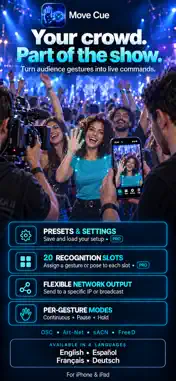
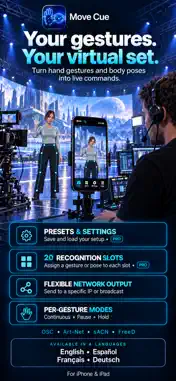
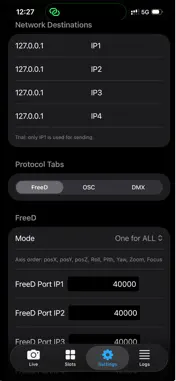
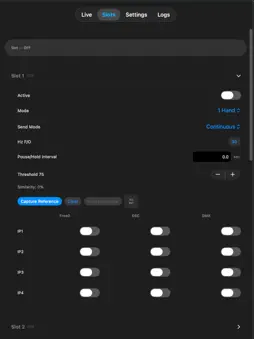
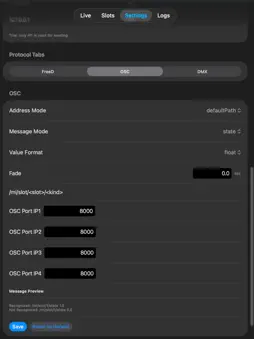
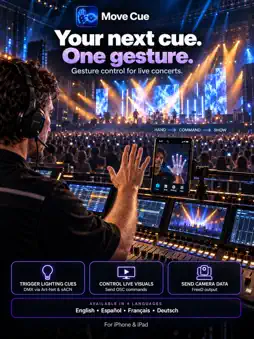
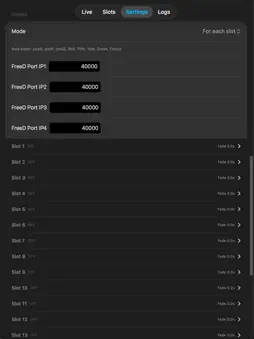
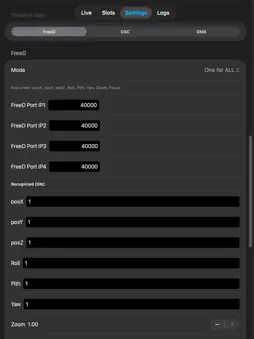
Move Cue turns body gestures and poses into professional live show control from your iPhone or iPad. The app recognizes hands and body movement in real time and sends commands over your local network via OSC, FreeD, and DMX (Art-Net and sACN). No cloud, no server delay - everything runs on your device. Multilingual interface: English, French, Spanish, German WHO IT'S FOR • Broadcast directors and camera operators • Lighting designers and console programmers • VJs, installation artists, and performers • Technical directors for concerts and corporate shows HOW IT WORKS Configure gesture slots - up to 20 different triggers. Capture a reference frame for each gesture or pose. Set IP destinations on your local network. Press Start - the camera tracks movement and sends signals to lights, PTZ cameras, media servers, and any gear that accepts OSC, FreeD, or DMX. RECOGNITION MODES • One hand • Two hands • Body pose • Pose + one hand • Pose + two hands Per slot: sensitivity threshold, send mode (continuous, pause, hold), and output rate. PROTOCOLS - FreeD, OSC, DMX FreeD Send position and orientation FreeD data to PTZ cameras or to Unreal engine/Unity/Resolume/ Touchdesigner. Global mode for all slots or per-slot values. Configurable ports, fade times, and ON/OFF values. OSC Flexible routing: default paths, per-slot addresses, or custom paths. State and change modes, float or int values, fade, up to 4 IP destinations. DMX Art-Net and sACN. Per-slot channel table: universe, channel, ON/OFF values, 8/16-bit resolution, fade. Channel conflict detection. Adjustable send speed. CAMERA & PREVIEW • Front and back camera, lens selection (wide / ultra / tele on supported iPhones) • ROI - region of interest for precise recognition • Live preview with skeleton overlay • External USB camera support on Mac • Anti-false-trigger: hysteresis and ON/OFF timing • FPS Boost to reduce device load • Keep screen awake during shows NETWORK Up to 4 independent IP destinations (IP1–IP4) with labels. Local network permission for UDP output. Works with typical setups: lighting desk, media server, PTZ controller, DMX controller. PROJECTS (PRO) Save and load full configuration: slots, references, protocols, ROI, camera settings. Import projects. Switch shows quickly without manual reconfiguration. FREE & PRO Free: • 2 active slots (of 20 configurable) • 1 IP destination • Up to 7 minutes per Start session • All protocols and settings within these limits Pro (subscription): • 20 active slots • 4 IP destinations • Unlimited session duration • Save, load, and import projects Subscriptions: Pro Monthly and Pro Yearly. Billed through your Apple ID. Manage in Settings → Apple ID → Subscriptions. Restore purchases in the app. PRIVACY Camera and recognition are processed only on your device. Video is not uploaded to developer servers. No ad trackers. Learn more: https://www.tobeproduction.com/movecue-ios-app-termsofuse IMPORTANT Before going live, verify IP addresses, ports, DMX channels, and OSC/FreeD routing. You are responsible for safe and correct output in live environments. REQUIREMENTS iOS 17 or later. iPhone and iPad; also runs on Apple Silicon Mac (Designed for iPad). Camera and local network permissions required. Move Cue turns movement into a reliable trigger for live production - compact, fast, and professional. Questions: [email protected]
What's New
Version 1.4.2 2026-10-07
Optimization and a bug fixed where the camera would freeze when capturing a reference. Technical Analysis
Package Overview Basic metadata
Bundle ID
com.magicevent.ios Current Version 1.4.2
Minimum iOS 17.0
Package Size App Store Size
Package Metadata 0 / 0 version records
Detailed binary, privacy manifest, framework, and Info.plist results have not been indexed for this package yet. The verified App Store and archive metadata above remains available.
Known Version Records
0 version records with stored package metadata
Stored metadata does not guarantee a package is currently available to download.
| Details | Version / IDs | Version date | Action |
|---|