Preview






Description
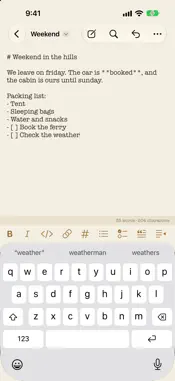
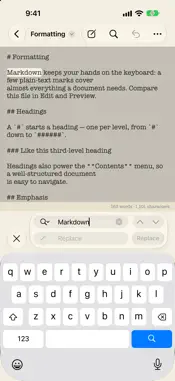
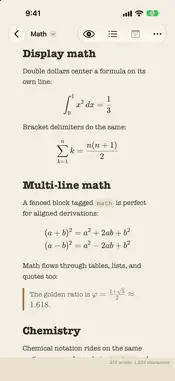
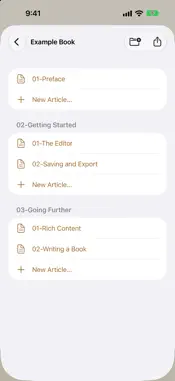
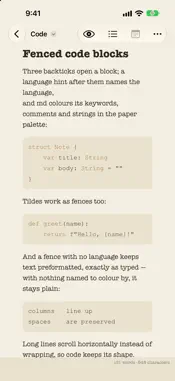
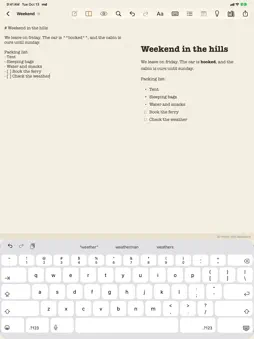
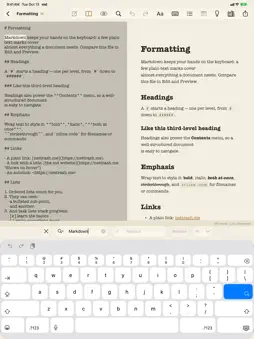
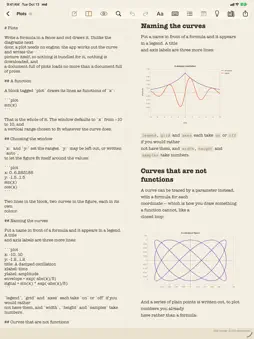
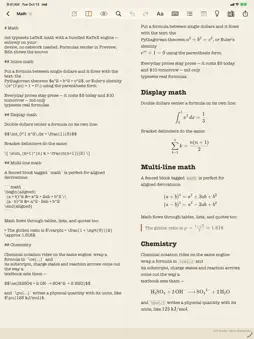
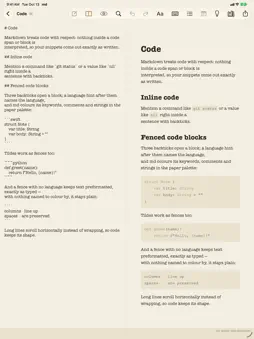
md is a Markdown editor and live previewer for iPhone and iPad. Write plain Markdown, watch the finished page take shape as you type, then print it, export it, or turn a folder of chapters into a whole book. WRITE AND SEE • Edit and Preview on iPhone; on iPad, a Split view puts the source and the rendered page side by side — and the two panes scroll as one, so the passage you are reading is the paragraph you are writing. • The preview is the printed page: one renderer draws the preview, the printout and the PDF — the same layout, set for paper. • Headings, lists, task lists, tables, quotes, code, links and images — plus footnotes, and metadata front matter (YAML or TOML) recognised and kept out of the page. • LaTeX math and mhchem chemistry, Mermaid graphs, Graphviz and PlantUML diagrams — all drawn on your device by engines built into the app. • A block of formulas tagged plot becomes a chart — curves, parametric figures and your own points, with a legend and a window you set — drawn by md itself. • Fenced code is highlighted in a quiet palette that matches the page. • Paste a table from a spreadsheet into a csv or tsv block and md draws it. • Contents lists every heading and jumps the editor and the preview to it. Private author notes — an HTML comment on its own line whose text begins with the word note — are listed in the Notes menu and never appear in the preview, the PDF or the printout. FORMAT, FIND AND TYPE • Formatting at a tap: a bar above the iPhone keyboard and a Format menu on iPad for bold, italic, code, links, headings, lists, quotes and indents, each on a hardware-keyboard shortcut as well. • Find and replace, with Replace All as a single undo. • Return continues lists, quotes and tables, and the first letter of each line and sentence is capitalized as you type. Both are switches. • On iPad, keyboard shortcuts for the layouts, Find, Print and the book. PRINT AND EXPORT • Print or export real A4 pages — or A5, US Letter, US Legal, or a paperback trim size for a book bound for print. Breaks fall between lines, and \newpage starts a fresh page wherever you decide. • Export as HTML: one self-contained file that opens anywhere, diagrams as drawings and formulas as real, selectable text. • Export as LaTeX: a .tex file where your mathematics stays mathematics, ready to paste into a paper. • Export a diagram or a plot as a standalone .svg vector, or a document as a standard EPUB 3 that carries the author, language, series and cover its front matter names. • Share the rendered PDF, share the Markdown source, or open and export TextBundle and TextPack, the Markdown-with-images container. WRITER MODE: BOOKS • A book is simply a folder: its subfolders are chapters, its Markdown files are articles, ordered by name. • Rename, reorder or delete a row and the order is written back to the file names, so it stays true in Files. • Compile the whole book into one PDF at the page size you choose, or export it as a standard EPUB 3 with a proper table of contents — math and diagrams travel with it as images. FILES YOU CAN KEEP • Your documents are ordinary text files — .md, .markdown and every other Markdown spelling, or .txt — kept where you choose, on your device or in your own iCloud Drive, in the encoding they arrived in. • md also opens PlantUML, Graphviz, TextBundle and TextPack files. Quick Look shows a TextBundle as md renders it, in Files and Mail. Built-in examples, including a small sample book, show everything the app can do. PRIVATE BY DESIGN • No accounts, no sign-in, no analytics, no tracking, no ads. • Everything is rendered on your device. The only things md fetches from the network are an image your own document points at by URL and an EPUB cover it names. The only outside code is the open-source engines for math, chemistry, diagrams and code — KaTeX, mhchem, Mermaid, Graphviz, PlantUML and highlight.js — bundled in and run on your device. The source code is public.
What's New
Version 1.6 2026-10-13
Version 1.6: formatting at a tap, Quick Look previews of TextBundles, and EPUBs that carry their author, language, series and cover. FORMATTING • On iPhone, a ... Technical Analysis
Package Overview Basic metadata
Bundle ID
me.nettrash.md Current Version 1.6
Minimum iOS 26.0
Package Size App Store Size
Package Metadata 0 / 4 version records
Detailed binary, privacy manifest, framework, and Info.plist results have not been indexed for this package yet. The verified App Store and archive metadata above remains available.
Developer Information
Known Version Records
0 version records with stored package metadata • 4 known version records
Stored metadata does not guarantee a package is currently available to download.
| Details | Version / IDs | Version date | Action |
|---|---|---|---|
| Not archived | App Store ID: 888829121 | Unknown | Request Version |
| Not archived | App Store ID: 888253096 | Unknown | Request Version |
| Not archived | App Store ID: 887950526 | Unknown | Request Version |
| Not archived | App Store ID: 887575485 | Unknown | Request Version |