
Preview
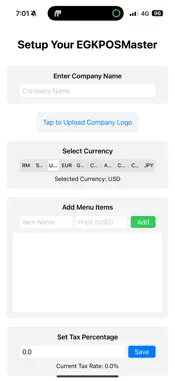
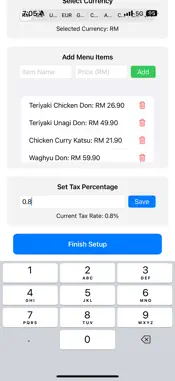
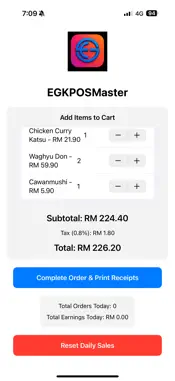
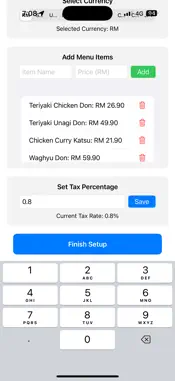


Description
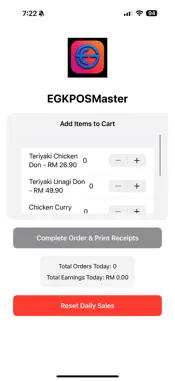
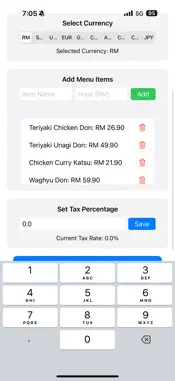
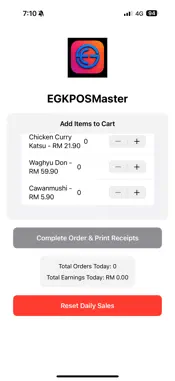
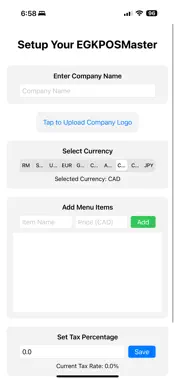
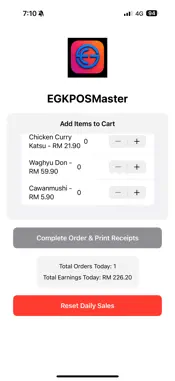
Key Features: Customizable Setup: Company Name: Users can input their business name during setup, which is then displayed prominently at the top of both customer and kitchen receipts, enhancing brand visibility. Company Logo: Upload a logo via the photo library to personalize the app and customer receipts (logo display on kitchen receipts is optional). Currency Selection: Choose from 10 major currencies (RM, SGD, USD, EUR, GBP, CHF, AUD, CAD, CNH, JPY) to align with the business’s operational region, ensuring accurate pricing and receipt formatting. Tax Rate Configuration: Set a custom tax percentage (e.g., 10.0%) to automatically calculate taxes on orders. Menu Item Management: Add, edit, or delete menu items with names and prices (e.g., “Sushi” at JPY 500). Users can amend items at any time during setup by adding new items or removing existing ones using a trash button. Usage Mode for Transactions: Order Entry: Select items from the menu and specify quantities using a stepper (0 to 100). The app calculates the subtotal, tax, and total in real-time, displaying them in the selected currency. Receipt Printing: Upon completing an order, the app generates two receipts: Customer Receipt: Includes the company name, date, itemized order (e.g., “Sushi: 2 x JPY 500.00 = JPY 1000.00”), subtotal, tax, and total, with a “Thank you” message. Kitchen Receipt: Lists the company name, order ID, and items with quantities (e.g., “Sushi: 2 units”) for kitchen staff. Sales Tracking: Tracks daily orders and earnings, displaying a summary (e.g., “Total Orders Today: 1”, “Total Earnings Today: JPY 1100.00”). Reset Daily Sales: Reset daily sales data to zero, clearing orders and earnings for the current day while preserving historical orders. Flexibility and Restart Option: Amend Items Sold: During setup, users can freely modify the menu by adding new items or deleting existing ones, ensuring the item list reflects current offerings. Restart Setup: If users need to start fresh (e.g., to change the company name, logo, or currency), they can delete the app, which clears all saved data in UserDefaults. Upon reinstalling, the app restarts in setup mode, allowing a completely new configuration. User Flow: Setup Mode: The app launches in setup mode if it’s the first use or after a reset. Users input their company name (e.g., “My Cafe”), upload a logo, select a currency (e.g., JPY), add menu items (e.g., “Sushi” at JPY 500), and set a tax rate (e.g., 10.0%). Validation ensures all required fields (company name, logo, at least one menu item) are complete before proceeding. Tap “Finish Setup” to save settings and transition to usage mode. Usage Mode: Displays the company logo (if uploaded) and the app name “EGKPOSMaster”. Users add items to a cart, view the subtotal, tax, and total, then complete the order to “print” receipts (output to the console in this version). Daily sales are tracked, and users can reset them as needed. To amend items or restart, users can delete the app and reinstall to return to setup mode. Technical Details: Sample Receipt ----------------------------------- POS System Date: 02/06/2025 21:42:28 ----------------------------------- Customer Receipt ----------------------------------- Chicken Curry Katsu : 1 x $ 26.90 = $ 26.90 Uni Don: 1 x $ 69.90 = $ 69.90 Chicken Katsu Don: 1 x $ 25.90 = $ 25.90 ----------------------------------- Subtotal: $ 122.70 Tax (0.8%): $ 0.98 Total: $ 123.68 Thank you for your purchase! ----------------------------------- Printing Kitchen Receipt: Kitchen Receipt Order ID: E1F7794C Chicken Curry Katsu : 1 units Uni Don: 1 units Chicken Katsu Don: 1 units Receipts printed
Technical Analysis
Package Overview Basic metadata
Bundle ID
EGK-Microelectronic-Solutions-Group-Sdn.-Bhd.EGKPOSMaster Current Version 1.0
Minimum iOS 18.5
Package Size App Store Size
Package Metadata 0 / 1 version records
Detailed binary, privacy manifest, framework, and Info.plist results have not been indexed for this package yet. The verified App Store and archive metadata above remains available.
Known Version Records
0 version records with stored package metadata • 1 known version records
Stored metadata does not guarantee a package is currently available to download.
| Details | Version / IDs | Version date | Action |
|---|---|---|---|
| Not archived | App Store ID: 875257542 | Unknown | Paid / Arcade |