
Preview






Description
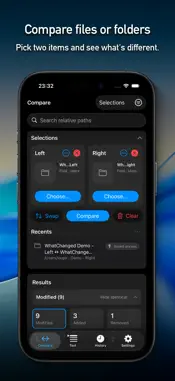
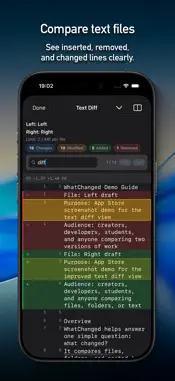
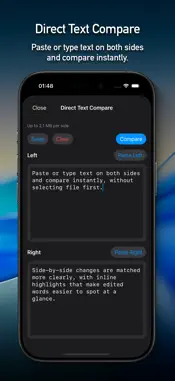
WhatChanged is a file and folder comparison app built to answer one practical question: what changed between these two copies? Compare two files or two folders on iPhone, iPad, and Mac and get a clear summary of added, removed, modified, renamed, and identical items. Use optional SHA-256 verification when metadata alone is not enough. On iPhone and iPad, start inside the app or send exactly two files from Files straight to WhatChanged. It is useful for backups, exports, cloud-drive copies, builds, and any “did this transfer match?” check. ◼ File and folder comparison • Compare two files or two folders as Left and Right • Review added, removed, modified, renamed, and identical items • Use smart ignore rules for hidden items, extensions, names, and patterns • Ignore line-ending or whitespace-only changes when appropriate • Preview supported files, keep recent comparisons, and export or share reports • Verify content with optional SHA-256 and cached re-checks • Use the app in 25 languages, with an optional in-app language override ◼ From the share sheet In Files, or another app that can share files, select exactly two files. Tap Share → WhatChanged. The comparison opens automatically. Tip: The extension is intended for file-to-file comparison. To compare folders, open the main app. ◼ Safe Merge Run a folder comparison, open Safe Merge, and choose a main rule: Newest, Oldest, Smallest (New), Smallest (Old), Biggest (New), or Biggest (Old). The Safe Merge Assistant shows selected items, recommendations, conflicts, blocking issues, output details, and safety checks before anything is copied. For individual output paths, you can keep the main Merge Rule or choose Left or Right. Recommended continues to show what the main rule would choose, while Selected shows what will actually be copied. The “+ Custom” indicator appears whenever exceptions are active. WhatChanged recalculates the plan and verifies it again before copying. Custom merges use a clearly named output folder, such as “Safe Merge by WhatChanged (Newest + Custom).” Successful merges include a generated README describing the compared folders, main rule, custom selections, copied items, output paths, counts, and safety notes. ◼ Quick text checks Use Direct Text Compare, supported text files, or folder-pair text results for convenient text checks. Copy a unified-diff-style result, search with Find in Diff, move between matches, highlight rows, and review Diff Summary counts. These text tools are included for quick comparison inside a file-and-folder utility. WhatChanged is not designed as a full drafting workspace. ◼ Looking for a dedicated text workspace? DiffDraft is designed specifically for comparing text versions and composing a clean final draft in a row-aware workspace. Source rows, draft rows, manual rows, and intentional gaps stay visually aligned, helping long reviews remain stable and trustworthy while you cherry-pick, edit, and continue later. View DiffDraft on the App Store: https://apps.apple.com/us/app/diffdraft/id6779625050 ◼ Safe by design WhatChanged does not modify or delete your originals. Comparisons are read-only. Safe Merge writes only to a new output folder after you confirm the merge and every required safety check passes. ◼ Official website Product information, support, privacy details, and terms are available here: https://hazybyte.studio/whatchanged/ Requires iOS 16.6 or later. Terms of Use: https://hazybyte.studio/whatchanged/terms-of-use/
What's New
Version 1.80.0 2026-09-01
What’s New in Version 1.80.0: Custom Safe Merge on iPhone and iPad Safe Merge now gives you direct control over individual choices on iPhone and iPad. Review... Technical Analysis
Package Overview Basic metadata
Bundle ID
studio.hazybyte.WhatChanged Current Version 1.80.0
Minimum iOS 16.6
Package Size App Store Size
Package Metadata 2 / 9 version records
Detailed binary, privacy manifest, framework, and Info.plist results have not been indexed for this package yet. The verified App Store and archive metadata above remains available.
Developer Information
Known Version Records
2 version records with stored package metadata • 9 known version records
Stored metadata does not guarantee a package is currently available to download.
| Details | Version / IDs | Version date | Action |
|---|---|---|---|
| 30.57 MB | v1.80.0 App Store ID: 890604811Build: 1.80.0 | 2026-09-01 18:23:50 | Paid / Arcade |
| 30.57 MB | v1.80.0 App Store ID: 887061054Build: 1.80.0 | 2026-09-01 18:23:50 | Paid / Arcade |
| Not archived | v1.65.0 App Store ID: 886980223Build: 1.65.0 | 2026-06-15 21:04:11 | Paid / Arcade |
| Not archived | v1.60.0 App Store ID: 886081943Build: 1.60.0 | 2026-05-26 20:52:44 | Paid / Arcade |
| Not archived | v1.50.0 App Store ID: 885300486Build: 1.50.0 | 2026-05-06 22:54:27 | Paid / Arcade |
| Not archived | v1.40 App Store ID: 884035537Build: 1.40 | 2026-04-02 22:31:58 | Paid / Arcade |
| Not archived | v1.35 App Store ID: 883711081Build: 1.35 | 2026-03-25 17:46:34 | Paid / Arcade |
| Not archived | v1.3 App Store ID: 883557205Build: 1.3 | 2026-03-20 23:36:42 | Paid / Arcade |
| Not archived | v1.0 App Store ID: 883227257Build: 1.0 | 2026-03-16 18:00:45 | Paid / Arcade |