Preview







Description
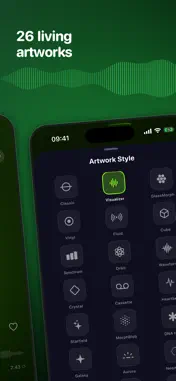
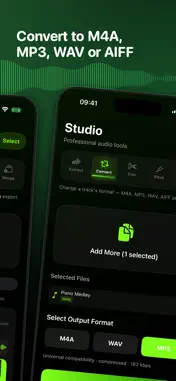
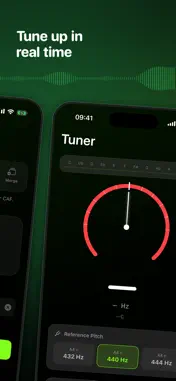
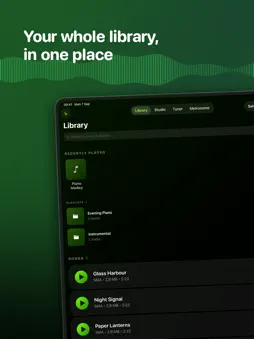
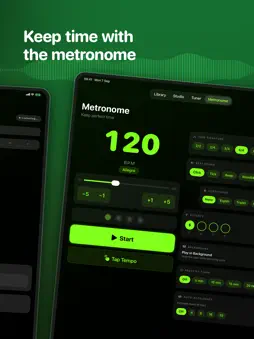
Audio Studio is the all-in-one audio toolkit for iPhone. Whether you're pulling audio from a video, converting tracks for a DJ set, trimming a podcast, or practising an instrument — every tool you need is here, beautifully designed and fast. Pro Music Player A full-featured player built for your audio files — not streaming. Everything stays local, private, and yours. - 19 real-time animated artwork styles — from Aurora and Galaxy to DNA Helix, Plasma, Silk Ribbon and Kaleidoscope, each visualizer reacts to your music - 10-Band Equalizer with genre presets (Bass Boost, Vocal, Classical, and more), or dial in your own sound - Speed & Pitch Control — adjust playback speed from 0.5× to 2× and shift pitch ±24 semitones, completely independently - Audio Boost — push volume beyond the hardware limit with a digital gain stage; perfect for quiet recordings - Crossfade — seamless transitions between tracks with a configurable 1–8 second fade - A-B Loop — mark any two points and loop a section on repeat to master a passage - Stable Volume — loudness normalisation so no track is ever jarringly louder than another - Sleep Timer — set a countdown up to 10 hours; playback fades and stops automatically - Bookmarks — drop a timestamp in one tap, long-press to review and manage them all - Queue — view, reorder, and remove upcoming tracks with a drag handle - AirPlay — stream to any AirPlay speaker or Apple TV directly from the player Smart Library - Playlists — create named folders, drag tracks in, and browse them anywhere - Favourites — heart any track; a dedicated view gathers all favourites across every folder - Recently Played — a quick-access strip of your last 10 tracks at the top of the library - Library Stats — total tracks, favourite count, total plays, most-played track, and a format breakdown Studio Tools Five professional audio tools in one place — and any tool's output can be sent directly into another. - Extract — pull audio from any video (MP4, MOV, M4V…) from your Camera Roll or Files app, in seconds. Batch-process entire albums at once - Convert — transcode between M4A, MP3, WAV, AIFF and CAF. Batch-convert a whole folder in one tap - Trim — an interactive waveform editor with three modes: Trim (keep a range), Delete Regions (cut a section and rejoin), Mute Regions (silence a range without removing it) - Pitch Shift — permanently export a file at any pitch from −24 to +24 semitones - Merge — combine multiple audio files into one seamlessly joined export Chromatic Tuner - Real-time pitch detection via the microphone with a live cents gauge - Scrolling chromatic strip highlights the nearest note - Support for A4 = 432 Hz, 440 Hz, or 444 Hz reference pitch - Note History log to review a session's detected pitches Metronome - BPM control from 20 to 300 with fine-step precision - Tap Tempo — tap in rhythm to set BPM instantly - Common and unusual time signatures (2/4, 3/4, 4/4, 5/4, 6/8, and more) - Multiple beat sounds to match your style - Subdivisions — quarter, eighth, triplet, sixteenth - Accent Pattern Editor — toggle accents on individual beats - Practice Timer — automatically stop after a set duration - Auto-Accelerate — gradually ramp BPM toward a target to build speed - Runs in the background while you use other apps Personalise Everything - Dozens of curated colour themes that tint the player, artwork glow, and UI accents - Random theme or artwork on launch — wake up to a fresh look every day - Use Original Artwork — display the cover art embedded in your audio files Mini-Player Gestures - Swipe up to open the full player - Swipe left to skip to the next track - Swipe down to stop and dismiss - Long-press play to cycle through speed presets (0.75× → 1× → 1.25× → 1.5× → 2×) Audio Studio Pro works entirely offline. Your files never leave your device. No subscriptions. No accounts. No ads (optional upgrade available). Your music. Your tools. Your studio.
What's New
Version 0.1.3 2026-09-07
Audio Studio is now a real iPad app, and the player and Trim tool have been rebuilt. • Made for iPad — every screen scales to the canvas, in all four orientati...Audio Studio is now a real iPad app, and the player and Trim tool have been rebuilt. • Made for iPad — every screen scales to the canvas, in all four orientations, with Split View and Slide Over • Back and forward 10 seconds are always in the player now, alongside previous and next • 28 live artwork styles, and the picker previews the one you're choosing • Trim rebuilt: a full-track overview above a zoomable waveform. Drag the ends, pinch to zoom, nudge to the exact second Technical Analysis
Package Overview Basic metadata
Bundle ID
com.alexionescu.Audio-Extractor Current Version 0.1.3
Minimum iOS 18
Package Size App Store Size
Package Metadata 0 / 2 version records
Detailed binary, privacy manifest, framework, and Info.plist results have not been indexed for this package yet. The verified App Store and archive metadata above remains available.
Developer Information
Known Version Records
0 version records with stored package metadata • 2 known version records
Stored metadata does not guarantee a package is currently available to download.
| Details | Version / IDs | Version date | Action |
|---|---|---|---|
| Not archived | App Store ID: 886329855 | Unknown | Request Version |
| Not archived | App Store ID: 886156670 | Unknown | Request Version |