
Preview




Description
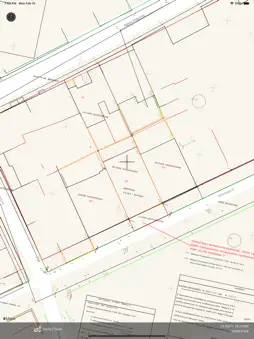
GIS Lite. Use your iPad and iPhone to open DXF, KML, Shapefiles, GeoTiff, WorldFiles and more. Collect data on the field, attach photos and share pdf item reports. Take freehand / pencil notes over maps and export georeferenced tiff. Features that support property view available. New updates will gradually add features that will transform your device to a complete GIS station. GIS Lite is a professional mobile GIS solution that enables users to load and view heir own data over a background of map service imagery. Open of various vector data formats is supported. Below a list of current support types. ** For formats that use support files (eg dbf for shapefiles), files must be in the dedicated iCloud/GIS_Lite folder, so that access is provided to the application. Raster Files * #GeoTiff GIS Lite can open and render your GeoTiff files directly on the map. #WoldFiles** Open PNG, JPG or TIFF file using the corresponding world file (pgw,jpw,tfw). Just specify the projection used. Vector Files #DXF files .dxf Select your file to open from local or iCloud storage. You will need to select data projection. Layers and styles will be loaded. #KML / KMZ files .kml / .kmz #ESRI Shapefiles .shp Select .zip file that contains .shp, .dbf, .prj files Or Select your .shp file to open from local or iCloud storage. If you want a full load (.dbf attributes and .prj file), the files must be copied in iCloud application folder (GIS_Lite). If not, you can still view your data. In that case, only geometry will be loaded and you will have to define projection. Rendering of geometry primitives is currently available (points / lines / polygons) Parsing engine is continuously updated so stay updated for more features. Create datasets by collecting data on the field. Capture on field photos and attach to polygon / line / point record. Version 1.6 introduces Apple Pencil usage for enhanced object selection. Your spatial data is stored on the iPhone, so there’s no need for an Internet connection to see your data – great for field work. We also support over 3000 projections, so no need for re-projection. Change Basemap among apple map / satellite / hybrid and more. This application is optimised to provide • High parse and render speed • Zoom to extend • Zoom to selection • Select objects on map • Display attributes • Highlight selection items • Extensive projection list • GPS position • Export and share selected objects Some basic GIS background is assumed to be able to use the application (projections, layers, etc) *Images loaded are currently restricted to 2 MegaPixel size for performance reasons.
What's New
Version 1.8.1 2024-05-10
Handle export to .shp bug Technical Analysis
Package Overview Basic metadata
Bundle ID
geosolution.gis-lite Current Version 1.8.1
Minimum iOS 13.0
Package Size App Store Size
Package Metadata 1 / 10 version records
Detailed binary, privacy manifest, framework, and Info.plist results have not been indexed for this package yet. The verified App Store and archive metadata above remains available.
Developer Information
Known Version Records
1 version record with stored package metadata • 10 known version records
Stored metadata does not guarantee a package is currently available to download.
| Details | Version / IDs | Version date | Action |
|---|---|---|---|
| 29.81 MB | v1.8.1 App Store ID: 865830434Build: 1.8.1 | 2024-05-10 15:53:46 | Get Version |
| Not archived | App Store ID: 848596698 | Unknown | Request Version |
| Not archived | App Store ID: 843687317 | Unknown | Request Version |
| Not archived | App Store ID: 841143635 | Unknown | Request Version |
| Not archived | App Store ID: 841061358 | Unknown | Request Version |
| Not archived | App Store ID: 841025732 | Unknown | Request Version |
| Not archived | App Store ID: 840762707 | Unknown | Request Version |
| Not archived | App Store ID: 840678308 | Unknown | Request Version |
| Not archived | App Store ID: 840619927 | Unknown | Request Version |
| Not archived | App Store ID: 839985164 | Unknown | Request Version |