
Preview




Description
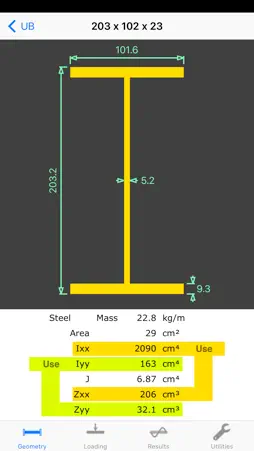
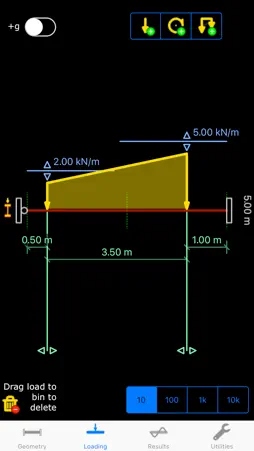
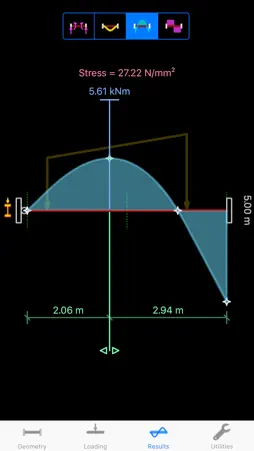
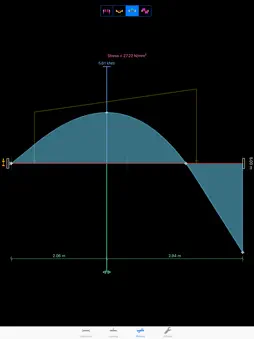
Structural / Civil Engineering App for single-span beams. Caters for many beams with arbitrary loadings. There is an emphasis on quick and precise input of high-resolution data through graphical drag-and-tap interaction, with numeric input available as an alternative. Instantly available, clear graphical representations of deflections and force envelopes are interactive with slider bars for reading off results at any point along the beam, together with single-tap access to maxima/minima and other points of interest. === Technical features === * Metric & imperial units. * Integrated extensive section library: - British: UB, UC, SHS, RHS, CHS, RSC, PFC, ERSA, URSA, RSJ, UBP - European: HD, HE, HL, HP, IPE, IPN, LE, LU, UAP, UPN - American: W, HP, HSS, C - Australian: UB, UC, WB, WC, SHS, RHS, CHS, PFC, EA, UA, TFB, UBP - Japanese: HJ - Russian: BFB, NFB, RSC * Integrated section generator for common shapes: - Open: I/H, channel, zed, angle, tee - Hollow: Oval, Rectangular - Solid: Oval, Rectangular - Calculates: Calculates: Area, Inertia, Torsional constant, Elastic moduli, and mass per unit length * Integrated material library: - Steel, Aluminium, Concrete, Timber, Glass * Dimensional resolutions to 0.01 m (0.5"). * Loading resolution to 2 significant figures. * Beam lengths from 0.2 m to 40 m (6" ~ 1600"). * Loads from 0 kN to 1000 kN (0 kips ~ 200 kips). * Arbitrary combined loadings of point, couple, and trapezoidal loads. * Point and couple loads at any position along beam. * Trapezoidal loads at any position and length (full or partial span) along beam. * Various end conditions: - Simply supported. - Fixed both ends. - Fixed and pinned at opposite ends. - Left-hand and right-hand cantilevers. * Instant automatic analysis. * Results include: - Reactions. - Deflections. - Bending moments. - Shear forces. - Bending Stress. - Span/deflection ratio. * Results at any position along the beam * Points of interest automatically determined: - Local and global maxima & minima. - Zero intercept. - Zero crossing points. === User Interface features === * Four simple interactive screens: - Geometry: for entering beam length, supports, and section properties. - Loading: for adding, removing, and editing loads. - Results: for reading numerical results and viewing graphical deflections and force envelopes. - Utilities: for clearing model and selecting unit system (metric/imperial). * Easy and accurate graphical drag-and-tap controls: - Precision of positioning with finger as high as 1 part in 2000. - Drag slider for beam span. - Tap to add a load to the beam. - Drag loads along to set position. - Drag loads and envelopes to specify magnitudes. - Drag a load to the wastebin to remove it. - Drag marker along deflected shape or force envelope to read off value. - Tap on points of interest for specific results (e.g. maxima/minima). * Numeric entry available if preferred: - Double-tap on an input variable to enter its value numerically instead of graphically. * Section library presented as a straightforward selection: - Tap on button in geometry window to open library. - Tap on category (e.g. British UB). - Tap on section size. - Diagram and properties will appear; tap on a Use button to pick major or minor axis. * Custom property generator accessible in the library: - In library, choose custom category. - Diagram and properties will appear; double-tap on a dimension to edit it. - Properties will automatically recalculate when dimensions are changed. - Choose a material (optional) by tapping on the blue button. - Tap on the Use buttons to pick either major or minor axis.
What's New
Version 22.03 2022-03-18
* Fixed text colour in lists when the device is in dark mode. Technical Analysis
Package Overview Basic metadata
Bundle ID
com.intesym.CASA-beam Current Version 22.03
Minimum iOS 12.1
Package Size App Store Size
Package Metadata 1 / 11 version records
Detailed binary, privacy manifest, framework, and Info.plist results have not been indexed for this package yet. The verified App Store and archive metadata above remains available.
Price History (USA store)
2 recorded price change points. These are historical observations, not a guarantee of the current price.
| Recorded at | Price | Currency |
|---|---|---|
| 23.0 | USD | |
| 22.99 | USD |
Developer Information
Known Version Records
1 version record with stored package metadata • 11 known version records
Stored metadata does not guarantee a package is currently available to download.
| Details | Version / IDs | Version date | Action |
|---|---|---|---|
| 2.45 MB | v22.03 App Store ID: 847729755Build: 22.03 | 2022-03-18 10:13:14 | Paid / Arcade |
| Not archived | App Store ID: 842302560 | Unknown | Paid / Arcade |
| Not archived | App Store ID: 841386349 | Unknown | Paid / Arcade |
| Not archived | App Store ID: 820371214 | Unknown | Paid / Arcade |
| Not archived | App Store ID: 5973821 | Unknown | Paid / Arcade |
| Not archived | App Store ID: 5075630 | Unknown | Paid / Arcade |
| Not archived | App Store ID: 2687459 | Unknown | Paid / Arcade |
| Not archived | App Store ID: 2595364 | Unknown | Paid / Arcade |
| Not archived | App Store ID: 2531445 | Unknown | Paid / Arcade |
| Not archived | App Store ID: 2500111 | Unknown | Paid / Arcade |
| Not archived | App Store ID: 2437146 | Unknown | Paid / Arcade |