Preview



Description
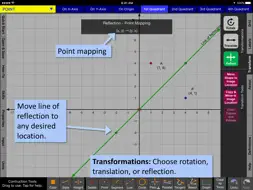
Geometry Ace is a fusion between a graphics based calculator and a geometry textbook. Detailed step-by-step solutions update as you create new math problems by changing the graphics. Learn vocabulary with unlimited examples. Try before you buy! Full functionality for Points and Lines including transformations and constructions. Preview for Segments, Rays, Angles, Triangles, Quadrilaterals, Polygons, and Circles. Low cost in-app purchase upgrades to full function for all shapes. No ads! *** Easy Start-up *** • Simply choose shape to study. • Shape will already be on the screen and all you have to do is start manipulating it. • Learn vocabulary, choose from list of tutorials, perform transformations, or create a construction. *** Detailed problem solutions update as you change the graphics. *** • You are not limited to a set of pre-written or randomly generated problems. • Geometry Ace does not simply calculate lengths and areas for you. It shows you step-by-step how to do it! *** Includes introductory material and makes connections with algebra. *** • Introductory material appropriate for upper elementary students is included. • Helps with differentiation. Middle and high school students who need a refresher can review introductory topics. • Algebra topics needed for coordinate geometry are included. • Introductory topics include coordinates of a point, finding slope, and writing the equation of a line. • Answers to problems are given in fraction form when possible. • Solutions address common student misconceptions and give attention to detail. *** Interactive definitions *** • Relevant definitions highlight interactively as you drag points and lines to change the shape on the screen to meet various attributes. • Example: A triangle can be obtuse, oblique, and scalene. • Example: A polygon can be concave and irregular. • Definitions are inclusive. Example: A quadrilateral that is a rectangle is also a parallelogram and a trapezoid. *** Transformations: Rotations, Reflections, and Translations *** • Easily change degrees of rotation, center of rotation, line of reflection, and translation vector. • Point mapping is shown! • Perform successive transformations on the same object. *** Constructions *** • Includes points, lines, segments, circles, perpendicular lines, parallel lines, tangents, and angle bisectors. • Easily make attachments to points, lines, circles, intersections, and midpoints. *** Monitor Students *** • Teachers can view student’s iPad screens who are on the same local wifi network and running this app. TOPICS AVAILABLE: Note: LT version has full function for points and lines only. Other shapes are in preview mode. POINT: Coordinates Quadrants Distance between points LINE/RAY/SEGMENT: Slope Vertical, Horizontal Y-intercept Equation of line/ray/segment Distance between point and line Construct or write equation of parallel or perpendicular line Segment midpoint and length Construct or write equation of perpendicular bisector Intersection point of 2 lines Transversals Alternate interior angles Alternate exterior angles Corresponding angles Same side interior angles Vertical angles ANGLE: Vertex, Legs, Interior, Measure Acute, Right, Obtuse, Straight, Reflex Convert between degrees/radians Construct or write equation for angle bisector Congruent, Adjacent, Complimentary, Supplementary, Linear Pair, Vertical TRIANGLE: Acute, Obtuse, Right, Oblique, Equilateral, Isosceles, Scalene Perimeter Area – basic elementary Area – coordinate plane - algebra Area – box method Centroid, Circumcenter, Incenter QUADRILATERAL: Square, Rectangle, Rhombus, Parallelogram, Trapezoid, Kite Perimeter Area POLYGON: Triangle, Quadrilateral, Pentagon, Hexagon, Heptagon, Octagon, Nonagon, Decagon Convex, Concave Regular, Irregular Sum of interior angles CIRCLE: Radius, Diameter, Tangent, Secant, Chord Circumference Area Measure and length of an arc Area of a sector
What's New
Version 5.0.14 2018-02-26
Provides easy in-app purchase option to upgrade to the fully functional Geometry Ace version. Technical Analysis
Package Overview Basic metadata
Bundle ID
com.InteractiveMindware.InGeometry-LT Current Version 5.0.14
Minimum iOS 8.2
Package Size Latest Recorded Package Size
Package Metadata 1 / 2 version records
Detailed binary, privacy manifest, framework, and Info.plist results have not been indexed for this package yet. The verified App Store and archive metadata above remains available.
Developer Information
Known Version Records
1 version record with stored package metadata • 2 known version records
Stored metadata does not guarantee a package is currently available to download.
| Details | Version / IDs | Version date | Action |
|---|---|---|---|
 23.26 MB | v5.0.14 App Store ID: 841495412Build: 20180225 | 2021-04-16 13:46:14 | Get Version |
| Not archived | App Store ID: 822809978 | Unknown | Request Version |