
Preview

Description
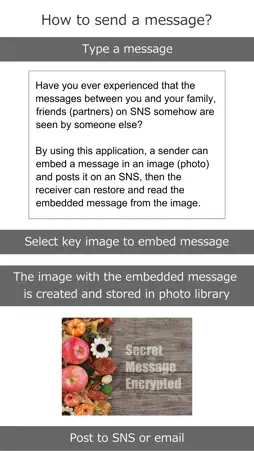
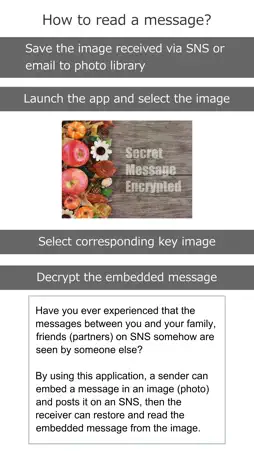
Have you ever experienced that the messages between you and your family, friends (partners) on SNS somehow are seen by someone else? If you have such a concern, you can solve the problem if you can exchange messages in a way that only you and your partners can understand. By using this application, a sender can embed a message in an image (photo) and posts it on an SNS, then the receiver can restore and read the embedded message from the image. Since the sender and receiver of the message use the same "key image" to embed (encrypt) and restore (decrypt) the message into/from the key image, the sender and receiver need to register the same image as the key image in advance in this application. One sample key image is registered in this application. So, it is recommended that you try it once by using the sample key image and experience what it feels like. [Note] - Only landscape image with aspect ratio 4: 3 can be used. - The key image to be registered for each of the sender and receiver must have the same image size and file size. If you do not have the exact same key, you can not decrypt the message correctly. - In the case of the image sent by e-mail, the image size may be reduced due to limitation of the e-mail attachment file size, so please pay attention to the file size when you use email. Overview of the operation follows; == Create an encrypted message == 1. Launch this application and tap "Encryption" button. 2. Select a key image. If you use key images other than samples, In-app Purchase is required. 3. Type your message. 4. Tap "Encrypt" button. 5. The message is embedded in the key image and saved in the Photo Library, so post it using SNS applications or email. == Decrypt an encrypted message == 1. Save the image received by SNS applications or email to Photo Library. At this time, it needs to be saved with the image size and file size as it is sent. 2. Open this application and tap "Decryption" button. 3. Select an image from the Photo Library, and select the corresponding key image as well. 4. Tap "Decrypt" button to decrypt and display a message. [Note] - The displayed message is an image. If you want to save the message, please take a screenshot and save it as an image. - Depending on the key image used, noise (black dots) may be displayed on the message screen. We are happy if you are interested in this application. Thanks!
Technical Analysis
Package Overview Basic metadata
Bundle ID
com.import-ev.SecretMessage Current Version 1.0
Minimum iOS 12.2
Package Size App Store Size
Package Metadata 0 / 1 version records
Detailed binary, privacy manifest, framework, and Info.plist results have not been indexed for this package yet. The verified App Store and archive metadata above remains available.
Known Version Records
0 version records with stored package metadata • 1 known version records
Stored metadata does not guarantee a package is currently available to download.
| Details | Version / IDs | Version date | Action |
|---|---|---|---|
| Not archived | App Store ID: 831649311 | Unknown | Request Version |