Preview




Description
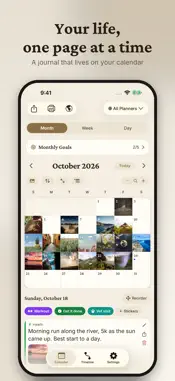
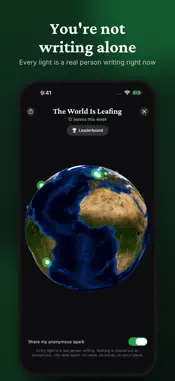
The warmth of a paper planner, the power of your iPhone. Write your days, stick stickers on your dates, and watch your life fill a beautiful calendar: journal, diary, goals, and planner in one quiet, ad-free app. Free to start; Pro is a one-time purchase or a subscription, your choice. Open it to a calendar, not a blank page: your entries, photos, and stickers live right inside the month, week, and day views, so every glance tells the story of your life. **New: Your Second Brain in an Agentic World** Switch on Headless Dayleaf and Meta Muse, Claude, Gemini or your own scripts can write the day's weather, your steps and sleep, or a summary of what you shipped into the right planner, labelled "via muse" so your words and theirs never blur, and read back what you wrote. Your whole journal also exports as Markdown files, one note per day, ready for Obsidian and any AI tool. Off by default; text only, never your photos or audio. **Switching from Day One?** Bring your entire journal home in minutes: every entry, photo, and voice recording. Choose your export in Settings → Import and Dayleaf does the rest, even for journals with a decade of memories. Free, forever. **Photos & Voice Notes** Attach photos to any entry and see them right on your calendar. Tap the mic to capture a voice note on the spot. Some days deserve to be heard, not typed. **Planner Stickers** Birthday, Pay day, Trip, Deadline, Date night… stick them on any date like a real paper planner, or design your own with your choice of icon and color. **Twenty Hand-Crafted Themes** Paper, Forest, Ocean, Lavender, Rosé, Ink & Gold, Sunset, Olive, Retro, Clay, Frost, Linen, Kraft, Pop: each tuned by hand with a light and a dark face, several with their own page construction. Your journal, your mood. **Set Goals. Reflect. Grow.** Daily, weekly, and monthly goals with a Notes & Reflection space to look back and write how it really went, just like the review pages of a great paper planner. **Private Diary with Lock. Your Year in Review.** App Lock (Pro) guards your diary with a 4-digit passcode; forgot it? A code sent to your email resets it. Year in Review (Pro) shows streaks, words written, busiest days and a globe lit by every city you've written from. Tag entries with your location, write your own reminder messages, and switch on a persistent reminder that nudges until you open the app. **Private. Backed Up. Always Yours.** One-tap backups to your own iCloud: entries, photos, voice notes, stickers, everything. No account required, no tracking, and your journal stays in your own Apple account. Restore anywhere, anytime. Key Features: - Day One import: entries, photos & audio, free forever - App Lock passcode, Year in Review, places globe, blog-post entries (Pro) - Headless Dayleaf: local API, `dayleaf` command line and MCP server (Mac); cloud access for Meta Muse and other agents - Markdown export: one note per day, ready for Obsidian and AI tools - Photo attachments with calendar thumbnails - On-the-spot voice notes - 20 planner stickers + design your own - 20 hand-crafted themes, each with light & dark - Per-planner icons, fonts, and text sizes - Daily, weekly, and monthly goals with reflection - Monthly, Weekly, and Day calendar views with zoom - Daily reminder at your chosen time - Instant search and a fast, beautiful Timeline - iCloud backup and restore: no account needed - Print your calendar; export by email (text/CSV) DAYLEAF EVERYWHERE Capture on Apple Watch: dictate an entry, record voice memos with automatic transcripts, tick off goals from your wrist, and add the watch-face complication. And with the Mac app, your whole journal is at home on your desktop too. Perfect for daily journaling, gratitude and mood tracking, habit reflection, work notes, reading lists, travel plans, and memory keeping. Your memories deserve a beautiful home. Start today. Terms of Use: https://www.apple.com/legal/internet-services/itunes/dev/stdeula/
What's New
Version 2.6.3 2026-10-27
• Tags: write a #tag in any entry, or tap # above the keyboard. Dayleaf suggests your tags as you type, and the Timeline filters by them. Day One imports keep t... Technical Analysis
Package Overview Basic metadata
Bundle ID
com.imobiapp.planner Current Version 2.6.3
Minimum iOS 17.0
Package Size App Store Size
Package Metadata 0 / 2 version records
Detailed binary, privacy manifest, framework, and Info.plist results have not been indexed for this package yet. The verified App Store and archive metadata above remains available.
Developer Information
Known Version Records
0 version records with stored package metadata • 2 known version records
Stored metadata does not guarantee a package is currently available to download.
| Details | Version / IDs | Version date | Action |
|---|---|---|---|
| Not archived | App Store ID: 881840358 | Unknown | Request Version |
| Not archived | App Store ID: 881614209 | Unknown | Request Version |