Preview



Description
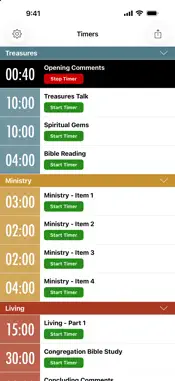
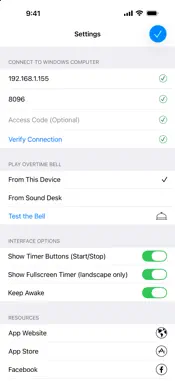
This app is a remote control for the OnlyT Windows software, used to control a series of timers for a meeting or conference. You MUST have the OnlyT Windows software installed on a computer to use this app. REMOTE APP FEATURES --------------------------------- Timers for each Meeting Part: - independent control of the timers away from the sound desk - start/stop/reset timers - the timer runs on your device and stays in sync with OnlyT every 5 seconds, for a smoother countdown - collapse meeting sections - timer changes from white > yellow (30 secs) > red (overtime) - sound bell for talks that go overtime - optionally hide the start/stop buttons in settings for "read-only" mode - email a summary of timers Fullscreen Timer in Landscape: - optimised for use on the speaker's podium - tap the clock to hide the timer if it is distracting The app can be run on multiple devices at the same time. For example, the meeting chairman can view the timers and could decide to ring the bell for a talk if it is running overtime. Another user could be sitting in his seat in the audience starting/stopping the timers for each talk. And of course the fullscreen timer could be running on a device on the speaker's podium. While the app is running, it will prevent the device from turning off. This can be disabled in settings. The bell can be played from the local device or from the main Windows computer, which is typically connected to the sound system. If it is played from the local device the app will detect the current volume setting, switch it to 100% to play the bell, and then set the volume back to its previous setting. This prevents the device from playing unwanted sounds from other apps and notifications. And of course you are always asked to confirm before the bell is played - just in case you hit the button by mistake. This app is optimised for iPhone and iPad. Split Screen mode is supported on iPad. For setup instructions please see the website: https://onlyt.app/#setup RESOURCES -------------------- Download OnlyT for Windows: https://github.com/AntonyCorbett/OnlyT Remote App Website: https://onlyt.app Remote App on Facebook: https://facebook.com/RemoteForOnlyT Remote App on X: https://x.com/RemoteForOnlyT OTHER APPS BY IMATT SOLUTIONS ----------------------------------------- If you enjoy OnlyT Remote, you might also enjoy... *** ServicePlanner *** Field Service and Ministry App with automated Dropbox Sync, full Call and Return Visit Management, Reporting, Time Scheduling, integration with Territory Helper and much more. https://www.serviceplanner.me *** Equipd Bible *** Multiple Bibles side-by-side, Verse Notes, Bible Reading Schedules, Bookmarks grouped by Topic, and optional support for Chinese Pinyin, Yale, Bopomofo (Zhuyin), and Sidney Lau. https://www.equipd.me
What's New
Version 1.7.0 2026-10-20
• Support for the latest versions of iOS • Smoother, more efficient timers: the countdown now runs on your device and syncs with OnlyT every 5 seconds • The "Th... Technical Analysis
Package Overview Basic metadata
Bundle ID
com.imattsolutions.onlyt Current Version 1.7.0
Minimum iOS 15.0
Package Size App Store Size
Package Metadata 1 / 5 version records
Detailed binary, privacy manifest, framework, and Info.plist results have not been indexed for this package yet. The verified App Store and archive metadata above remains available.
Known Version Records
1 version record with stored package metadata • 5 known version records
Stored metadata does not guarantee a package is currently available to download.
| Details | Version / IDs | Version date | Action |
|---|---|---|---|
 6.67 MB | v1.4.17 App Store ID: 829334298Build: 1.4.17 | 2018-11-17 11:17:06 | Get Version |
| Not archived | App Store ID: 828837887 | Unknown | Request Version |
| Not archived | App Store ID: 828794920 | Unknown | Request Version |
| Not archived | App Store ID: 827945639 | Unknown | Request Version |
| Not archived | App Store ID: 827519842 | Unknown | Request Version |