Preview






Description
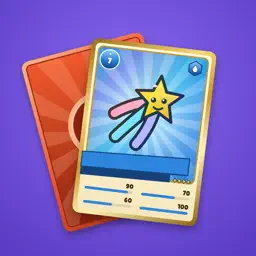
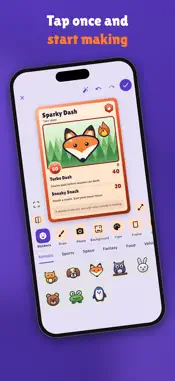
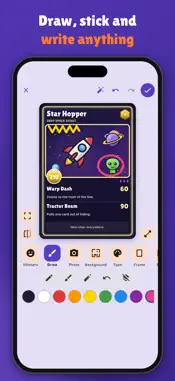
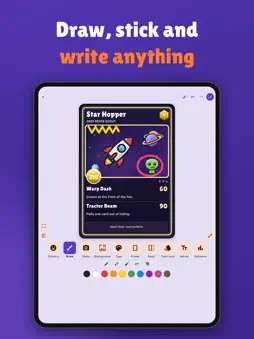
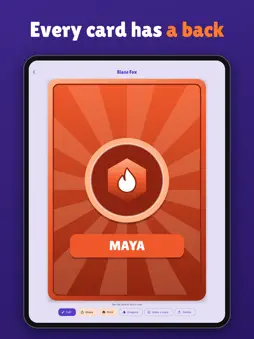
Make your own trading cards — for a hero you invented, a star player, your best friend or the family dog. Card Lab opens straight onto a card you can change — no questions first. MAKE A CARD • Tap the big plus and a card is already there: a creature, a name and two moves, ready to change • Picture buttons under the card: stickers, draw, photo, background, type, frame, back, card kind, words and numbers • Pick from 56 hand-drawn stickers, then drag them to move them and pinch to make them bigger or smaller • Move a sticker forward or back in the pile • Draw on the card with your finger, and erase • Put stickers and drawings over the whole card — even on the frame and the words • Add a photo and drag or pinch to frame it • Tap the dice for a funny name, pick skill names from a list, or write every word yourself • Surprise me writes a whole card's words and numbers in one tap, and one Undo takes them back • Give a card a second type, and give each move its own element • The magic wand walks through the choices one question at a time • Undo and redo anything THREE KINDS OF CARD • Battle cards: a power number, two moves and a motto, or a third move in place of the motto. You can hide the type or the power • Star cards: a big picture, a number and four stat bars, like a sports card • Buddy cards: star ratings and a few lines about them, for pets, friends and family Ten types (or make your own, with its own name, colour and symbol), six frames (Classic, Holo, Neon, Gold, Comic and Midnight) and four rarities. Legendary cards get a foil shine that moves when you drag the card. THE BACK OF THE CARD Every card has a back. Pick a pattern or a scene, keep the badge with your name on it, or design the back yourself with stickers, drawing and a photo. Tap a card to turn it over. DECKS Put your cards into decks: give each one a name, a colour and a cover card. Cards in a deck can be numbered like a real set (3/12), and a whole deck can share one back. Print or send a whole deck at once. Decks are optional — your cards are all still there without them. CARD DUEL Play with the cards you made. Pick eight for a deck (or let Fill for me pick), then play five rounds against the phone (Easy, Normal or Hard) or pass the phone to a second player. Beginner rules compare Strength, Special and Rarity; Full rules add Type Clash rounds. No cards yet? Start with a sample deck you can open and change. Each card keeps its own duel record. SHARE AND PRINT • Share a card as one picture with its front and back side by side • Print sheets of nine cards at real size (2.5 × 3.5 inches) with cut marks. The backs print on the next page, and the printer is asked to print both sides so each back lands behind its front YOUR CARDS STAY ON YOUR PHONE Cards and photos are saved on your device and are never uploaded. Settings › Delete my data removes all of them. There are no accounts and no in-app purchases. Card Lab shows a small banner ad on the home screen only, never while you are making a card. Available in English, Spanish, French, German and Portuguese.
What's New
Version 1.4.1 2026-11-21
New in 1.4.1: • Press and hold the Card Lab icon on your home screen for "Make a card", which opens a new card straight away • The icon has its own dark and tin...New in 1.4.1: • Press and hold the Card Lab icon on your home screen for "Make a card", which opens a new card straight away • The icon has its own dark and tinted looks on iOS 18 and later • Card Duel remembers your choices (who you play, the rules, how hard) until you close the app • In Card Duel, the tick on a picked card no longer covers the card's name • A card made from a seasonal event link now shows on home as soon as you go back, and opening a link while you are making a card no longer loses it Technical Analysis
Package Overview Basic metadata
Bundle ID
com.illuminationdevelopment.cardlab Current Version 1.4.1
Minimum iOS 15.0
Package Size App Store Size
Package Metadata 0 / 0 version records
Detailed binary, privacy manifest, framework, and Info.plist results have not been indexed for this package yet. The verified App Store and archive metadata above remains available.
Developer Information
Known Version Records
0 version records with stored package metadata
Stored metadata does not guarantee a package is currently available to download.
| Details | Version / IDs | Version date | Action |
|---|