
Preview


Description
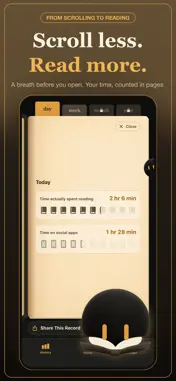
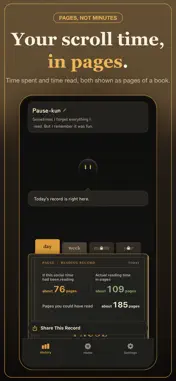
What if the time that melts away on social media went into a book instead? A quick break? Catching up on news? Just checking one notification… You meant to look for a minute, and two hours are gone. The break left you tired, not rested. And every day, a faint sense of "what am I doing" quietly eats at your confidence along with your time. You're not alone. That's why Pause exists. Pause asks you to decide how long BEFORE you open social or video apps. Then it shows what that time was worth in pages: how much of a book you could have read. When your time is up, the apps are blocked again automatically. No blame. Just a gentle place to stop, so a little of your scrolling turns into reading, day by day. That book you've been meaning to read, a few pages at a time. A reading habit builds on its own. And a small companion, Pause-kun, grows with every page. [ Free ] • Sessions: pick "just N minutes" before you open. When time's up, the apps are blocked again • Reading timer: paper or app. Time in Kindle, Audible, or Apple Books counts as reading too • Pages instead of minutes: your social time shown as "about N pages of a book" • Honest records: based on Screen Time measurements. No inflated numbers to scare you • A companion that grows: books pile up behind Pause-kun as you pause and read • Home Screen widget and a Lock Screen view while you read (Live Activity) • Share card: the time you turned into reading, and your companion, in one image • Today and this week at a glance * The free version covers up to 3 apps. [ Pause Plus ] The free version is enough for most days. Pause Plus is for people who want to cut back more seriously. It's available as a subscription or a one-time purchase. • Push Mode: a block you can't lift for the period you choose • Unlimited apps • Reward Mode: after you finish, 24 hours with no limits on your blocked apps • Monthly and yearly views, with a full year of history • Name your companion Pause Plus yearly and monthly plans each come with a 1-month free trial. Pause Plus one-time purchase: pay once, no auto-renewal. [ Your privacy ] • Your Screen Time details and the books you read never leave your device. No account, no sign-in • Pause doesn't ban social media. It only asks you to pause. The choice is always yours After the free trial, the subscription converts to a paid plan. Payment is charged to your Apple ID account at confirmation of purchase, and the subscription renews automatically at the same price unless auto-renew is turned off at least 24 hours before the end of the period. You can manage or cancel subscriptions in Settings → Apple ID after purchase. Terms of Use https://www.apple.com/legal/internet-services/itunes/dev/stdeula/ Privacy Policy https://pause-lp.vercel.app/privacy/
What's New
Version 1.6.2 2026-10-31
You can now open a book right from the block screen. On every block screen, the top button is now "Open a book" — tap it to open Pause's reading timer. Buttons...You can now open a book right from the block screen. On every block screen, the top button is now "Open a book" — tap it to open Pause's reading timer. Buttons like "Use for 1 min" and "Close" are now under "More options." These changes apply to iOS 26.5 or later. Technical Analysis
Package Overview Basic metadata
Bundle ID
com.yagoiku.Pause Current Version 1.6.2
Minimum iOS 17.0
Package Size App Store Size
Package Metadata 0 / 0 version records
Detailed binary, privacy manifest, framework, and Info.plist results have not been indexed for this package yet. The verified App Store and archive metadata above remains available.
Developer Information
Known Version Records
0 version records with stored package metadata
Stored metadata does not guarantee a package is currently available to download.
| Details | Version / IDs | Version date | Action |
|---|