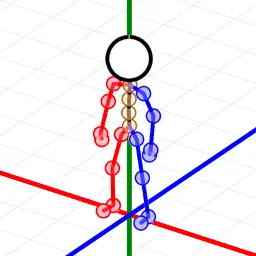
Preview


Description
This app lets you create 3D poses for stick figures and use multiple 3D poses to create animations. - Features - [Basic Features] Save, load, and delete 3D poses. [Pose Editing Features] - Overall XYZ Movement - Overall XYZ Rotation - Joint Movement (Up/Down/Left/Right) - Joint Rotation - Flip Left/Right - Flip Up/Down *Undo and redo are possible for any changes made to the pose. [Camera View] ・View Cube ・Return to Initial Position ・Switch Viewpoints (Front, Back, Left, Right, Up, Down) ・Lock/Unlock [Grid] ・Horizontal Grid (Y) ・Vertical Grid (X) ・Vertical Grid (Z) ・Center Line (XYZ) *Can be individually displayed/hidden [Animation List Function] ・Add, Insert, Overwrite, Delete, Clear (All) ・Playback (Loopable) ・Save, Load, Delete ・Export (Share) Video Output (MP4) Animated GIF Output Transparent PNG File (ZIP) Plist File Output [3D Pose Interpolation Frame Function] ・This function inserts automatically generated poses between poses. Increasing the number of interpolation frames will result in smoother animations. Although animations will be slower as smoother, you can adjust the speed by adjusting the FPS. *Number of interpolation frames: 0-59 *FPS: 1-240 [Other Features] ・Import and paste images from the Camera Roll. You can create 3D poses using 2D images as reference. [Settings Menu Related] - Line Width - Head Size - No Perspective - Perspective - Animation Interpolation Frame Count - Animation FPS - Output Resolution - Left/Right Color Separation in Output - No Left/Right Color Separation in Output - Editing Screen Background Color - Horizontal Grid Color (Y) - Vertical Grid Color (X) - Vertical Grid Color (Z) - Reset to Initial Pose - Data Backup/Restore Created 3D Pose Created Animation List Settings File
What's New
Version 1.0.1 2025-09-30
The joints of the 3D poses have been made less noticeable. Fixed an issue where the screen would be unlocked when loading a pose file. Technical Analysis
Package Overview Basic metadata
Bundle ID
jp.IKsoftware.StickFigureView Current Version 1.0.1
Minimum iOS 15.0
Package Size App Store Size
Package Metadata 1 / 2 version records
Detailed binary, privacy manifest, framework, and Info.plist results have not been indexed for this package yet. The verified App Store and archive metadata above remains available.
Developer Information
Known Version Records
1 version record with stored package metadata • 2 known version records
Stored metadata does not guarantee a package is currently available to download.
| Details | Version / IDs | Version date | Action |
|---|---|---|---|
| 3.33 MB | v1.0.1 App Store ID: 878423320Build: 1.0.1 | 2025-09-30 02:21:37 | Paid / Arcade |
| Not archived | App Store ID: 878220325 | Unknown | Paid / Arcade |