Preview





Description
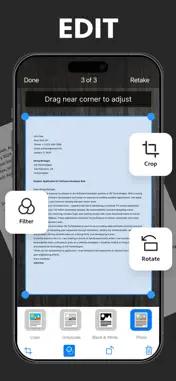
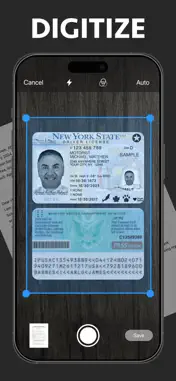
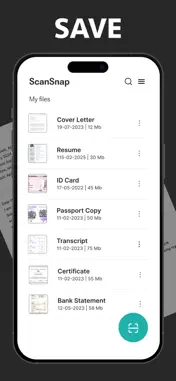
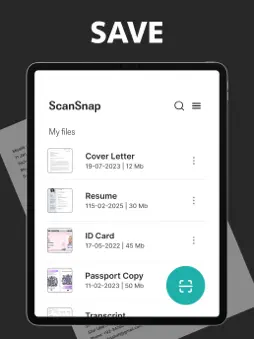
Scan Snap: Scanner App is a free iPhone scanner PDF tool that offers high-quality photo scans in just 3 steps. Scan, Edit and Share any document to PDF with the help of best portable Scanner App. This PDF editor equipped with JPG to PDF converter and PDF maker fits the entire work documents in your pocket and improves productivity by 3x. No need to find fast photo scanning services near me, just pick your iPhone, tap to scan any document into high-quality pdf, word/JPG files including books, ID cards, passports, notes, receipts, visa cards, business cards, assignments, invoices and more. 3 Easy Mobile Scanning Steps - San documents or digitalize ID cards/passports - Edit and Save your scanned files - Share as PDF, JPG or Word files Unlimited Doc PDF Scanner * A must-have tiny portable scanner to snap high-quality scans of documents using your iPhone. PDF Editor and File Manager * Edit your scanned images effortlessly. * Sign PDF files and other documents. * Apply filters and color to enhance readability. * Crop and rotate your images to get the perfect scan. * Remove paper skews and curves. * Access and manage documents anytime. Convert Scan to PDF/JPG * Share your scanned files via email, messaging apps, or cloud storage with just a tap. Sign PDF Files * Sign your scan manually or insert a signature from an image. Quickly and professionally sign official documents in few taps. User-Friendly Experience * This PDF scanner features a smooth, easy-to-use interface, making it simple to scan and organize your documents and photos with just a few taps. PDF Converter * Convert jpg to pdf files or convert pdf to jpg. * Convert PDF to word, word to PDF. * PDF to docx or PDF to doc will manage your finances. * Automatically convert word to jpg, Jpg to pdf, Pdf to jpg. Convert images to pdf quickly. Compress PDF files * Compress pdf to zip in order to reduce file size Create PDF files/PDF Maker Create a PDF document from any file format including heic, image, photo, jpf, png and more. Why Choose Scan Snap App? * Free Scanner App for iPhone: Access powerful scanning features at no cost. * Document Scanner – Image to PDF: Smoothly convert images to PDF format. * Scanner App PDF Tool: All-in-one tool for all your scanning requirements. * Sign PDF - Sign documents and PDF files for Free. * Camera Scanner - A multi-page Camera Scanner to run fast. Document Scanner App offers optimal image converter quality with automatic document edge identification. Free & Pro Options * Enjoy the basic features for free. * Unlock advanced features with in-app purchases for a premium experience. Download the SnapScan PDF Scanner App now and experience the convenience of having a portable scanner in your pocket. Perfect for students, professionals, and anyone who needs a reliable document scanner on the go. Subscription Plan Go premium today with an annual or monthly subscription to enjoy ads free, unlimited scans. Your payment will be charged to your iTunes Account at confirmation of purchase. Secondly, your subscription will renew automatically, but you can turn off auto-renewal by accessing your Account Settings 24 hours before the end of the current period. For suggestions regarding a Document Scanner app, Contact us at [email protected] Terms of Use: https://www.apple.com/legal/internet-services/itunes/dev/stdeula/
What's New
Version 1.0.19 2026-07-07
* Sign PDF with ease * Support for more file formats * Reduced document size * Improved UI Technical Analysis
Package Overview Basic metadata
Bundle ID
codebuster.masterscanner.pdfscanner.document Current Version 1.0.19
Minimum iOS 16.0
Package Size App Store Size
Package Metadata 1 / 19 version records
4.0 / 5.0 (4 ratings)
Detailed binary, privacy manifest, framework, and Info.plist results have not been indexed for this package yet. The verified App Store and archive metadata above remains available.
Developer Information
Known Version Records
1 version record with stored package metadata • 19 known version records
Stored metadata does not guarantee a package is currently available to download.
| Details | Version / IDs | Version date | Action |
|---|---|---|---|
 Not archived | App Store ID: 887934766 | Unknown | Request Version |
| Not archived | App Store ID: 885235890 | Unknown | Request Version |
| Not archived | App Store ID: 883969529 | Unknown | Request Version |
| 13.16 MB | v1.0.16 App Store ID: 880971763Build: 1 | 2025-12-24 12:14:50 | Get Version |
| Not archived | App Store ID: 880164998 | Unknown | Request Version |
| Not archived | App Store ID: 880017360 | Unknown | Request Version |
| Not archived | App Store ID: 879516163 | Unknown | Request Version |
| Not archived | App Store ID: 878592046 | Unknown | Request Version |
| Not archived | App Store ID: 877410515 | Unknown | Request Version |
| Not archived | App Store ID: 876604716 | Unknown | Request Version |
| Not archived | App Store ID: 875491163 | Unknown | Request Version |
| Not archived | App Store ID: 874893066 | Unknown | Request Version |
| Not archived | App Store ID: 873549571 | Unknown | Request Version |
| Not archived | App Store ID: 872470692 | Unknown | Request Version |
| Not archived | App Store ID: 872045982 | Unknown | Request Version |
| Not archived | App Store ID: 869556298 | Unknown | Request Version |
| Not archived | App Store ID: 868926751 | Unknown | Request Version |
| Not archived | App Store ID: 868811233 | Unknown | Request Version |
| Not archived | App Store ID: 867684474 | Unknown | Request Version |