
Preview







Description
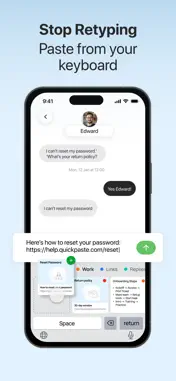
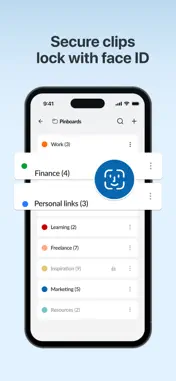
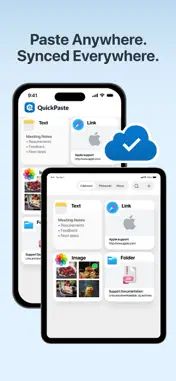
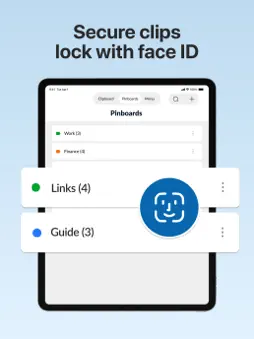
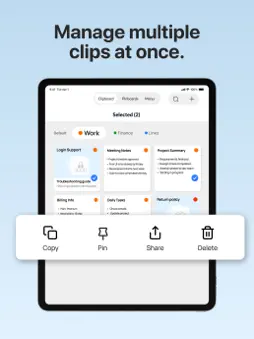
Quick Paste is a clipboard manager for iPhone that helps users copy, save, and reuse text across apps. It stores clipboard history, works as a pasteboard utility, and includes a keyboard extension for fast copy and paste. Designed for users who frequently copy text, Quick Paste prevents lost clipboard content and eliminates the need to retype the same information again. Key Features * Clipboard History: Automatically save copied text and access it later * Copy & Paste Management: Reuse saved content across different apps * Pasteboard Utility: Manage copied text efficiently on iPhone * Multiple Content Types: Save text, images, and links in one organized clipboard * Keyboard Extension: Paste saved text quickly without switching apps * Fast & Lightweight: Designed for smooth performance on iOS Why Use Quick Paste? Unlike basic clipboard tools, Quick Paste keeps a secure history of copied content, helping you stay productive and organized. It prevents accidental loss of important text and reduces repetitive typing, saving time every day. Privacy is a core focus of Quick Paste. All clipboard data is stored locally on your device and is never uploaded or shared. To protect sensitive information, Quick Paste includes a Face ID lock, allowing only you to access your clipboard history. Designed for simplicity, speed, and privacy, Quick Paste offers a more secure alternative to other clipboard managers making it a reliable choice for everyday iOS use. Manage Your Pinboards Organize your frequently used clips with Pinboards for faster access. * Add or remove items from Pinboards * Rename pinboards to fit your workflow * Delete ones you no longer need * Change colors for visual organization * Reorder or swap pinboards for quick navigation. Find Anything Fast: The app’s intelligent search makes it easy to find anything you've copied instantly. Just select the clip and it will be pasted in the text field. How to Copy & Paste with Quick Paste? Quick Paste makes it effortless to copy, save, and reuse any content without interrupting your workflow. Step 1: Enable Action Extension for Limitless Copying * Once you enable the Quick Paste Action Extension, you'll see a “Copy to Quick Paste” option whenever you copy any content on your device. * Just select the text, image, or content you want to save * Tap Share and choose "Copy to Quick Paste" option * That item is now instantly saved to your clipboard history in the app. Step 2: Use the Paste Keyboard in Any App When you're typing in any app: * Touch and hold the language switch icon on your keyboard * Select “Quick Paste” from the list * Instantly access all your saved clipboard items * Tap to autopaste content directly into the text field. Enable Automatic Clipboard Saving: If you don’t want to see permission prompts every time you copy something, simply enable automatic clipboard capture in settings. Go Premium Quick Paste offers a premium plan designed to make your workflows even simpler and more efficient. Your payment will be charged to your iTunes Account at confirmation of purchase. Secondly, your subscription will renew automatically, but you can turn off auto-renewal by accessing your Account Settings 24 hours before the end of the current period. For suggestions regarding Quick Paste - Clipboard Manager, Contact us at [email protected] Terms of Use: https://www.apple.com/legal/internet-services/itunes/dev/stdeula/
What's New
Version 1.1.5 2026-10-26
- Dark and light mode. - Quick preview option. - Improved visuals and user experience. - Open links in your browser. Technical Analysis
Package Overview Basic metadata
Bundle ID
codebuster.quickpaste.autopaste.clipboard.smartkeyboard.copypaste Current Version 1.1.5
Minimum iOS 16.0
Package Size App Store Size
Package Metadata 1 / 13 version records
0.0 / 5.0 (0 ratings)
Detailed binary, privacy manifest, framework, and Info.plist results have not been indexed for this package yet. The verified App Store and archive metadata above remains available.
Known Version Records
1 version record with stored package metadata • 13 known version records
Stored metadata does not guarantee a package is currently available to download.
| Details | Version / IDs | Version date | Action |
|---|---|---|---|
| 75.21 MB | v1.1.4 App Store ID: 887087628Build: 1.1.4 | 2026-09-01 21:54:13 | Get Version |
| Not archived | App Store ID: 885376894 | Unknown | Request Version |
| Not archived | App Store ID: 884749189 | Unknown | Request Version |
| Not archived | App Store ID: 884188105 | Unknown | Request Version |
| Not archived | App Store ID: 883094231 | Unknown | Request Version |
| Not archived | App Store ID: 882676625 | Unknown | Request Version |
| Not archived | App Store ID: 881956030 | Unknown | Request Version |
| Not archived | App Store ID: 881530199 | Unknown | Request Version |
| Not archived | App Store ID: 880680348 | Unknown | Request Version |
| Not archived | App Store ID: 879425091 | Unknown | Request Version |
| Not archived | App Store ID: 879322794 | Unknown | Request Version |
| Not archived | App Store ID: 879204060 | Unknown | Request Version |
| Not archived | App Store ID: 876412552 | Unknown | Request Version |