Preview





Description
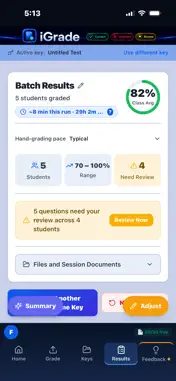
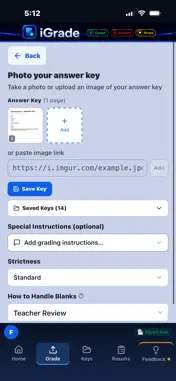
iGrade is an AI grading assistant — built by a teacher, for teachers. Photograph your answer key. Photograph your students' papers. iGrade tells you what's right, what's wrong, and what it's not sure about. You stay in charge of every grade and all feedback. iGrade doesn't replace your judgment. It replaces the stack of papers on your kitchen table. WHAT iGRADE DOES Reads handwritten answers from photos of paper tests Grades multiple choice, fill-in-the-blank, short answer, and free response Flags answers it isn't sure about — so you can review before a grade is final Warns you when a student's answers look shifted by a line, so one skipped line doesn't mark the rest of the test wrong Summarizes class performance to help you decide what to reteach Exports per-student results as CSV you can bring into most gradebooks WHAT iGRADE DOESN'T DO Mark your papers (nothing is ever written on the physical page) Write feedback for students (that stays with you) Store student paper images (they are deleted after grading) Sell, share for advertising, or train on your students' personal data — ever PRIVACY IS THE DEFAULT, NOT A FEATURE iGrade is designed to be restrictive about how much student identifying information ever travels digitally in association with a paper. Before a student page leaves your phone, iGrade looks for the student's name and covers it. We also strip names and IDs from extracted text, and we don't keep them. Student paper images are processed for grading only, are not used to build profiles, and are deleted after grading. Answer keys are kept so you can reuse them. If you photograph a student's paper to use as your key, that image is stored with your saved keys until you delete it. There are no student accounts — students never touch iGrade. No automated system catches everything, so cropping identifying information before uploading is recommended best practice. HOW IT WORKS Snap a photo of your answer key Snap photos of your students' papers (one or many) Review anything iGrade flagged for your attention Adjust anything you disagree with, and export results if you wish BUILT BY A TEACHER I have taught in NY at the middle and high school level for 26 years. I built iGrade because I wanted a grading assistant that would dramatically speed up the manual labor of grading but stay honest about its uncertainty. I wanted it to stand out as unique because it doesn't seek student data and keeps it private by default. It wasn't worth building to me if it wasn't going to make my own daily life as a teacher better. Questions, feedback, or bug reports: [email protected] Terms of Use (EULA): https://www.apple.com/legal/internet-services/itunes/dev/stdeula/current
What's New
Version 1.0.23 2026-10-27
A key you've loaded now stays put when you go back, switch to Batch, or tap a different key type. Continue with your key takes you straight on. Changes to a sav... Technical Analysis
Package Overview Basic metadata
Bundle ID
com.igradellc.igrade Current Version 1.0.23
Minimum iOS 15.0
Package Size App Store Size
Package Metadata 0 / 14 version records
Detailed binary, privacy manifest, framework, and Info.plist results have not been indexed for this package yet. The verified App Store and archive metadata above remains available.
Developer Information
Known Version Records
0 version records with stored package metadata • 14 known version records
Stored metadata does not guarantee a package is currently available to download.
| Details | Version / IDs | Version date | Action |
|---|---|---|---|
| Not archived | App Store ID: 889673739 | Unknown | Request Version |
| Not archived | App Store ID: 889583428 | Unknown | Request Version |
| Not archived | App Store ID: 889147380 | Unknown | Request Version |
| Not archived | App Store ID: 888967700 | Unknown | Request Version |
| Not archived | App Store ID: 888307379 | Unknown | Request Version |
| Not archived | App Store ID: 887963850 | Unknown | Request Version |
| Not archived | App Store ID: 887832029 | Unknown | Request Version |
| Not archived | App Store ID: 887771044 | Unknown | Request Version |
| Not archived | App Store ID: 887696776 | Unknown | Request Version |
| Not archived | App Store ID: 887652299 | Unknown | Request Version |
| Not archived | App Store ID: 887604131 | Unknown | Request Version |
| Not archived | App Store ID: 887262658 | Unknown | Request Version |
| Not archived | App Store ID: 886927698 | Unknown | Request Version |
| Not archived | App Store ID: 884070876 | Unknown | Request Version |