Preview






Description
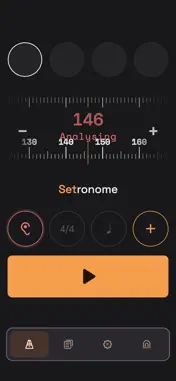
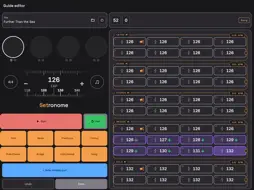
The metronome built for the stage, not the practice room. Manage your repertoire, build setlists, run your show. The click keeps running even when you switch apps. Count-ins, transitions and guide tracks: everything you need to keep a band tight on stage. REPERTOIRE, SETLIST, SHOW Every song carries its own tempo, time signature and notes. The setlist puts them in order for the night. Show mode plays them and moves on to the next song by itself after the bar count you set, either immediately or at the end of the bar. On stage you stop tapping anything. GUIDE TRACK The guide track editor lays out the arrangement bar by bar: section markers, time signature changes, tempo jumps, tempo ramps across a whole passage, and tempo bands for breathing between two values. Twelve sections are spoken into your ear: intro, verse, prechorus, chorus, post-chorus, bridge, solo, instrumental, interlude, rap, vamp, outro. The editor itself runs on iPad only, because of the screen it needs. Finished guide tracks play on iPhone just the same. MEDLEYS Several parts, one continuous click. Tempo and time signature change sample accurately at the transition, with a count-in or a spoken transition cue if you want one. A part can stay open and loop until you move on. CLICK TRACK AS WAV For the DAW: click alone, cues alone, or both as a stereo mix with click left and voice right. 48 kHz at 24 bit or 44.1 kHz at 16 bit. Calculated rather than recorded, so there is no drift and the file is ready in seconds. IN-EAR Click and voice can go out on separate channels, click left and every cue right. At the desk that becomes two mono sends, and everyone sets their own ear. SCAN A SETLIST Your setlist as a PDF, as a photo, or straight from the camera. Titles, tempos and artists arrive as songs in the archive. Text recognition uses Apple's own components and runs entirely on the device. HEAR THE TEMPO Hold the device towards the music and Setronome names the tempo. Half time and double time sit next to it as equals, because either one can be the right answer. SONG DIRECTORY A directory of 5.3 million recordings from 1970 to 2026 with their tempos can be downloaded once and is then fully searchable offline. Optional, the app works without it. TIME SIGNATURES 3/4, 4/4, 5/4, 6/4, 7/4 as well as 6/8, 5/8 and 7/8 with their own grouping. Subdivision in eighths, triplets or sixteenths. Individual bars may step out of line inside a guide track. FOOTSWITCH Ordinary Bluetooth pedals that identify as a keyboard control start, stop and song changes. Key assignment is yours to choose, and a key test shows what actually arrives. TIMING The click runs on a dedicated audio engine rather than a timer, with sample accurate scheduling. The technical page in settings shows the measured output latency of your device, so you know where you stand. NO ACCOUNT No login, no sign-up, no ads, no analytics, no tracking. Your songs, setlists and guide tracks stay on the device. The app works without a signal, because it has to work on stage. On first launch you will find example songs, an example medley and an example setlist. A guided tour explains the seven areas, if you want it.
What's New
Version 1.0.5 2026-10-26
What's new in 1.0.5 - Hardware keyboard: the space bar no longer starts the click while you type song names. In a show the footswitch still comes first, in reh... Technical Analysis
Package Overview Basic metadata
Bundle ID
com.setronome.setronome Current Version 1.0.5
Minimum iOS 15.0
Package Size App Store Size
Package Metadata 0 / 0 version records
Detailed binary, privacy manifest, framework, and Info.plist results have not been indexed for this package yet. The verified App Store and archive metadata above remains available.
Developer Information
Known Version Records
0 version records with stored package metadata
Stored metadata does not guarantee a package is currently available to download.
| Details | Version / IDs | Version date | Action |
|---|