
Preview


Description
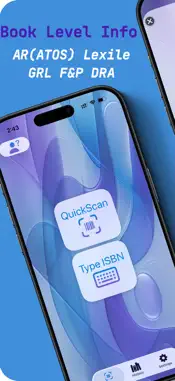
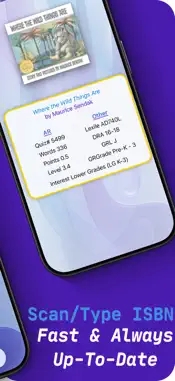
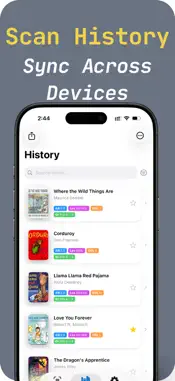
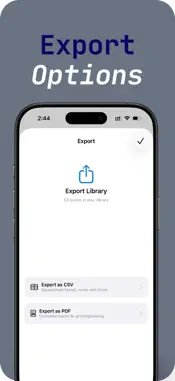
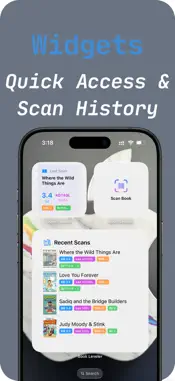
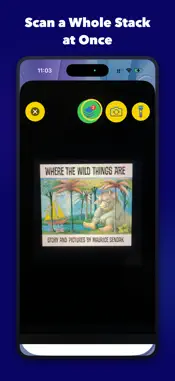
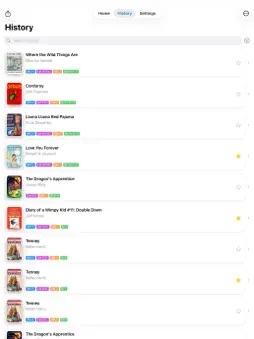
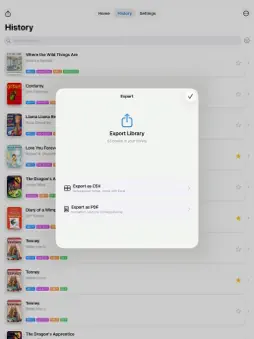
LEVEL YOUR CLASSROOM LIBRARY QuickScan Book Leveler shows you a book's reading levels. Just scan the barcode with your camera to see AR, Lexile, Guided Reading, and more - and see which of them QuickScan looked up and which it estimated. QuickScan is from the makers of BookScanner, used by teachers since 2012. PERFECT FOR TEACHERS AND PARENTS - Organize your classroom library by reading level - Match students with books at their just-right level - Check reading levels before buying books - Track books your students have read 5 READING LEVELS, PLUS AR POINTS AND INTEREST LEVEL No more hunting through multiple websites. QuickScan shows you where every level came from: - AR (Accelerated Reader) / ATOS levels - looked up, never estimated - Lexile measures - looked up, never estimated - Guided Reading Level (GRL) / F&P - looked up from Scholastic when Scholastic has it; otherwise QuickScan estimates it and marks it ≈ - DRA (Developmental Reading Assessment) - marked ≈ when QuickScan estimates it - Grade level equivalent - marked ≈ when QuickScan estimates it - Interest level (LG, MG, MG+, UG) - AR Points and Word Count Above P, QuickScan doesn't estimate a Guided Reading Level: where Scholastic has no level for a longer chapter book, QuickScan shows none rather than a letter it can't stand behind. NO BARCODE? FIND IT ANOTHER WAY When a barcode won't scan, or it isn't the book's ISBN, type the book's title instead. On iPhone and iPad models whose camera can read text, QuickScan can also read the title from the cover or spine for you to check before it searches, or read the ISBN printed on the book. SAVE YOUR SCAN HISTORY Never lose track of books you've scanned. QuickScan automatically saves every book with full reading level data. Search, filter, and sort your history to find any book you've scanned. EXPORT YOUR BOOK LISTS Create professional book lists for your classroom: - Export to CSV for spreadsheets - Export to PDF for printing - Share individual books or your entire library - Auto-dated files keep you organized WORKS ON MAC, TOO Use QuickScan on your Mac with your webcam. Scan books right at your desk. Your scan history syncs automatically between iPhone, iPad, and Mac via iCloud. HOME SCREEN WIDGETS See your recently scanned books right on your Home Screen. Add the Quick Scan widget for one-tap access to the camera. BUILT FOR EDUCATORS - No ads - ever - No student data collection - Works offline after initial lookup - Free to use with a daily scan limit - upgrade in the app for unlimited scanning Whether you're a teacher leveling a classroom library, a reading specialist matching students with books, or a parent finding appropriate reads - QuickScan Book Leveler makes reading level lookup effortless. Download now and level your first book. AR, Accelerated Reader and ATOS are trademarks of Renaissance Learning, Inc. Lexile is a trademark of MetaMetrics, Inc. Fountas & Pinnell, F&P and Guided Reading Level are trademarks of their respective owners. QuickScan is not affiliated with, endorsed by or sponsored by Renaissance Learning, MetaMetrics or Fountas & Pinnell. DRA and Developmental Reading Assessment are trademarks of their owner.
What's New
Version 6.6 2026-10-23
New ways to find a book when its barcode won't scan. - Type Title — A new Home screen tile looks a book up by its title, with the author if you know it. It is ... Technical Analysis
Package Overview Basic metadata
Bundle ID
com.ifthendev.QuickScanBookLeveler Current Version 6.6
Minimum iOS 18.0
Package Size App Store Size
Package Metadata 0 / 31 version records
4.6 / 5.0 (877 ratings)
Detailed binary, privacy manifest, framework, and Info.plist results have not been indexed for this package yet. The verified App Store and archive metadata above remains available.
Developer Information
Known Version Records
0 version records with stored package metadata • 31 known version records
Stored metadata does not guarantee a package is currently available to download.
| Details | Version / IDs | Version date | Action |
|---|---|---|---|
| Not archived | App Store ID: 888130429 | Unknown | Request Version |
| Not archived | App Store ID: 884519992 | Unknown | Request Version |
| Not archived | App Store ID: 878546935 | Unknown | Request Version |
| Not archived | App Store ID: 876817845 | Unknown | Request Version |
| Not archived | App Store ID: 876581097 | Unknown | Request Version |
| Not archived | App Store ID: 871751485 | Unknown | Request Version |
| Not archived | App Store ID: 871563506 | Unknown | Request Version |
| Not archived | App Store ID: 869050574 | Unknown | Request Version |
| Not archived | App Store ID: 868999106 | Unknown | Request Version |
| Not archived | App Store ID: 868728740 | Unknown | Request Version |
| Not archived | App Store ID: 868158651 | Unknown | Request Version |
| Not archived | App Store ID: 866801713 | Unknown | Request Version |
| Not archived | App Store ID: 860974683 | Unknown | Request Version |
| Not archived | App Store ID: 860137449 | Unknown | Request Version |
| Not archived | App Store ID: 859265290 | Unknown | Request Version |
| Not archived | App Store ID: 859212417 | Unknown | Request Version |
| Not archived | App Store ID: 859091601 | Unknown | Request Version |
| Not archived | App Store ID: 858959426 | Unknown | Request Version |
| Not archived | App Store ID: 858858607 | Unknown | Request Version |
| Not archived | App Store ID: 853797510 | Unknown | Request Version |
| Not archived | App Store ID: 853647580 | Unknown | Request Version |
| Not archived | App Store ID: 852975692 | Unknown | Request Version |
| Not archived | App Store ID: 852647157 | Unknown | Request Version |
| Not archived | App Store ID: 852358105 | Unknown | Request Version |
| Not archived | App Store ID: 851887419 | Unknown | Request Version |
| Not archived | App Store ID: 851509050 | Unknown | Request Version |
| Not archived | App Store ID: 849169844 | Unknown | Request Version |
| Not archived | App Store ID: 845127253 | Unknown | Request Version |
| Not archived | App Store ID: 843609940 | Unknown | Request Version |
| Not archived | App Store ID: 842962421 | Unknown | Request Version |
| Not archived | App Store ID: 842223011 | Unknown | Request Version |