
Preview






Description
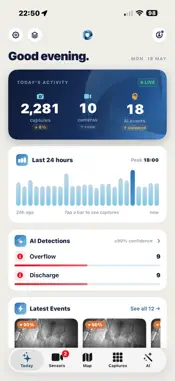
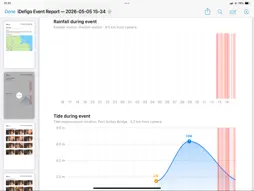
iDefigo Viewer is the official mobile companion for the iDefigo visual sensor platform. Whether you're monitoring storm overflows for a water utility, fly-tipping hot-spots for a waste-management contractor, perimeter activity on a construction site, vehicle movements at a logistics yard, or any other deployment iDefigo supports, the app turns your camera fleet into an at-a-glance status check from anywhere you have a signal. Open the app and the Today screen shows what mattered in the last 24 hours: total captures across your fleet, which cameras have been most active, and an Insights row that calls out unusual patterns worth a closer look. Step into AI Review and every flagged frame is one tap away, ranked by confidence and grouped by event so a single long incident doesn't drown out everything else that happened that day. Browse the full image library by date or by site, view your fleet on a map, or drill into an individual sensor to see its activity history and most recent capture. When you need to share what you've found, the Build Event Report flow generates a polished PDF in seconds. Reports include a narrative summary, camera locations on a map, and frame thumbnails with timestamps and AI tags. Save the report to your device, AirDrop it to a colleague, attach it to an email, or open it in any other app from the share sheet. Saved reports stay on the device until you delete them. iDefigo Viewer adapts to the kind of work you do. Pick your industry on first sign-in and the app tailors its defaults to fit. Water utility customers get rainfall and tidal context overlaid on every capture, dry-weather spill detection on the Today screen, and a tide cycle view that lines up with each site's environmental data — alongside the same captures, AI events, fleet map, and event reports that every other industry gets. Customers who run more than one iDefigo account can sign in to all of them and switch between accounts without re-typing passwords. Each account keeps its own settings, its own saved reports, and its own industry profile. Credentials are stored in the device Keychain. An active iDefigo account is required. If you're not yet a customer, visit idefigo.com to find out more about visual monitoring for water utilities, waste management, property and construction, transport and logistics, safety and security, and other industries.
What's New
Version 2.3.4 2026-09-11
This update brings the app in step with the iDefigo web viewer, with a major upgrade to incident evidence handling and team-wide coordination. INCIDENTS & EVID...This update brings the app in step with the iDefigo web viewer, with a major upgrade to incident evidence handling and team-wide coordination. INCIDENTS & EVIDENCE • Attach up to 30 related captures to an incident — from any camera and a wider time window — with the original detection frame clearly marked. • Captures cited by an open incident are locked against deletion. When an incident ends, you decide whether its images stay protected. • Every status change (except acknowledge) now requires a note, so the audit trail always records why a decision was made. • Incident details now show who has claimed or been referred an incident, whether a workflow raised it, its recorded outcome, and any enforcement case built on it. • Cross-team incident sync is now reliable, and saved reports follow you across devices and the web viewer. WORK AS ONE TEAM • Dismissed AI events and acknowledged sensor alerts now apply across your whole organisation — triage once, on any device or the web, and everyone's queue stays in step, with who-and-when recorded. • Incident deadlines (acknowledge / resolve / report) now follow your organisation's policy, so every member counts down to the same clock. NUMBER PLATES (ANPR) • Plate reads no longer appear as high-priority AI alerts. They're kept as reference data on the Captures screens, shown as proper registrations (SD25 NKP), and searchable however you type them. SENSORS • Tampered captures are badged with a TAMPER pill in the camera's image grid. • Your organisation's own sensor identifiers now appear under sensor names and are searchable. • Bridge/relay devices are shown correctly and no longer report false "NO DATA". ALSO IN THIS RELEASE • Shared or saved photos now include the camera name, location and timestamp on the image. • Settings sync between the app and the web viewer, your organisation's industry is provisioned by iDefigo, Face ID unlock is smoother, and PDF reports render correctly in dark mode. Technical Analysis
Package Overview Basic metadata
Bundle ID
com.idefigo.viewer Current Version 2.3.4
Minimum iOS 16.0
Package Size App Store Size
Package Metadata 1 / 7 version records
Detailed binary, privacy manifest, framework, and Info.plist results have not been indexed for this package yet. The verified App Store and archive metadata above remains available.
Developer Information
Known Version Records
1 version record with stored package metadata • 7 known version records
Stored metadata does not guarantee a package is currently available to download.
| Details | Version / IDs | Version date | Action |
|---|---|---|---|
| 14.36 MB | v2.3.4 App Store ID: 887261762Build: 2.3.4 | 2026-09-11 18:29:57 | Get Version |
| Not archived | App Store ID: 886356967 | Unknown | Request Version |
| Not archived | App Store ID: 886018699 | Unknown | Request Version |
| Not archived | App Store ID: 885917855 | Unknown | Request Version |
| Not archived | App Store ID: 885835581 | Unknown | Request Version |
| Not archived | App Store ID: 885527565 | Unknown | Request Version |
| Not archived | App Store ID: 884944502 | Unknown | Request Version |