Preview

Description
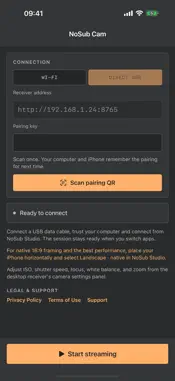
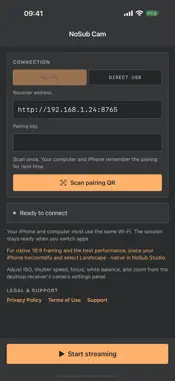
NoSub Cam turns your iPhone into a camera source for your Mac or Windows PC — without an account, cloud relay, advertising, or subscription. Connect over your trusted local Wi-Fi network or use Direct USB. NoSub Studio, the free desktop companion, shows the live preview and lets you choose the rear or front camera, portrait or landscape output, and supported settings including ISO, shutter speed, focus, white balance, zoom, and resolution. FEATURES • Local Wi-Fi and Direct USB connections • Rear and front camera support • Portrait and landscape output controlled from the desktop • Manual and automatic camera controls • Supported 480p, 720p, 1080p, and 4K capture presets • Pairing key required for each receiver session • No account, cloud storage, analytics, advertising, or tracking • No subscription NoSub Cam does not intentionally record or upload your video to the publisher. Wi-Fi mode sends video over unencrypted HTTP on your local network, so use a private network you trust and never expose the receiver port to the public internet. The free NoSub Studio companion app is required on macOS or Windows. OBS Studio is currently required to expose the stream as a virtual webcam to other applications. Availability and frame rate depend on the iPhone, selected resolution, connection, and computer.
Technical Analysis
Package Overview Basic metadata
Bundle ID
com.ethem.nosubcam Current Version 1.0.0
Minimum iOS 26.0
Package Size App Store Size
Package Metadata 0 / 0 version records
Detailed binary, privacy manifest, framework, and Info.plist results have not been indexed for this package yet. The verified App Store and archive metadata above remains available.
Developer Information
Known Version Records
0 version records with stored package metadata
Stored metadata does not guarantee a package is currently available to download.
| Details | Version / IDs | Version date | Action |
|---|