
Preview


Description
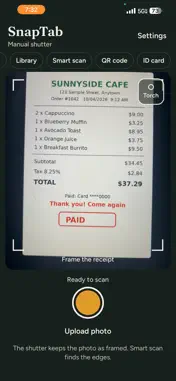
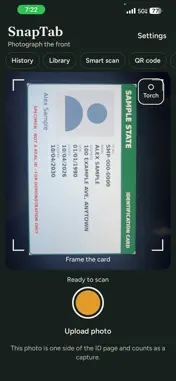
SnapTab Pro turns your iPhone into a fast scanner for documents, receipts, ID cards and QR codes. Every feature is free to use, and the app is supported by ads. Your scans are processed and stored on your device and are not uploaded to our servers. SCAN YOUR WAY - Use the document scanner to detect the page edges and crop automatically. - Use the manual shutter to keep the photo exactly as framed. - Import a photo you already took. - Scan several pages into one document. CLEAN UP EVERY PAGE - Adjust brightness, contrast and sharpness, or tap auto-enhance. - Choose a filter: Original, Grayscale, Black & White or Magic Color. Magic Color brightens the page while keeping colored ink and stamps. - Drag the corners to fix the crop on any page. READ TEXT AND SIGN - Read text from a scan with on-device text recognition (OCR), then copy or share it. - Draw your signature once and place it on your documents. ID CARD MODE - Capture the front and back of an ID card. - SnapTab Pro places both sides on one A4 or Letter page at true card size, ready to print or share. QR CODE SCANNER - Scan a QR code with the camera or from a photo in your library. - Open links, copy the text or share it. STAY ORGANIZED - Keep your scans in a library with folders. - Search to find any scan quickly. SAVE, SHARE AND PRINT - Export a multi-page PDF. - Save to Photos or Files. - Share through any app on your phone, or print with AirPrint. PRIVATE BY DESIGN - Scans, extracted text and signatures stay on your device. - Turn on App Lock to open the app with Face ID or your device passcode. - Sign in with Apple or Google if you like. It is optional, and your name and email are stored only on this device. SnapTab Pro is made by ADY Technology for anyone who needs a quick, clean copy of receipts, invoices, forms, contracts, notes and IDs. Privacy policy: https://snaptab-privacy.vercel.app Questions or feedback: [email protected]
What's New
Version 1.0.1 2026-10-20
Scanner upgrade: - Cleaner Smart Scan results. - The app now opens straight into scan mode. - New separate Upload photo button. - Stability fixes, including a c...Scanner upgrade: - Cleaner Smart Scan results. - The app now opens straight into scan mode. - New separate Upload photo button. - Stability fixes, including a crash when dragging crop corners. Technical Analysis
Package Overview Basic metadata
Bundle ID
com.ayexpress.snaptab Current Version 1.0.1
Minimum iOS 16.4
Package Size App Store Size
Package Metadata 0 / 0 version records
Detailed binary, privacy manifest, framework, and Info.plist results have not been indexed for this package yet. The verified App Store and archive metadata above remains available.
Developer Information
Known Version Records
0 version records with stored package metadata
Stored metadata does not guarantee a package is currently available to download.
| Details | Version / IDs | Version date | Action |
|---|