
Preview






Description
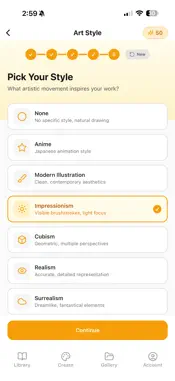
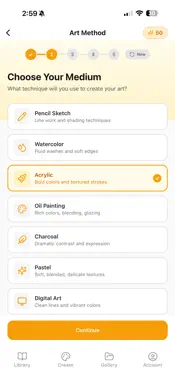
Learn to draw and paint with AI-powered step-by-step guides tailored to your skill level. Canvas Caddy transforms your artistic ideas into visual tutorials. Simply describe what you want to create, and our AI generates beautiful artwork — then breaks it down into easy-to-follow steps showing you exactly how to recreate it. CREATE AT YOUR LEVEL Whether you're picking up a pencil for the first time or refining your masterful technique, Canvas Caddy adapts to you: • Beginner — Simple shapes and compositions • Intermediate — More detail and complexity • Advanced — Sophisticated techniques and nuance • Expert — Professional-level masterworks CHOOSE YOUR MEDIUM Get step-by-step guides designed for your preferred art method: • Pencil Sketch • Watercolor • Acrylic • Oil Painting • Charcoal • Pastel • Digital Art Each medium comes with technique-specific breakdowns — watercolor guides show layering and glazes, while pencil sketches progress from basic shapes to detailed shading. 10+ ARTISTIC STYLES From classical to contemporary, find your aesthetic: Anime, Modern, Impressionism, Cubism, Realism, Surrealism, Pop Art, Minimalist, Baroque, and Romanticism. STEP-BY-STEP LEARNING Every artwork comes with 5 progressive steps showing you exactly how to build your piece from start to finish. Swipe through the stages and learn the techniques behind each creation. COMMUNITY LIBRARY • Browse thousands of artworks shared by artists worldwide • Filter by skill level, medium, style, and canvas size • Download tutorials for inspiration • Share your own creations to help others learn SMART CREATION WORKFLOW 1. Select your skill level 2. Choose your art medium 3. Pick your canvas ratio 4. Browse styles for inspiration 5. Describe your vision (add reference photos too!) 6. Generate and refine until perfect 7. Save to your gallery and share with the community ITERATE UNTIL PERFECT Not quite right? Request changes and our AI will refine your artwork while maintaining your chosen style, medium, and complexity level. Terms of Use (EULA): https://www.apple.com/legal/internet-services/itunes/dev/stdeula/
Technical Analysis
Package Overview Basic metadata
Bundle ID
com.vibecode.canvascaddy-gqguja Current Version 1.0.22
Minimum iOS 15.1
Package Size App Store Size
Package Metadata 0 / 1 version records
Detailed binary, privacy manifest, framework, and Info.plist results have not been indexed for this package yet. The verified App Store and archive metadata above remains available.
Known Version Records
0 version records with stored package metadata • 1 known version records
Stored metadata does not guarantee a package is currently available to download.
| Details | Version / IDs | Version date | Action |
|---|---|---|---|
| Not archived | App Store ID: 882078783 | Unknown | Request Version |