Preview
Description
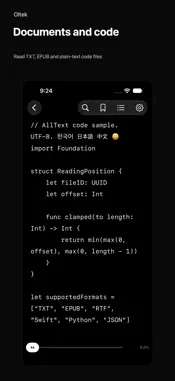
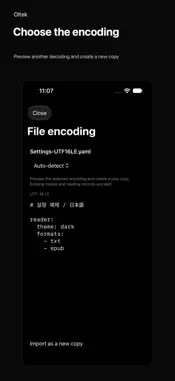
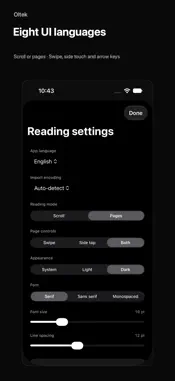
Oltek reads documents and source code as text on iPhone and native Mac. FILES AND ENCODINGS • TXT, TEXT, MD, LOG, RTF and EPUB. • Plain-text code, configuration and data files: Swift, Python, JavaScript, TypeScript, C/C++, Java, Kotlin, Rust, Go, HTML/CSS, JSON, YAML, XML, CSV and more, including extensionless text files. • Code preserves indentation, tabs and blank lines in a monospaced font. No execution, editing or syntax highlighting. PDF, Office documents and other binary formats are not supported. • Auto-detect or choose an encoding provided by the device: Unicode, CP949/EUC-KR, Shift_JIS/EUC-JP, GB18030/Big5, Windows, ISO, KOI8 and others. Some encodings require manual selection. • Preview a different encoding and create a new copy while keeping existing copies and reading records. • RTF and EPUB show body text without formatting or media. EPUB follows package reading order. DRM-protected or encrypted text is not supported. READING AND NAVIGATION • Scroll or paged reading; text search, bookmarks and saved positions. • Automatically detect chapter headings and search the chapter list. • Drag the position bar to preview text and the detected chapter; release to jump. Return to the position before a search, chapter or position jump. • Choose swipe, side tap/click or both. Arrow-key paging; iPhone requires a hardware keyboard. • Native Mac keyboard shortcuts and adjustable text width. Apple Silicon and Intel support. • System, light and dark appearance, font size and line spacing. • UI in English, Korean, Japanese, Simplified/Traditional Chinese, Spanish, French and German. Imported text is not translated. LOCAL STORAGE Plain text is stored inside the app as an original-byte copy and a UTF-8 reading copy. RTF and EPUB store extracted body text. Original files are unchanged, and later original-file changes do not automatically update imported copies. Earlier-version imports require importing the original again for encoding previews. Files, positions, bookmarks and settings stay on each device. No iPhone–Mac sync. Large-file processing depends on device memory and performance. No account or in-app purchases. A small fixed-size banner may appear at the bottom of the iPhone file list.
What's New
Version 1.1 2026-11-10
Added a small fixed-size banner at the bottom of the file list. Ad privacy choices are available in Settings where required. Technical Analysis
Package Overview Basic metadata
Bundle ID
com.munjang.reader Current Version 1.1
Minimum iOS 17.0
Package Size App Store Size
Package Metadata 0 / 0 version records
Detailed binary, privacy manifest, framework, and Info.plist results have not been indexed for this package yet. The verified App Store and archive metadata above remains available.
Developer Information
Known Version Records
0 version records with stored package metadata
Stored metadata does not guarantee a package is currently available to download.
| Details | Version / IDs | Version date | Action |
|---|