Preview



Description
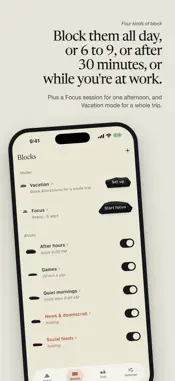
You make the promise. Cairn helps you keep it. Cairn blocks the apps that pull you away, and you decide in advance how hard it is to get back in. Not a dashboard, not a report on how bad last week was. A commitment device. THE UNLOCK LADDER Every block has a price you set when you're clear-headed, and pay when you're not: • Confirm: one tap to say you mean it. • Cooldown: wait it out, then a short window. • Effort: a puzzle, a long passphrase, or ten pushups. • In stone: no way through. It opens when it was always going to open. The top rung is only offered where a block ends on its own: a schedule that closes, a daily limit that resets, a place you can walk out of. A hard block that never lifts isn't a commitment, it's a trap with app deletion as the only key, so Cairn won't offer it. The same price applies to every way out. Turning a block off, deleting it, and editing it all cost what opening it costs. A lock you can undo by flipping a switch isn't a lock. FOUR WAYS TO BLOCK • Hard block: on until you turn it off. • Scheduled: a window on the days you choose. • Daily limit: after 30, 60, or 120 minutes, it closes for the day. • At a place: holds while you're at the gym, the office, or any set location. Plus Focus sessions and a Vacation mode that stands everything down. THE TRAIL One stone for each day you keep every block. Seven stones make a week. Cairn counts the day you resisted, not just the day you slipped, and a day it can't be sure about stays blank rather than being awarded to you. A quiet day under your limit earns its stone like any other. WE CAN'T SEE A THING Cairn has no account, no servers, and no analytics. Not "we don't sell your data"; there is no data. You pick apps in Apple's own Screen Time picker, and Cairn only ever receives an anonymous token. It can't read which apps you chose. Neither can we. If you set a daily limit, iOS counts the minutes on your device and tells Cairn only that a limit was crossed. Never how long, never which app. PAY ONCE One payment. No subscription, no ads, no upsell. Free for a month first, and when the month ends nothing is held hostage: every block you made is still there, and nothing on your phone stays blocked because you didn't pay. WHAT CAIRN WON'T DO It won't stop you deleting it. That's deliberate. iOS lets you remove any app, and a blocker that pretended otherwise would be lying. Cairn is a commitment device, not a cage. Pair it with iOS Screen Time restrictions if you want that door closed too. Be where you are.
What's New
Version 1.1.1 2026-09-14
Updated style of widgets to match the 1.1 re-design. Technical Analysis
Package Overview Basic metadata
Bundle ID
com.hytimesgroup.cairn Current Version 1.1.1
Minimum iOS 18.0
Package Size App Store Size
Package Metadata 0 / 0 version records
Detailed binary, privacy manifest, framework, and Info.plist results have not been indexed for this package yet. The verified App Store and archive metadata above remains available.
Developer Information
Known Version Records
0 version records with stored package metadata
Stored metadata does not guarantee a package is currently available to download.
| Details | Version / IDs | Version date | Action |
|---|