Preview







Description
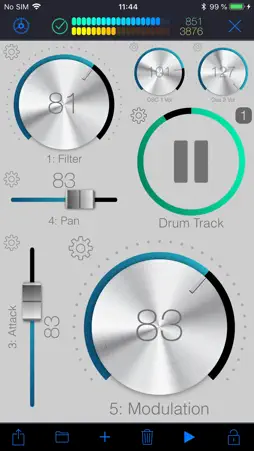
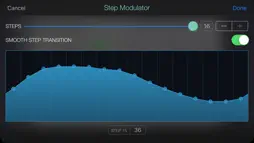
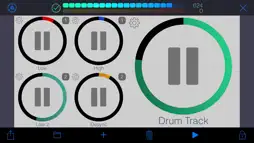
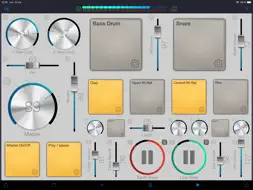
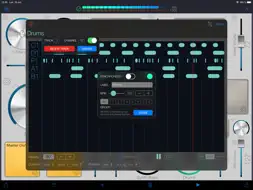
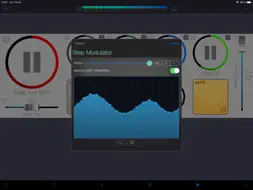
WiDI is a control surface with an integrated step sequencer in which you create controls such as buttons, pads, knobs and faders to send MIDI events and play sequences. • CONTROL SURFACE AND SEQUENCER: A control is bound to a channel and a specific MIDI Control Change. You can either specify the CC number if you know it, or let the app learn it. Once placed on the surface, use this control to interact with your MIDI device. Alternatively, any CC event sent by your device will be shown live by the control(s) bound to this CC. Pads are special controls: they can either produce MIDI CC events, Notes or Program changes. If bound to a CC, the pad can act as an on/off switch (you specify the values for each state.) If bound to a note, each tap produces the specified MIDI note. This is especially useful to operate MIDI instruments without keyboards such as synthesizer modules or drum machines. A sequence can hold as many tracks as you wish, and send notes to different MIDI channels. Sequences can play in sync or running freely. You may also group sequences together to start or pause them at the same time. • MIDI: To interface WiDI with any MIDI instruments/devices connected to your Mac or PC, connect to a MIDI Network Session on your Mac or your PC. On a Mac, this is natively supported by macOS, and you do not need to install third party software (use Audio MIDI Setup.) On a PC running Windows, you might want to install rtpMIDI. As an alternative to MIDI Network Sessions, you may use the WiDI Desktop Application. It acts as a MIDI bridge between the network and your MIDI hardware. You can install the desktop application on as many computers as you want (it's free!). It's a very lightweight package that doesn't need to perform any installation procedure whatsoever. You may download the WiDI Desktop Application for macOS on the Mac App Store, or go to : https://www.hypertide.com/widi/ for both macOS and Windows archives. Additionally, any class-compliant MIDI interface natively supported by iOS can also be used directly by WiDI without the need of a network connection. • FEATURES: ○ Use any CoreMIDI-supported MIDI interface connected to your device ○ MIDI network session: use WiDI as an external control surface for any DAW such as Logic Pro, Ableton Live, Cubase, ... ○ Multiple iPhone and iPad can connect to your computer, allowing different control surfaces simultaneously ○ Integrated step sequencer: create sequences, each one holding as many tracks as needed ○ Sequences can run freely or in sync and start simultaneously if grouped together in fire groups ○ Auto discover MIDI CC : you don't need to know each one to add controls, WiDI learns CC numbers sent by your devices ○ Automate CC : sweep ranges or use the step modulator to design patterns to modulate controls values, supporting various advanced options like step-by-step or smooth variations, bouncing, repeating, changing speed ○ Add as many pads as you want to generate MIDI Notes, Control Changes or Program Changes ○ Flexible control surface : set layout and grid size for both portrait and landscape orientations ○ Re-arranging controls is as simple as drag & drop ○ Fully customizable user interface : themes, colors, display of values and labels, aspect ratios, grid spacing, grid coloring, background, ... ○ Integrated File Manager to load and save your surfaces, which are also accessible in the iOS Files app and your computer's iTunes connection ○ Exchange surfaces between devices with the integrated QR code generator and scanner ○ Or use the share feature, so you may import them on any device. We'd love to hear from you! Should you be in need of support or eager to request a new feature, please contact us at [email protected]
What's New
Version 1.8.3 2024-08-08
IMPORTANT note for WiDI Desktop App users: upgrade the Desktop App to version 1.0.2 if you intend yo send program changes! Version 1.8.3: • More bug fixes! Ne...IMPORTANT note for WiDI Desktop App users: upgrade the Desktop App to version 1.0.2 if you intend yo send program changes! Version 1.8.3: • More bug fixes! New in versions 1.8.x: • Send program change (select patch on any MIDI device compatible with MSB/LSB/PC program change messages) • Corrected many UI issues (including keyboard covering dialogs in some situations) • MIDI channel of pads can now be modified • Compatibility with latests iOS and iPadOS releases, while still maintaining support down to iOS 10 (!) Technical Analysis
Package Overview Basic metadata
Bundle ID
com.hypertide.audioutils.WiDI-iOS-trial Current Version 1.8.3
Minimum iOS 10.0
Package Size App Store Size
Package Metadata 1 / 9 version records
Detailed binary, privacy manifest, framework, and Info.plist results have not been indexed for this package yet. The verified App Store and archive metadata above remains available.
Developer Information
Known Version Records
1 version record with stored package metadata • 9 known version records
Stored metadata does not guarantee a package is currently available to download.
| Details | Version / IDs | Version date | Action |
|---|---|---|---|
 19.01 MB | v1.8.3 App Store ID: 868066059Build: 1 | 2024-08-08 11:30:44 | Get Version |
| Not archived | App Store ID: 867873839 | Unknown | Request Version |
| Not archived | App Store ID: 867794486 | Unknown | Request Version |
| Not archived | App Store ID: 859450315 | Unknown | Request Version |
| Not archived | App Store ID: 835494540 | Unknown | Request Version |
| Not archived | App Store ID: 833953173 | Unknown | Request Version |
| Not archived | App Store ID: 833355812 | Unknown | Request Version |
| Not archived | App Store ID: 828927307 | Unknown | Request Version |
| Not archived | App Store ID: 828717715 | Unknown | Request Version |