
Preview







Description
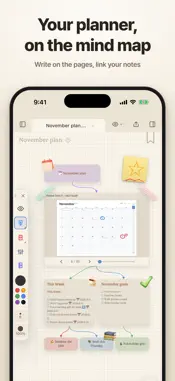
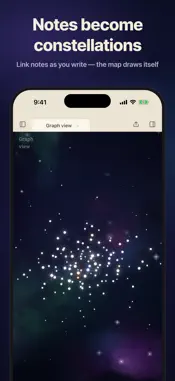
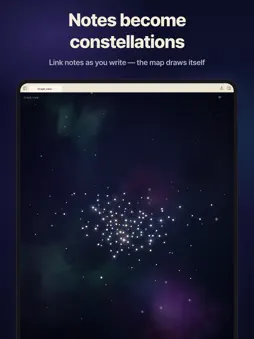
Tired of converting files or picking plugins? Spent the day on settings and never wrote a line? Plenty of features, none of them talking to each other? Writing, knowledge management, mind maps, reading logs, codices, schedules, file conversion — all in ObsiKO, with no login, payment, subscription or ads. Obsidian vaults (.md·.canvas·.base) open as-is. (AI uses your own API key. With Apple Intelligence on, no key needed.) ■ Notebooks and planners you write by hand · Notebook cards on your mind map, 23 papers — lined, Cornell, manuscript grid. Export as one PDF · Pens, brushes, pencils, crayon and chalk, with sounds recorded on real paper · A dated year planner as one PDF for your note-taking app or printer · Stickers and washi tape on the page of your note. Handwriting turns into text on the device ■ Made for iPhone Duo · Folded: floating glass buttons on the right strip. Unfolded: an iPad-style layout, books in two pages · Half-folded: the app on top, the keyboard below — like a small laptop ■ Built for Korean · The ObsiKO Korean Dictionary and spell checker, from the National Institute of Korean Language's data — no key · 860+ newer words not yet in the official dictionaries, and hanja input · A "Korean word of the day" widget ■ A focus timer on your Lock Screen · A dial like a real pomodoro clock — tap or drag the ticks in 1-minute steps · Start from the widget without opening the app; time left on the Lock Screen, in StandBy and the Dynamic Island ■ Share and sync (GitHub) · "Share to the web" turns a note into one link, stored in your GitHub, not on our servers · Sync devices through your own repository, and share your LLM wiki by subscription link ■ Write once, it connects itself · One "color" property tints tabs, headers, tree icons, .base and codex cards · Type "book" and a search fills in the rest; "project" adds dates to the calendar · Highlight a PDF and quotes collect in a matching note. ■ A graph like the night sky · Links, types, relations and PARA form one constellation — more links, brighter stars ■ Infinite mind-map canvas (.canvas) · Apple Pencil drawing — sketches into mind maps (iOS 27) or AI images. Ask the AI and it builds, sizes and colors the map · Enter and Tab grow cards. 5 styles, 10+ presets, auto-built maps & dungeons ■ .base files and search · Projects, kanban, cards, charts, a library, PARA and a budget. Dataview queries become tables · Search filenames, full text, Korean jamo, meaning and word forms. Find books and papers, or just ask Siri ■ Dashboard, themes and Markdown · 50+ widgets — calendar, habits, stats, D-day, mini games, AI briefing, tarot. 20+ themes, your own fonts · Editing tuned for Korean, a format bar, Mermaid, 20+ charts, inline drawing, embeds ■ Writing helper · 70+ structures across 13 genres (Hero's Journey, Save the Cat and more) · Socratic questions, genre feedback, style polish, your own assistants, on-device translation, read-aloud ■ Schedules · A date in any file lands on the calendar (Obsidian Tasks compatible) — calendar views, widgets, writing reminders ■ Viewers from one line of front matter · Book view (two pages, real page turns), web-novel view (platform presets) · Messenger and visual-novel views — record the screen and it's a short. ■ Clip, convert, export · Web clipper, RSS and a Memo Box for loose thoughts. Import from Apple Notes, Notion, Evernote, Bear, Logseq and Roam · doc, docx, PDF, hwp and hwpx to Markdown, AI OCR and transcription · Slides with Marp. Export to PDF, HWPX, DOCX, EPUB, HTML, ZIP and wikis ■ AI agent · Just add an API key (Claude, Gemini, GPT) — the app works fully without one · Mind maps and tables on your phone, voice input, and a plan card before big changes · Auto memory, LLM wikis, slash commands, a prompt helper, MCP Tell us about bugs anytime. ■ Supported · iPhone, iPad, Mac, Apple Watch / Korean, English, Japanese, Chinese (Traditional, Simplified) · Ready for iOS 27 and iPhone Duo
What's New
Version 1.4.5 2026-11-10
■ New in 1.4.5 — an update for writing by hand Redesigned drawing tools · Five groups: pens, ink pens, brushes, pencils, and crayon & chalk. Tap a group to fan...■ New in 1.4.5 — an update for writing by hand Redesigned drawing tools · Five groups: pens, ink pens, brushes, pencils, and crayon & chalk. Tap a group to fan it out. · New tools — a glossy gel pen that lets layers show through, a ballpoint that pools where it lands, an even mechanical pencil, a drawing pencil that shades wide when tilted, and square-tipped chalk. · Crayon fills in and blends as you layer it. Blend smudges like a fingertip, and the watercolor brush is watercolor while you draw. · Every tool's drawing sound was recorded on real paper. · Hold to straighten a line, keep drawing from its end, and touch the start point to close it. Move, bend and smooth strokes you've drawn. · Rest your palm while you write — it won't draw or move the canvas. Once you use Apple Pencil, fingers stop drawing (turn them back on with the hand button). · Double-tap or squeeze Apple Pencil to switch eraser ↔ pen or show and hide the toolbar. Notebook cards · 23 kinds of paper · New notebook in the drawing toolbar — lined, Cornell, Korean manuscript grid, English four-line, graph, music staff, picture diary, video storyboard and more: 23 papers, per page, portrait or landscape. · Flip pages inside the card with ‹ ›, and drag in the page list to reorder. Two-page view and a scrub track to find pages by dragging. · PDF cards can add (graph paper), select and delete pages. · Select a card and Export as PDF — every page, with handwriting and stickers, as one PDF. PDF pages without ink stay exactly as the original. ObsiKO Stickers · Tap one in the Stickers tab of the Image Search panel and it sticks onto the page of your note — your text doesn't move. · Washi tape and arrow tape you stretch by dragging an end, planner frames that wrap a paragraph, and My stickers from your own photos. They show up in PDF and print too. Planner pages · 14 extra page types — habit tracker, monthly review, yearly goals, nine-square goals, spending log, study plan and more — plus an overview page that gathers them. · Choose a size for iPad large, medium, small or Duo — pages fill that screen. · With AI connected, describe a mood in one line to decorate. The new Siri understands "this note" — while viewing a note, say "Add milk to this note." Siri is told only which note it is (iOS and iPadOS 27). Hand-drawn → mind map now recognizes circles that aren't quite closed, and rereads each card for better accuracy. 860+ newer and subculture words not yet in the national dictionaries (ObsiKO supplement), with tags for slang, derogatory and vulgar words. Typing `--` makes an em dash, and three periods become an ellipsis on phones too. On iPad and the unfolded Duo, an unpinned right panel closes when you tap outside it. In Duo split screen, the pill menu and mind map toolbar stay in place. The focus timer ends with a glockenspiel chime. "Daily Wordle" on the dashboard is now "Daily Word Guess." + Other improvements and bug fixes Technical Analysis
Package Overview Basic metadata
Bundle ID
com.obsiko.app Current Version 1.4.5
Minimum iOS 15.1
Package Size App Store Size
Package Metadata 0 / 0 version records
Detailed binary, privacy manifest, framework, and Info.plist results have not been indexed for this package yet. The verified App Store and archive metadata above remains available.
Developer Information
Known Version Records
0 version records with stored package metadata
Stored metadata does not guarantee a package is currently available to download.
| Details | Version / IDs | Version date | Action |
|---|