
Preview

Description
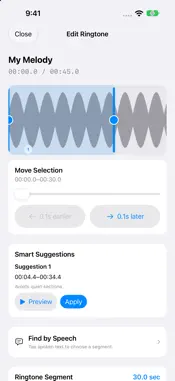
Choose the sound you love from music or video and turn it into an iPhone ringtone file. Make It a Ringtone imports audio files you own or videos from Photos, displays the waveform, and lets you select a segment up to 30 seconds long. Key features • Import videos containing audio from Photos • Import MP3, M4A, AAC, and WAV files from Files or iCloud Drive • View a waveform analyzed from the actual audio • Adjust start and end points in 0.1-second steps • Move the whole selection in 0.1-second steps with the slider and buttons directly below the waveform, preserving its length • See up to three suggested ranges based on audio analysis • Find spoken phrases and select a range with on-device speech recognition on supported devices and languages • Quickly choose the first, middle, or last 30 seconds • Loop and preview the selected segment • Automatically match volume while preventing clipping • Add fade-in and fade-out • Edit a saved ringtone again or duplicate it to create a variation • Rename saved ringtones • Open files from other apps and resume automatically saved edits • Save an edit in the Photos share window, then continue it in the main app • Collect up to 10 ranges from one source, each with its own name and effects, and save them separately • Create an M4A file containing AAC audio • Save to Files or send through the iOS share menu Privacy by design Video and audio import, waveform analysis, editing, preview, and export all happen on your iPhone. There is no account, advertising, analytics SDK, or tracking, and files are never sent to the developer's servers. Speech recognition availability depends on the device and language. An internet connection may be needed to download a language model; speech recognition runs on-device. DRM-protected music cannot be edited. Please use DRM-free media you have permission to use. Because of how iOS works, you complete the final ringtone assignment yourself from the share menu.
What's New
Version 1.4 2026-10-29
• Selection movement now sits directly below the waveform, with earlier/later buttons that move it in 0.1-second steps while preserving its length. • Find a use...• Selection movement now sits directly below the waveform, with earlier/later buttons that move it in 0.1-second steps while preserving its length. • Find a useful moment with audio-based range suggestions or recognized speech. Speech recognition requires a supported device and language; a model download may be needed. • Open files from other apps and continue edits saved in the Photos share window in the main app. • Your edits are saved automatically so you can return and continue. • Collect up to 10 ranges from one source, with separate names and effects, and save each as a ringtone. Technical Analysis
Package Overview Basic metadata
Bundle ID
com.hiorio.ringringring Current Version 1.4
Minimum iOS 26.0
Package Size App Store Size
Package Metadata 0 / 0 version records
Detailed binary, privacy manifest, framework, and Info.plist results have not been indexed for this package yet. The verified App Store and archive metadata above remains available.
Developer Information
Known Version Records
0 version records with stored package metadata
Stored metadata does not guarantee a package is currently available to download.
| Details | Version / IDs | Version date | Action |
|---|