
Preview



Description
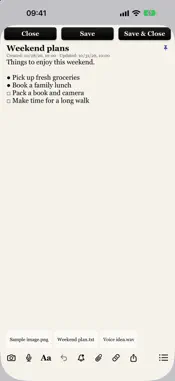
Keep ideas, plans and everyday information organised. NoteFlow brings personal notes, groups and optional reminders together on iPhone and iPad. An active monthly or yearly subscription is required to create and edit notes and use all features. There is no free plan. WRITE YOUR WAY Start writing in General without setting up groups, importance or reminders first. Georgia is the default font; choose another font or size in Settings or for an individual note. Keep one font family throughout a note while using inline bold, italic, underline, headings and different text sizes. Use bullets, empty or filled circles, squares, numbered lists and checklists. Return continues your list, Tab creates sublists, and you can mark one item done without changing the rest. Undo text and formatting edits. SAVE WITH CONFIDENCE See whether a note is saved, has unsaved changes or needs another save attempt. Save keeps the note open. Save & Close saves and returns to Notes. After further edits, Close becomes Close without Saving and discards only edits since the last save, without another confirmation. Notes use an explicit Save action; unsaved edits are not autosaved. CAPTURE AND CONNECT Add photos, voice recordings and local files. Link to another NoteFlow note, edit it in a popup and return to your original draft. Open detected website links, share a note or make a copy. Import a text or Markdown note through Apple Notes' Share menu into General. Original Apple Notes folders, timestamps and media are not imported. GIVE EVERY NOTE A PLACE Organise personal notes into groups and subgroups, with colours, icons and importance levels. Rename the ten importance levels in Settings. Notes within a group follow importance order, with pinned notes first. Delete a group while keeping its notes in General. Browse a compact List or overlapping Cards. Search and filter by status, group or importance. A note's menu shows its current Category, Level, Font and Text Size and lets you change them directly. Retained deleted notes can be restored within 30 days. TURN NOTES INTO REMINDERS Add multiple named reminders with optional notifications. Choose one-time, daily, weekly, monthly or yearly schedules and selected repeat dates. View reminders in Day, Week and Month Calendar. Today starts the agenda from today. Select Past schedule, Due today, Upcoming or Completed to filter both the calendar and its list. Optional Apple Calendar sync maintains NoteFlow's own reminder calendar without importing unrelated events or copying note bodies and attachments. YOUR NOTES, YOUR DEVICES Notes stay on the device by default. Export a complete backup or restore one with confirmation. Optional private iCloud sync combines notes, formatting, attachments, groups and saved order across devices using the same Apple Account. Sync is off by default, runs while NoteFlow is open and remains beta; export a backup before testing it. Choose Small, Medium or Large Home Screen widgets, select their note group, feature a matching note and optionally enable text previews. Use System, Light or Dark appearance. No custom NoteFlow account is required. SUBSCRIPTION INFORMATION Monthly and yearly subscriptions unlock the same full app. Payment is charged to your Apple Account. Subscriptions renew automatically unless cancelled at least 24 hours before the current period ends. Manage or cancel in Apple Account settings. Expiry does not delete saved notes; read-only access and backup export remain available. Privacy Policy: https://noteflow-support.vswsft4n5m.chatgpt.site/privacy.html Terms of Use: https://noteflow-support.vswsft4n5m.chatgpt.site/terms.html Apple Standard Terms: https://www.apple.com/legal/internet-services/itunes/dev/stdeula/
What's New
Version 1.0.2 2026-11-05
• Clear Saved and Unsaved changes indicators, with improved draft retention while subscription access changes. • Refined black editor buttons for Close, Save an... Technical Analysis
Package Overview Basic metadata
Bundle ID
com.husamshomali.noteflow Current Version 1.0.2
Minimum iOS 15.0
Package Size App Store Size
Package Metadata 0 / 0 version records
Detailed binary, privacy manifest, framework, and Info.plist results have not been indexed for this package yet. The verified App Store and archive metadata above remains available.
Known Version Records
0 version records with stored package metadata
Stored metadata does not guarantee a package is currently available to download.
| Details | Version / IDs | Version date | Action |
|---|