Preview

Description
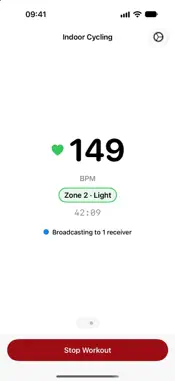
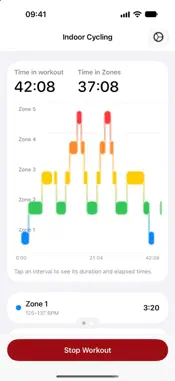
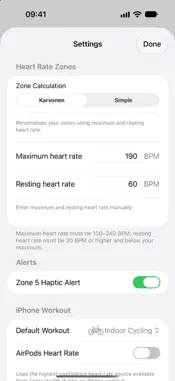
See your heart rate on compatible gym equipment and training apps. Pulse Link shares readings from your watch or supported earbuds through your iPhone, so you can follow your effort as you train. TRAIN YOUR WAY Start a workout on your watch, or on your phone with earbuds that measure heart rate. Follow an earbud workout on your watch and switch to the watch for heart-rate readings when you want to. CONNECT BEFORE YOU START Use Broadcast Warmup to connect your equipment before you begin. Once you turn it on, it stays ready between workouts until you turn it off. SEE YOUR PROGRESS Check your heart rate, workout time and connection at a glance. Follow your workout from the Lock Screen or Dynamic Island on supported iPhones. If heart-rate readings stop, Pulse Link lets you know. FOLLOW YOUR EFFORT Heart-rate zones help you see how hard you're working. Follow your zones on a colour-coded chart as you train. Tap a section to see when it started and how long it lasted, then review the chart and time in each zone after your workout. PERSONALISE YOUR ZONES Base your zones on your age, or on your maximum and resting heart rate. Use details from Apple Health or enter them yourself. Turn on watch alerts to feel a tap when you reach Zone 5, the highest zone. MORE ROOM FOR YOUR WORKOUT On iPhone Duo, check your workout on the outer screen or unfold for more space. Turn your phone sideways to see your workout and chart side by side. Swipe between your chart and time in each zone. LOOK BACK AT YOUR WORKOUT Choose from cycling, running, rowing, cooldowns and more. Your summary shows workout time, average and highest heart rate, active calories and time in each zone, when available. CHOOSE WHAT TO SAVE Save workouts to Apple Health automatically, or decide after each workout. If automatic saving is off, your workout is saved there temporarily until you choose to keep or delete it. You can still make that choice after closing and reopening the app. PRIVATE AND READY OFFLINE No account, no adverts, and no tracking of how you use the app. Your settings and workout progress are saved on your devices. Sharing heart rate over Bluetooth does not need an internet connection. WHAT YOU NEED • An iPhone running iOS 17.6 or later. • For watch workouts: a paired Apple Watch running watchOS 10.6 or later. • For earbud workouts: compatible AirPods that can measure heart rate, and an iPhone running iOS 26 or later. AirPods without heart-rate measurement cannot be used for this feature. • Equipment or a training app that can connect to a Bluetooth heart-rate monitor. Your iPhone is needed to share heart rate with your equipment, whether you use your watch or earbuds.
What's New
Version 3.0 2026-10-20
Get a clearer picture of every workout with Pulse Link 3.0. • A new chart shows how your heart-rate zone changes as you train. Tap a section to see when it sta...Get a clearer picture of every workout with Pulse Link 3.0. • A new chart shows how your heart-rate zone changes as you train. Tap a section to see when it started and how long it lasted. • Your workout summary now includes the chart and time spent in each zone. • Updated layouts make the most of both iPhone Duo screens. Unfold and turn your phone sideways to see your workout and chart together. • Clearer VoiceOver descriptions, better support for larger text and easier scrolling. Technical Analysis
Package Overview Basic metadata
Bundle ID
com.humblemars.pulse-link Current Version 3.0
Minimum iOS 17.6
Package Size App Store Size
Package Metadata 1 / 1 version records
Detailed binary, privacy manifest, framework, and Info.plist results have not been indexed for this package yet. The verified App Store and archive metadata above remains available.
Known Version Records
1 version record with stored package metadata
Stored metadata does not guarantee a package is currently available to download.
| Details | Version / IDs | Version date | Action |
|---|---|---|---|
| 8.49 MB | v2.0 App Store ID: 883882130Build: 2.0 | 2026-09-06 16:18:55 | Paid / Arcade |