
Preview




Description
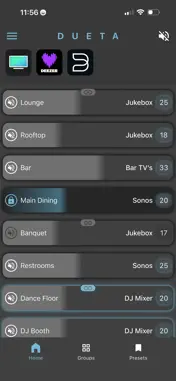
Dueta Whole-House Audio Take complete control of every room in your home with the Dueta app. Designed exclusively for Dueta whole-house audio systems, the Dueta app combines intuitive everyday operation with powerful administrative controls, making it easy for every member of the family to enjoy music and TV audio in their own way. Initial Setup The initial, one-time setup typically takes less than a minute to connect the app to your system. If your router configuration prevents automatic system detection, the app provides a simple manual setup process that only needs to be completed once. After the initial setup, future connections are nearly instantaneous. Administrator Control & User Profiles The Dueta app gives Administrators complete control over the system, while making it simple to create personalized experiences for family members and guests. Create and securely share user profiles. Restrict access to specific rooms, audio sources, maximum volume levels, and treble and bass controls. Create dedicated profiles for individuals, children, guests, vacation homes, or rental properties. Administrator controls also open the system for use in offices, restaurants, and other retail establishments. Home Page Monitor and control every room from a single page or press and hold any room name for additional controls. Features include: Power individual rooms on or off. Independently select sources and adjust volume for every room. Quickly link and unlink paired A/B rooms. Enable Room Lock to prevent unauthorized or accidental changes to a room's settings. Adjust Treble and Bass "on the fly" or keep this feature only available to the Administrator. Mute or unmute the entire home with one tap. Power off the entire home with one tap. Power on every room to its previous setting with one tap. Power on every room to a common source with one tap. Groups Create and save custom groups of rooms for quick access to: Select a common source. Adjust multiple rooms together using relative volume control. Set a common volume. Presets Save your favorite listening experiences and recall them instantly with a single tap. The following settings are saved for each room in your Preset: Power On/Off Source selection Volume level Room Lock On/Off App Shortcuts Add shortcuts to your favorite audio apps for quick switching between the Dueta app and popular streaming services. Compatible with services such as Spotify, Apple Music, Pandora, Amazon Music, and many more when used with a compatible music streamer. Learn more: https://www.htd.com/streamers Built to Grow With You Dueta works with virtually any audio source, including TVs, music streamers, Bluetooth receivers, and other analog and digital audio devices. As your entertainment system evolves, your Dueta system evolves with it. Universal Device Support Portrait mode Landscape mode Please Note The Dueta app is exclusively for Dueta systems. It is not compatible with HTD Lync 6 / Lync 12 or HTD MC-66 / MCA-66 systems.
What's New
Version 1.0.2 2026-09-01
Improvements to controlling more than one system. Easily switch between multiple saved profiles. Improvements to reconnecting to existing systems. Groups and Pr... Technical Analysis
Package Overview Basic metadata
Bundle ID
com.htd.dueta Current Version 1.0.2
Minimum iOS 15.0
Package Size App Store Size
Package Metadata 0 / 0 version records
Detailed binary, privacy manifest, framework, and Info.plist results have not been indexed for this package yet. The verified App Store and archive metadata above remains available.
Developer Information
Known Version Records
0 version records with stored package metadata
Stored metadata does not guarantee a package is currently available to download.
| Details | Version / IDs | Version date | Action |
|---|