
Preview





Description
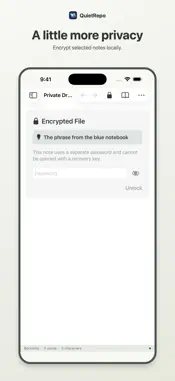
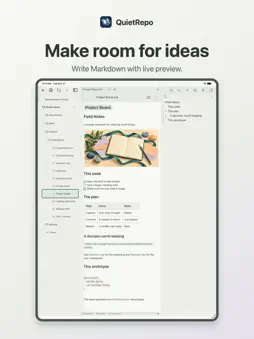
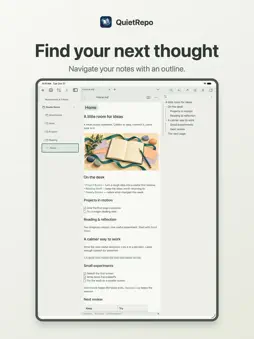
Your notes, in your files, across your devices. SYNC WITH GITHUB, WORK IN LOCAL FOLDERS Clone a GitHub repository to this device for a local working copy with two-way Git synchronization. Save edits offline and sync when connected. Automatic sync keeps saved changes moving between Mac, iPhone and iPad. When edits overlap, review the conflict and choose the local version, incoming version, or both with one action, then save. Automatic sync pauses while conflicts need attention. You can also open ordinary local folders and text files without an account. Automatic Git sync applies to repositories cloned and managed by QuietRepo; opening an ordinary folder does not connect it to GitHub. Sync requires a connection and appropriate repository access. FROM AI CONVERSATION TO YOUR NOTEBOOK The separate QuietRepo AI plugin lets you ask ChatGPT or Claude to save decisions, selected passages, and documents as Markdown in your own private GitHub repository. It also lets AI search those saved notes and cite them when answering. QuietRepo is the native editor for that same repository: organize the notes, merge related material, and encrypt selected notes locally. The plugin is a separate component with its own setup and authorization; AI chat is not built into this app. It saves material you choose, rather than automatically archiving every conversation. Encrypted note bodies must be decrypted before the plugin can search or cite them. Learn about the companion plugin: https://houjun.dev/tools/quietrepo/ MAKE NOTES EASY TO RETURN TO Write Markdown with live preview. Follow [[wiki links]], find backlinks, and navigate with an outline. Search your notes, merge or move files, and organize with tags and front matter properties. Add color highlights to keep useful passages in view. Images can live beside a note in its own assets folder. ENCRYPT SELECTED NOTES LOCALLY Use a default password with a recovery key, or give a note its own password. Unlock with Touch ID on supported devices after configuring device authentication. Keep passwords and recovery material safe. Encryption protects selected note contents; filenames and older plaintext versions in Git history are not hidden by encrypting a note now. MORE THAN MARKDOWN Edit plain text and text files such as JSON, YAML, CSV, HTML, CSS, JavaScript, and Swift. Non-Markdown files open as text; this is not a code runner or a rich document editor. Currently free. Support and privacy: https://houjun.dev/tools/quietrepo/
What's New
Version 1.3.0 2026-11-17
Find works the same way in every view. Every match is highlighted, the current one in its own colour, and the find bar shows where you are (for example 2/5). In...Find works the same way in every view. Every match is highlighted, the current one in its own colour, and the find bar shows where you are (for example 2/5). In Live Preview and Source you can replace the current match or all of them. Text inside tables is found too, and Reading view stays in Reading view while you search. Tabs on Mac and iPad: right-click a file (touch and hold on iPad) and choose Open in New Tab, or turn on "Open files in new tabs" in Settings. New tabs open at the end, closing a tab returns to the one you viewed before it, and on the Mac you can drag tabs to reorder them. Paste: the editor's context menu has Paste as Plain Text (and Paste with Formatting on the Mac). Text pasted from web pages no longer gets extra backslashes before symbols such as angle brackets. Pictures: deleting a note also deletes its attachments folder, and a picture you added to a note and then removed is deleted when you leave the note. Folders that hold only attachments no longer appear in the sidebar. Technical Analysis
Package Overview Basic metadata
Bundle ID
dev.houjun.quietrepo Current Version 1.3.0
Minimum iOS 18.0
Package Size App Store Size
Package Metadata 0 / 0 version records
Detailed binary, privacy manifest, framework, and Info.plist results have not been indexed for this package yet. The verified App Store and archive metadata above remains available.
Developer Information
Known Version Records
0 version records with stored package metadata
Stored metadata does not guarantee a package is currently available to download.
| Details | Version / IDs | Version date | Action |
|---|