
Preview



Description
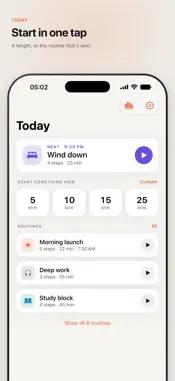
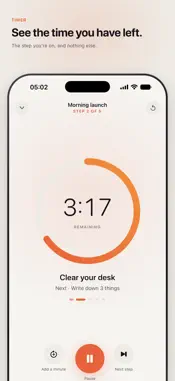
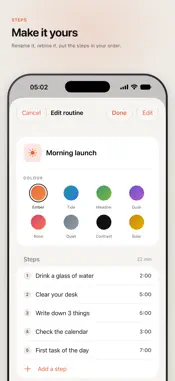
See the time you have left. Focal is a visual timer: it turns a countdown into something you can look at: a colored disk that shrinks as your time runs out — the same idea as the timer on a classroom wall, in your pocket, on your lock screen, and on your desk while the phone charges. ONE THING AT A TIME A routine in Focal is a chain of short steps, each with its own length. Focal shows you the step you are on and nothing else, then moves to the next one by itself. Morning launch, shutdown, cleaning sprint, a study block — start with ten ready-made routines or build your own. TIME YOU CAN SEE, EVERYWHERE • Full-screen timer in three shapes: disk, bar, or pie • Live Activity and Dynamic Island — the countdown keeps running on your lock screen • Home and Lock Screen widgets for your next routine • Put the phone on its side while charging and StandBy becomes a desk timer • Start from Siri, the Action Button, or Control Center BUILT FOR THE WAY ATTENTION ACTUALLY WORKS • Designed around ADHD time blindness — for when "five more minutes" quietly becomes an hour • Gentle haptics at the halfway mark and in the final minute • When time is up the clock keeps counting, and Focal taps you on the shoulder at five and fifteen minutes — the alarm for when you fall into something too deep • Add a minute without losing your place • Eight themes, including high-contrast and a quiet monochrome one NO INTERNET NEEDED. No account. No cloud. Nothing you make ever leaves your phone — the timer works in airplane mode, because it never needed the internet. Terms of Use (EULA): https://www.apple.com/legal/internet-services/itunes/dev/stdeula/
What's New
Version 1.1.7 2026-10-11
Bug fixes and stability improvements. Technical Analysis
Package Overview Basic metadata
Bundle ID
vn.bm.focal Current Version 1.1.7
Minimum iOS 18.0
Package Size App Store Size
Package Metadata 0 / 5 version records
Detailed binary, privacy manifest, framework, and Info.plist results have not been indexed for this package yet. The verified App Store and archive metadata above remains available.
Developer Information
Known Version Records
0 version records with stored package metadata • 5 known version records
Stored metadata does not guarantee a package is currently available to download.
| Details | Version / IDs | Version date | Action |
|---|---|---|---|
| Not archived | App Store ID: 891802370 | Unknown | Request Version |
| Not archived | App Store ID: 890765010 | Unknown | Request Version |
| Not archived | App Store ID: 890209297 | Unknown | Request Version |
| Not archived | App Store ID: 890109807 | Unknown | Request Version |
| Not archived | App Store ID: 889825919 | Unknown | Request Version |