
Preview





Description
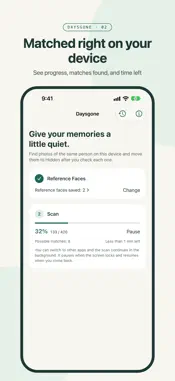
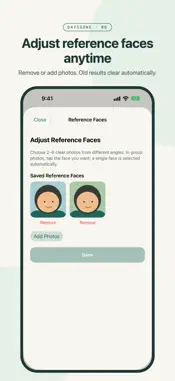
Some memories you don't want to delete. You just don't want to see them right now. Daysgone finds photos of the same person in your library. You review each one, and only then are they moved to the Hidden album in Photos. If you prefer, you can delete them instead. Hidden photos can be unhidden in Photos at any time; deleted photos stay in Recently Deleted for 30 days. HOW IT WORKS 1. Choose 2–6 clear photos of the same person from different angles. In group photos, tap the face you mean. 2. Start the scan. Daysgone compares photos on your device and keeps going in the background if you switch apps. 3. Review the results: the closest matches come first. Tap to select, use the magnifier to look closer, and tap "Not them" for anyone else. 4. Confirm the list to hide it. Every batch is recorded in your activity history. MORE CONTROL • Prefer to delete? Confirm twice in the app, then iOS asks once more. Deleted photos stay in Recently Deleted for 30 days, on all your devices with iCloud Photos. • Tap your saved reference faces to see them, remove some, or add new ones. Old scan results and cache are cleared automatically. • See the scan's percentage, matches found so far, and time left. Locking the screen pauses it; it picks up where it stopped. EVERYTHING STAYS ON YOUR DEVICE • The face recognition model is built into the app. No cloud service. • No account. Your photos and face data are never collected or uploaded. • No ads, tracking, or analytics. • Local data is excluded from backups and can be cleared in the app at any time. THOUGHTFUL DETAILS • Works on iPhone and iPad. • Large libraries are scanned in batches. Pause and resume anytime; next time only new photos are scanned. • Group photos show which face matched. • iCloud photos that aren't downloaded are analyzed from the thumbnail on your device. Nothing is downloaded; very small faces in a thumbnail may be missed. PLEASE NOTE • Similarity isn't proof of identity, and not every photo will be found. Small, turned, or much older faces may be missed. • Analyzes still photos and the cover image of Live Photos. Videos aren't supported. • With iCloud Photos on, hidden photos are hidden on your other devices too. If your accessible photos include an iCloud Shared Library, other members won't see the hidden photos either. One-time purchase. No subscription, no in-app purchases. Questions or feedback: [email protected]
Technical Analysis
Package Overview Basic metadata
Bundle ID
com.voidful.daysgone Current Version 1.1.0
Minimum iOS 16.0
Package Size App Store Size
Package Metadata 0 / 0 version records
Detailed binary, privacy manifest, framework, and Info.plist results have not been indexed for this package yet. The verified App Store and archive metadata above remains available.
Known Version Records
0 version records with stored package metadata
Stored metadata does not guarantee a package is currently available to download.
| Details | Version / IDs | Version date | Action |
|---|