Preview


Description
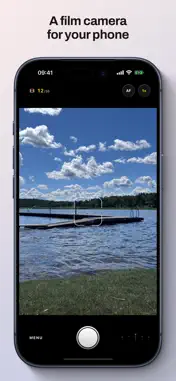
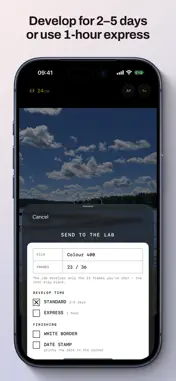
One roll. Thirty-six frames. No preview, no retakes, and no way to see a single photo until the roll comes back from the lab. 36 Frames is a film camera for your iPhone. You load a roll, and from the first frame to the thirty-sixth there is nothing to look at but the counter. You can't check the shot. You can't delete the bad ones. You shoot, you trust it, and you move on. It's how photography felt before there was a screen on the back of the camera. When the roll is full, or whenever you decide you're done with it, you send it to the lab. Standard developing takes two to five working days. Express comes back in about an hour. The look is identical either way; the only thing you ever trade is time. Then one day the roll is ready, the contact sheet arrives, and you finally see what you spent your week shooting. Keep the good ones. That's the whole app. WHAT YOU GET One roll, thirty-six frames. The counter is the only feedback there is. No preview, no retakes, no recovery. Nothing you shoot can be viewed until the roll is developed. Not previewed, not reviewed, not undeleted. Two ways to wait. Standard developing in two to five working days, never coming back on a weekend. Express in about an hour. Both are free, and neither one looks better than the other. Two films. Colour 400 and Mono 400, each with its own grain, colour rendering and tone. The look is applied when the roll is developed, not when you shoot, so you never get to preview it either. A camera worth holding. Every lens on your iPhone, a viewfinder that shows exactly what gets captured, a shutter speed dial from 1/1000 of a second to a full second, optional manual focus with focus peaking, a rule-of-thirds grid and a horizon level. One tap is the shutter. Short rolls are fine. Send any time after the first frame. The lab develops only the frames you actually shot. Widgets, Lock Screen and Siri. See how far into the roll you are and when the next one is ready, jump straight to the shutter from Control Center or the Action Button, and ask Siri about a roll. Put your developed photos on the Home Screen with the Album widget. Choose your app icon. Keep the original yellow camera on your Home Screen, or pick Kumquat, Raspberry, Plum, Juniper, Kiwi or two-tone black and chrome. Free for everyone. Keepers go to Photos. Developed frames save at full resolution with the real capture details: date, place, lens, exposure. They sort into your library where they belong. Ask the lab for a white border, or for the date or the frame number stamped in the corner. In a hurry? There's a Rush option that develops a roll on the spot, free and unlimited. The app will gently point out that rushing every roll rather defeats the point. WHERE YOUR PHOTOS GO Nowhere. "Sending the roll to the lab" is this app's language for a wait that runs entirely on your own phone. Undeveloped frames live in the app's private storage, developing happens on the device, and nothing is ever uploaded. There's no account to make, no sign-up, no analytics, no ads and no tracking. It works in airplane mode. The wait is real, though. It isn't a progress bar you can skip by relaunching. WHAT IT COSTS Free to download, and your first two rolls are free, one on each film, so you get a proper feel for it. After that, a single one-time purchase unlocks unlimited rolls, forever. Nothing metered, and nothing that expires. Buy it once and the app keeps working. Made in Stockholm. iPhone only, iOS 18 or later.
What's New
Version 1.1 2026-10-19
- A shutter speed dial in the viewfinder. Leave it on A and the camera picks the time, or set one from 1/1000 of a second to a full second. Fast times freeze ... Technical Analysis
Package Overview Basic metadata
Bundle ID
se.hjalle.36frames Current Version 1.1
Minimum iOS 18.0
Package Size App Store Size
Package Metadata 0 / 0 version records
Detailed binary, privacy manifest, framework, and Info.plist results have not been indexed for this package yet. The verified App Store and archive metadata above remains available.
Developer Information
Known Version Records
0 version records with stored package metadata
Stored metadata does not guarantee a package is currently available to download.
| Details | Version / IDs | Version date | Action |
|---|