
Preview



Description
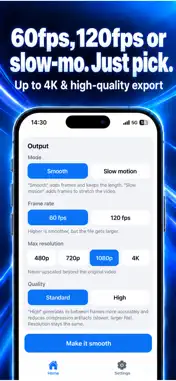
Turn choppy video into buttery-smooth motion — with one tap. FlowFrame uses AI frame interpolation to draw the frames your video is missing, turning it into smooth 60fps / 120fps footage or 2x / 4x slow motion. Everything runs on your iPhone. Your videos are never uploaded. GREAT FOR • Choppy gameplay captures and anime clips • Pets, kids, dance and sports — add slow motion after the fact • 30fps footage that deserves to look great on a 120Hz display • A final polish before posting to social media THREE SIMPLE STEPS 1. Pick a video (Photos or the Files app) 2. Choose 60fps, 120fps or a slow-motion factor — FlowFrame shows the resulting fps, duration and frame count up front 3. Tap "Make it smooth" (progress and time remaining shown; cancel anytime) Then compare Before / After / Split slider, and save to Photos or share. WHY FLOWFRAME • 100% on-device — no uploads, no account, works offline • On iOS 26 and later, Apple's latest frame-rate conversion technology delivers higher quality and speed • HDR stays HDR — brightness and color don't shift (converted to SDR on some devices) • No watermark — not even on the free version • Your original is never touched — a new video is added to Photos only when you save • If a video can't be converted, FlowFrame tells you why (unsupported format, low memory, low storage…) FREE • Convert the first 10 seconds of any video (longer clips are trimmed so you can try it) • 60fps output, up to 1080p • Slow-motion (2x / 4x) preview • Before/after comparison and saving to Photos PRO — ONE-TIME PURCHASE, NO SUBSCRIPTION • No length limit — convert to the very last second • 120fps output • Save and share slow motion (2x / 4x) • Output up to 4K • High-quality export (more accurate in-between frames + higher bitrate) Buy once, keep forever. PRO is tied to your Apple ID and can be restored on a new device. COMPATIBILITY • iOS 16.4 or later • Input: videos from Photos or the Files app (MOV / MP4, etc.) • Output: 60fps / 120fps, 480p–4K, HEVC (H.265) PLEASE NOTE • Frame interpolation estimates motion, so fast or complex scenes may show some ghosting or warping • 4K and long videos take time. Keep the app open and the screen on while converting Questions or ideas? Use "Contact" in the app. Terms of Use: https://sh-1101.github.io/flowframe/terms.html Privacy Policy: https://sh-1101.github.io/flowframe/privacy.html
Technical Analysis
Package Overview Basic metadata
Bundle ID
com.flowframe.app Current Version 1.0.0
Minimum iOS 16.4
Package Size App Store Size
Package Metadata 0 / 0 version records
Detailed binary, privacy manifest, framework, and Info.plist results have not been indexed for this package yet. The verified App Store and archive metadata above remains available.
Known Version Records
0 version records with stored package metadata
Stored metadata does not guarantee a package is currently available to download.
| Details | Version / IDs | Version date | Action |
|---|