
Preview



Description
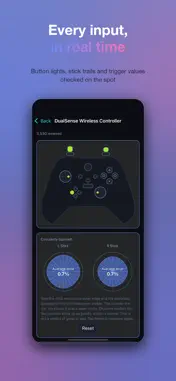
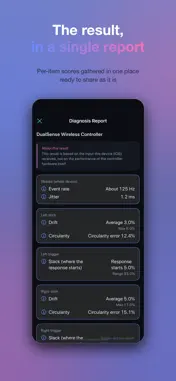
See what your connected game controller is doing, right now. PadVitals shows the buttons, sticks, triggers, rumble and sensors of a controller connected to your iPhone / iPad in real time, and measures stick drift and circularity as numbers. Note: this app does not diagnose or certify the controller hardware itself. It measures and visualizes the input data that iOS received on this device. ■ Try it before you connect anything - No compatible controller at hand? Demo mode walks through every screen — button lights, stick trails, each diagnosis and the report — so you can see what the app does right away - The values shown in demo mode are fictional (they are not measurements from a real device) ■ Real-time view - Pressed buttons light up on a schematic, and stick movement leaves a glowing trail - Raw stick / trigger values, motion (gyroscope and accelerometer) and battery level, all in one list - Values standing still is normal. GameController delivers input only when something changes ■ A guided diagnosis - Drift ... how far the center wanders once you take your fingers off - Circularity ... spin the stick around once, and the reach at each angle is compared - Input event delivery rate / jitter ... the effective rate of the input that reached the app, and how steady the intervals are (measured on iOS) - Trigger slack ... where the response starts - Rumble and core button response checks The input event delivery rate is not the polling rate of the controller itself. It is the input that reached the app, shaped by the Bluetooth connection interval and by scheduling on the iOS side. ■ Follow the wear over time - Results are kept on the device per controller, so the numbers show how things are trending ■ A report you can share - The result fits on a single image, ready to post ■ Supported controllers - DualSense / DualSense Edge / DualShock 4 - Xbox Wireless / Elite Series 2 - MFi controllers - Apple has not stated support for Nintendo Switch Pro / Joy-Con, so those may or may not work ■ Pricing - Free to use, with ads kept modest - Ad removal is a one-time purchase (non-consumable), not a monthly subscription. Purchases can be restored from Settings ■ Privacy and terms - Diagnosis results and history are stored on this device only. Diagnostic data is never sent to an external server - Privacy policy: https://padvitals-lab.web.app/en/privacy - Terms of use (Apple standard EULA): https://www.apple.com/legal/internet-services/itunes/dev/stdeula/ Requires iOS 17 or later.
What's New
Version 1.1.0 2026-09-07
- English is now supported. The app, the App Store listing and the support pages are all available in English. Technical Analysis
Package Overview Basic metadata
Bundle ID
com.harulab.padvitals Current Version 1.1.0
Minimum iOS 17.0
Package Size App Store Size
Package Metadata 0 / 0 version records
Detailed binary, privacy manifest, framework, and Info.plist results have not been indexed for this package yet. The verified App Store and archive metadata above remains available.
Developer Information
Known Version Records
0 version records with stored package metadata
Stored metadata does not guarantee a package is currently available to download.
| Details | Version / IDs | Version date | Action |
|---|