
Preview






Description
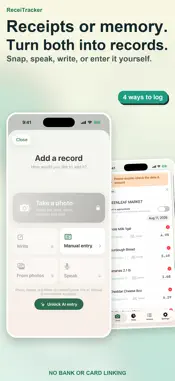
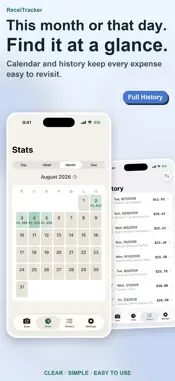
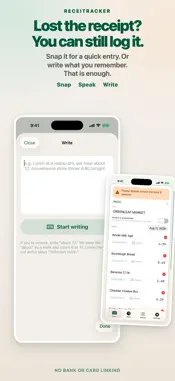
Snap a receipt and AI reads the store, items, amounts, and date, sorts each item into a category, and records it in your budget. You can also log expenses by speaking or typing a note, and manual entry is unlimited. No bank or card linking, and no account to create. Great for people who: · Let receipts pile up and can't keep a budget going · Often pay cash, so bank-linked apps miss part of their spending · Prefer not to hand bank or card details to an app MAKE IT YOURS Choose soft colors, original floral patterns, scenic photos, or bold color combinations. Use your own photo as a background, too. Pick a person, a hand-drawn car, or a dog for your progress path. Adjust the accent color and companion size to make it your own. Find your combination in Settings → Themes & Companions. MANUAL ENTRY, PLUS OPTIONAL AI Manual entry has no entry-count limit. AI turns receipt photos, transcribed speech, and typed text into expense records. Your app purchase lets you try AI scans right away; to keep going, choose AI scan tickets or ReceiTracker Pro. Check the scan result, then choose “Import & scan next” to keep recording receipts. REVIEW POSSIBLE DUPLICATES When records share the same date, total, and currency, History shows a button to review possible duplicates. Compare their details and choose whether to delete an entry. Candidates are suggestions, not confirmed duplicates. SEE YOUR RECORDS CLEARLY Review spending in charts and the calendar, and build progress through days recorded. The base app includes history for your current accounting month. Adjust the month's starting day to suit your routine. CHOOSE YOUR EXTRAS AI scan tickets are consumable In-App Purchases that add AI scans. They do not renew. Full History is a one-time, non-consumable In-App Purchase that unlocks all history and past navigation in the calendar and charts. AI entry and CSV export are not included. ReceiTracker Pro is an auto-renewing monthly or yearly subscription. It includes AI entry, CSV export, all history, and past calendar and chart navigation. View pricing, duration, and conditions in the app. KEEP RECORDS ON YOUR DEVICE No ReceiTracker account or bank/card connection is needed. Expense records and saved receipt photos are managed on your device. AI entry sends the required image or text through our server to Google Gemini for processing. Export and restore backups to manage your records. Available in Japanese, English, Simplified Chinese, and Traditional Chinese (Taiwan). Terms of Use: https://www.apple.com/legal/internet-services/itunes/dev/stdeula/ Privacy Policy: https://bokchoyworks-stack.github.io/receitracker-legal/
What's New
Version 10.2 2026-11-10
- You can now write an App Store review anytime from Settings. Your ratings and comments mean a lot to an indie developer. - "More apps by this developer" now m...- You can now write an App Store review anytime from Settings. Your ratings and comments mean a lot to an indie developer. - "More apps by this developer" now marks apps that are free for a limited time. - Minor improvements. Technical Analysis
Package Overview Basic metadata
Bundle ID
com.himur.recietracker-gemini-ver1-0 Current Version 10.2
Minimum iOS 18.6
Package Size App Store Size
Package Metadata 0 / 0 version records
Detailed binary, privacy manifest, framework, and Info.plist results have not been indexed for this package yet. The verified App Store and archive metadata above remains available.
Price History (USA store)
2 recorded price change points. These are historical observations, not a guarantee of the current price.
| Recorded at | Price | Currency |
|---|---|---|
| 0.0 | USD | |
| 2.99 | USD |
Developer Information
Known Version Records
0 version records with stored package metadata
Stored metadata does not guarantee a package is currently available to download.
| Details | Version / IDs | Version date | Action |
|---|