Preview


Description
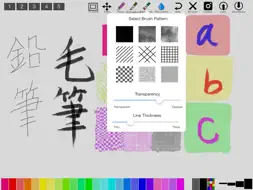
This app is a drawing application for iPad for people whose hobby is watercolor. You can surprisingly accurately create watercolor paintings of landscape, portrait, still life, etc. The secret is to create automatically sketches with camera. You can also create sketches from scratch by yourself. It's easy to use. Please operate the followings after starting the app. 1. Tap the camera icon and preview the sketch. 2. Try to place your subject and tap the shutter in composition that you like the most. Then, the sketch taken by the camera will be displayed on the canvas. 3. Choose a favorite color, a line thickness and a type of brush. 4. Draw freely. (Expansion and undo are available) 5. Save your drawing in the camera roll or post it to FB or Twitter. This app has the following functions. - load images from the camera roll. - save images in the camera roll and share images by e-mail, FB and Twitter. - take photos with the camera and get a sketch of them. - select any colors from 22 colors of crayons or full color palette. - When a color is selected from the color palette, the app remembers the color up to 10past. - select a hard touch line (pencil icon), a line to imitate writing brush (brush icon) or a brush with 9 patterns (brush icon). - change the degree of line transparency and blur in a wide range(water droplets icon).. - undo/redo of drawing (up to 10 times / impossible when the memory is tight). - zoom in/out and move with pinch gesture on the canvas and paint on enlarged sketches. - Five sample sketches have been registered in advance. - register five sketches or paintings under working on. - Full screen is available to use as a watercolor. *** This app include the following open sources. GPUImage(Copyright (c) 2012, Brad Larson, Ben Cochran, Hugues Lismonde, Keitaroh Kobayashi, Alaric Cole, Matthew Clark, Jacob Gundersen, Chris Williams. All rights reserved.) and Color-Picker-for-iOS(Copyright (c) 2011 Ryota Hayashi All rights reserved. ) [Note]:We are not able to offer compensation for any damages or losses that may occur during its operation.
What's New
Version 2.2 2026-10-06
・Completely rewrote the code. ・Improved photo-taking functionality. ・Improved the method for importing sketches from existing photos. ・Changed the sample images...・Completely rewrote the code. ・Improved photo-taking functionality. ・Improved the method for importing sketches from existing photos. ・Changed the sample images. Technical Analysis
Package Overview Basic metadata
Bundle ID
jp.cariya.products.WaterColorPad2 Current Version 2.2
Minimum iOS 15.0
Package Size App Store Size
Package Metadata 0 / 4 version records
Detailed binary, privacy manifest, framework, and Info.plist results have not been indexed for this package yet. The verified App Store and archive metadata above remains available.
Known Version Records
0 version records with stored package metadata • 4 known version records
Stored metadata does not guarantee a package is currently available to download.
| Details | Version / IDs | Version date | Action |
|---|---|---|---|
| Not archived | App Store ID: 857911480 | Unknown | Paid / Arcade |
| Not archived | App Store ID: 838334315 | Unknown | Paid / Arcade |
| Not archived | App Store ID: 833508683 | Unknown | Paid / Arcade |
| Not archived | App Store ID: 819189868 | Unknown | Paid / Arcade |