Preview

Description
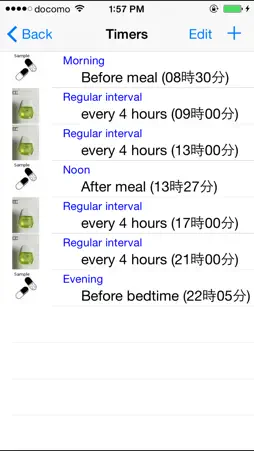
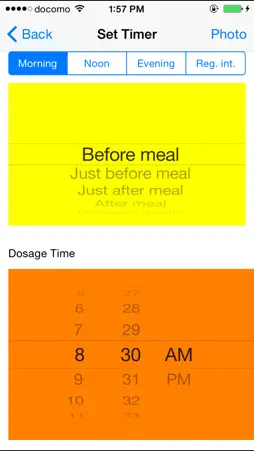
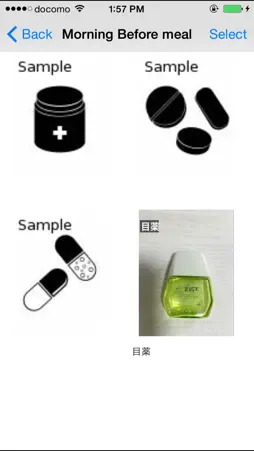
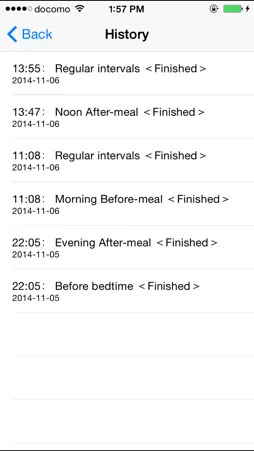
This application program let you know the dosage times by three continuous chimes. The dosage notification works even in the back ground. This app supports some QR codes for electronic medication records (JAHIS). Your medication will be recorded when you tap the blinking button after medication. You can see your medication history by tapping the 'History' button. Old history is automatically deleted after three months. Soon after having downloaded the app, medicine samples of ‘Morning before meal’, ‘Noon after meal’ and ‘Before bedtime’ are displayed on a time table for example usage. The chime rings to urge you to take medicine if the dosage times are things of the past already. The blink stops if you tap blinking buttons. Tapping upper right 'Setting' button on the screen to move to setting times screen, you can change the dosage times and add new dosage timings such as 'Morning after meal' or clear dosage timing. How to set dosage timing. - move to operation selection screen by tapping 'Setting' button in the upper right corner on the initial screen. (1) How to set dosage timing from QR code - Tap the "Register medication timing by scanning QR code" button to move to the QR code scanning screen. - Scan all available QR codes. Once scanning is complete, the QR code will be surrounded by a green frame, and the "Number of scanned QR codes" will be displayed. Confirm that all QR codes have been scanned. - Tap the "Scanning Complete" button to automatically set some of the QR code content as medication timing. The following Japanese medication instruction phrases can be interpreted by this app: "Breakfast," "Lunch," "Dinner," "Every Meal" "Before Meals," "After Meals," "x Times a Day" - move to 'Setting' screen by tapping 'Register/Update the dosage schedule' button. (2) Updating dosage time By tapping the line of medication item, you can move to 'set timer' screen and update the dosage time by the wheel. (3) Resister a new medication item By tapping the plus icon in the upper right corner, you can move to 'set timer' screen and resist a new medication item. The following are the categories of the medication item. In the morning: before meal, just before meal, just after meal, after meal, between meals (morning and noon) At noon: before meal, just before meal, just after meal, after meal, between meals (noon and evening) In the evening: before meal, just before meal, just after meal, after meal, before bedtime Regular Interval: every one hour, every two hours, - - - , every twelve hours How to associate the photo of medicines with the dosage timing. - You can associate photos of medicine with dosage timings which were set above. - Tap the top right 'Medicine' button on the 'Time' screen. - In the photo selection screen, when you tap the 'Select' button and select pictures on the screen and then tap the 'Done' button, the photos can be associated with the dosage timing. Multiple Photos can be selected at a time. ** If you want to mute the chime, you should set one of the following. - Clear all dosage timings. (Medicine notification vanish) - In Settings app with iPhone, tap "Do Not Disturb" and enable “Manual” or “Scheduled”.While iPhone is locked state, alerts will be silenced and moon icon will appear in the status bar. - Pressing and holding the power button with iPhone and turn off the power. [Note] - It does not guarantee reliably sounding chimes at specific times at any time in any case. - If you do not start the app for more than a day, chimes will be silenced. When you start the app, the chimes begin to sound. - We are not able to compensate for any damages or losses by any reason.
What's New
Version 2.0 2026-04-24
- Scanning a QR code will now automatically set medication timing. (Supports some QR codes for electronic medication records (JAHIS)) - Tapping a medication ima...- Scanning a QR code will now automatically set medication timing. (Supports some QR codes for electronic medication records (JAHIS)) - Tapping a medication image on the initial screen will now display a larger image in a pop-up window. - When taking a photo of medication after setting medication timing with a QR code, suggested medication names will now be displayed. - The history screen has been made more detailed. Technical Analysis
Package Overview Basic metadata
Bundle ID
jp.cariya.products.MedicineReminder Current Version 2.0
Minimum iOS 16.0
Package Size App Store Size
Package Metadata 1 / 10 version records
Detailed binary, privacy manifest, framework, and Info.plist results have not been indexed for this package yet. The verified App Store and archive metadata above remains available.
Known Version Records
1 version record with stored package metadata • 10 known version records
Stored metadata does not guarantee a package is currently available to download.
| Details | Version / IDs | Version date | Action |
|---|---|---|---|
| 3.93 MB | v2.0 App Store ID: 884748116Build: 2.0 | 2026-04-24 09:03:56 | Paid / Arcade |
| Not archived | App Store ID: 853528806 | Unknown | Paid / Arcade |
| Not archived | App Store ID: 833063869 | Unknown | Paid / Arcade |
| Not archived | App Store ID: 818931642 | Unknown | Paid / Arcade |
| Not archived | App Store ID: 813447709 | Unknown | Paid / Arcade |
| Not archived | App Store ID: 812549960 | Unknown | Paid / Arcade |
| Not archived | App Store ID: 812011174 | Unknown | Paid / Arcade |
| Not archived | App Store ID: 811655565 | Unknown | Paid / Arcade |
| Not archived | App Store ID: 780942716 | Unknown | Paid / Arcade |
| Not archived | App Store ID: 455912787 | Unknown | Paid / Arcade |