Preview




Description
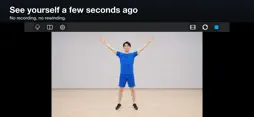
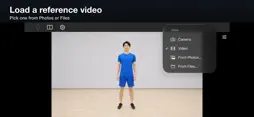
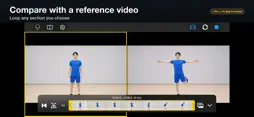
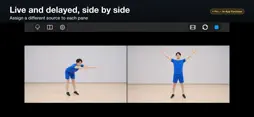
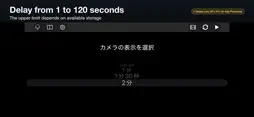
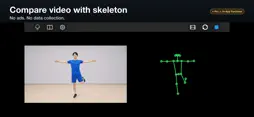
See your own movement seconds after you make it. Video Delay shows the camera feed on a delay. Set the delay, prop up your device, and perform. By the time you look at the screen, your movement is playing back. No recording, no tapping, no scrubbing. WHY A DELAY BEATS A RECORDING A normal camera makes you stop, pick up the device, and rewind. With a delay you simply keep practicing. Each repetition plays back on its own while you get ready for the next one, so a whole session runs without anyone touching the screen. COMPARE WITH A REFERENCE VIDEO Import a video from Photos or Files and loop the section you choose. Play a choreography reference, or your own best attempt, and put the live or delayed feed right next to it (two panes, Pro). Set the loop range, flip it left to right, or slow it down to 0.75x, 0.5x, or 0.25x. When you start the camera, every loop restarts from the top. BUILT FOR PRACTICE - Physical education: vaulting, mat work, high jump, swimming - Gymnastics and cheer: check landings and body line - Dance: verify choreography, timing, and formation - Golf, baseball, tennis: swing path and follow-through - Martial arts: stance, guard, and kick height - Music: posture, bowing, and hand position - Physical therapy and gait training - Public speaking: gesture and stance FREE - Delay from 1 to 20 seconds - Loop a section of a video (one pane) - Front and rear camera - Mirror mode for left/right flip - Live frame rate readout - No ads PRO (IN-APP PURCHASE) The following features require an additional purchase. - Delay extended to 120 seconds The upper limit depends on free storage. Before you buy, the app shows the longest delay this particular device can hold. - Two-pane display, split or inset Each pane takes either the live feed or any delay you choose, so you can put live next to delayed, or 5 seconds ago next to 30 seconds ago. - Skeleton overlay Overlay: body lines are drawn on top of the video. Only: the video is not shown and only the skeleton is drawn, so the background and clothing stay off the screen and you watch the movement itself. Split: video on one pane and skeleton on the other, side by side. The skeleton can also be drawn on imported videos. - Compare with a looping video In two panes, play a video next to the live feed, a delay, or another video. - Six colors for the skeleton lines Pro is a one-time purchase, not a subscription. Once bought, it restores on your other devices signed in to the same Apple Account. DESIGNED TO KEEP RUNNING Frames are buffered to disk instead of memory, so a 120-second delay uses no more memory than a one-second delay. Capture runs at 15 fps, and image quality steps down automatically if the device gets warm, so long sessions stay stable. The skeleton is computed on the device; no video leaves it. NO ACCOUNT, NO ADS, NO DATA COLLECTION Nothing is uploaded. Nothing is written to your photo library. Camera frames are discarded as they play back and cleared when you close the app. Importing a video needs no photo library permission; the app receives only the one video you pick. It keeps one imported video per pane inside the app and replaces it when you import a new one. PLEASE NOTE - The skeleton overlay is a visual aid for watching movement. It does not measure or diagnose anything. - Recording the camera or saving still images is not supported. - iPhone is landscape only. iPad supports every orientation. - Camera access is required. Set your device on a tripod or lean it against a wall, choose a delay, and start practicing.
What's New
Version 4.1 2026-11-03
Version 4.1 - Video loop. Import a video from Photos or Files and loop the section you choose. Free in a single pane. - Compare a video with the live feed, a d...Version 4.1 - Video loop. Import a video from Photos or Files and loop the section you choose. Free in a single pane. - Compare a video with the live feed, a delay, or another video in two panes (Pro). - Set the loop range, flip it left to right, or slow it to 0.75x, 0.5x, or 0.25x. Starting the camera restarts every loop from the top. - The skeleton overlay now works on imported videos too (Pro). - When a phone call or another app interrupts the camera, the screen now says why. - The start/stop button is now ▶ / ■. Importing a video needs no photo library permission. Pro is a one-time purchase, not a subscription. Technical Analysis
Package Overview Basic metadata
Bundle ID
net.teamdigicom.DelayedVideoCamera Current Version 4.1
Minimum iOS 15.6
Package Size App Store Size
Package Metadata 0 / 7 version records
0.0 / 5.0 (0 ratings)
Detailed binary, privacy manifest, framework, and Info.plist results have not been indexed for this package yet. The verified App Store and archive metadata above remains available.
Known Version Records
0 version records with stored package metadata • 7 known version records
Stored metadata does not guarantee a package is currently available to download.
| Details | Version / IDs | Version date | Action |
|---|---|---|---|
| Not archived | App Store ID: 876107417 | Unknown | Request Version |
| Not archived | App Store ID: 861277709 | Unknown | Request Version |
| Not archived | App Store ID: 838218932 | Unknown | Request Version |
| Not archived | App Store ID: 832327823 | Unknown | Request Version |
| Not archived | App Store ID: 831424692 | Unknown | Request Version |
| Not archived | App Store ID: 831184902 | Unknown | Request Version |
| Not archived | App Store ID: 830847580 | Unknown | Request Version |