
Preview








Description
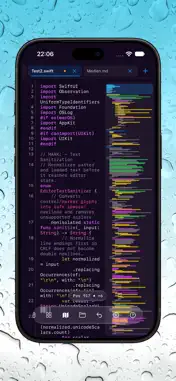
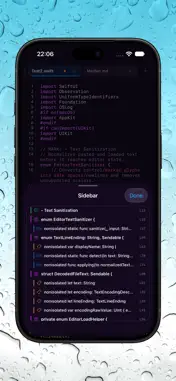
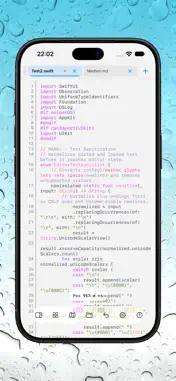
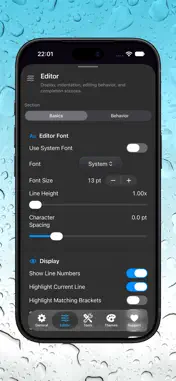
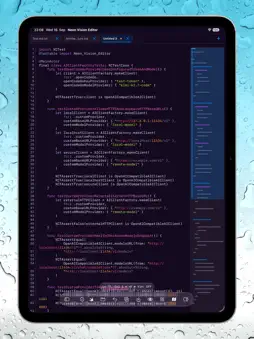
Neon Vision Editor is a fast, native text editor for macOS, iPhone, iPad, and Apple Vision Pro. Bloat-free. Readable. Built for focused editing without Electron, required plugins, or full IDE complexity. Edit notes, Markdown, code, configuration files, and large documents with an interface designed for each platform. Work with touch, hardware keyboards, and native editing controls. App Store editions do not include a local Terminal or shell-execution tools. HIGHLIGHTS • Broad syntax highlighting for Swift, Python, JavaScript, TypeScript, Java, Kotlin, Go, Ruby, Rust, SQL, HTML, CSS, C/C++, Objective-C, JSON, XML, YAML, TOML, INI, Markdown, shell scripts, TeX/LaTeX, and more. • Open text files with unfamiliar extensions or no extension. Preserve tabs, Unicode characters, and text content when loading and saving. • Navigate with Quick Open, project browsing, folder trees, and Find in Files. • Write Markdown with live preview, GitHub Flavored Markdown support, syntax-colored code blocks, preview templates, and PDF export. Preview HTML and SVG alongside your editing workflow. • Expand markup and stylesheet abbreviations with built-in Emmet 2. Use optional Vim-style keyboard controls and export styled Code Snapshots. • Edit on iPad with adaptive controls, hardware-keyboard support, line wrapping, and horizontal scrolling for long lines. • Work with large documents using background preparation and viewport-based rendering. Files of 100 MB or more open as clearly marked, read-only partial previews. • Handle external changes with conflict-aware saving and improved change detection for network files on macOS. Failed or conflicted saves keep affected documents open instead of silently closing them. • Recover unsaved work with draft recovery and local recovery copies for external-document save payloads on iPhone, iPad, and Apple Vision Pro. • Preview supported source and Markdown files directly in Finder with the macOS Quick Look extension. • Choose whether the Welcome Tour appears automatically. Opening a document from Finder skips the tour, including after updates. OPTIONAL AI ASSISTANCE Use AI-assisted completion and saved chat conversations with Apple Intelligence on supported devices or an external provider you configure. Ask about a selected snippet, attach supported document context, or chat without including editor content. Available external providers include OpenAI, Anthropic, Gemini, Grok, OpenCode Go, and custom OpenAI-compatible services. AI availability depends on your device and selected provider. Core editing works offline and does not require AI. PRIVACY Neon Vision Editor does not collect personal data for analytics or advertising. External AI features are optional. When you use them, requests go to your selected provider over HTTPS. Completion requests include relevant editing context, such as text near the cursor or an active selection. Chat requests include your messages and the context you explicitly choose, which can include selected text, a supported current file, or project structure. External AI providers process submitted content under their own terms and privacy policies. Provider API keys are stored securely in the system Keychain. Disabling AI features prevents AI-related requests; opening, saving, or previewing network-backed content may still communicate with the services you use. Built for developers, writers, students, sysadmins, and anyone who wants focused native editing. TERMS OF USE (EULA) https://www.apple.com/legal/internet-services/itunes/dev/stdeula/
What's New
Version 2.1.6 2026-10-27
• On iPhone Duo's unfolded display, the editor toolbar no longer covers the clock and status icons. • Typing in large documents on iPhone and iPad is more respo... Technical Analysis
Package Overview Basic metadata
Bundle ID
h3p.Neon-Vision-Editor Current Version 2.1.6
Minimum iOS 18.6
Package Size App Store Size
Package Metadata 1 / 30 version records
Detailed binary, privacy manifest, framework, and Info.plist results have not been indexed for this package yet. The verified App Store and archive metadata above remains available.
Developer Information
Known Version Records
1 version record with stored package metadata • 30 known version records
Stored metadata does not guarantee a package is currently available to download.
| Details | Version / IDs | Version date | Action |
|---|---|---|---|
| 15.46 MB | v1.6.4 App Store ID: 886814573Build: 1.6.4 | 2026-09-08 15:49:53 | Get Version |
| Not archived | App Store ID: 886697040 | Unknown | Request Version |
| Not archived | App Store ID: 886630183 | Unknown | Request Version |
| Not archived | App Store ID: 886571425 | Unknown | Request Version |
| Not archived | App Store ID: 886467124 | Unknown | Request Version |
| Not archived | App Store ID: 886283299 | Unknown | Request Version |
| Not archived | App Store ID: 886185710 | Unknown | Request Version |
| Not archived | App Store ID: 885882071 | Unknown | Request Version |
| Not archived | App Store ID: 885714530 | Unknown | Request Version |
| Not archived | App Store ID: 885643604 | Unknown | Request Version |
| Not archived | App Store ID: 885632551 | Unknown | Request Version |
| Not archived | App Store ID: 885474779 | Unknown | Request Version |
| Not archived | App Store ID: 885303985 | Unknown | Request Version |
| Not archived | App Store ID: 885192026 | Unknown | Request Version |
| Not archived | App Store ID: 885013459 | Unknown | Request Version |
| Not archived | App Store ID: 884893080 | Unknown | Request Version |
| Not archived | App Store ID: 884586117 | Unknown | Request Version |
| Not archived | App Store ID: 883922614 | Unknown | Request Version |
| Not archived | App Store ID: 883896988 | Unknown | Request Version |
| Not archived | App Store ID: 883807638 | Unknown | Request Version |
| Not archived | App Store ID: 883420145 | Unknown | Request Version |
| Not archived | App Store ID: 883356763 | Unknown | Request Version |
| Not archived | App Store ID: 883318004 | Unknown | Request Version |
| Not archived | App Store ID: 883189220 | Unknown | Request Version |
| Not archived | App Store ID: 883149772 | Unknown | Request Version |
| Not archived | App Store ID: 883112745 | Unknown | Request Version |
| Not archived | App Store ID: 883032684 | Unknown | Request Version |
| Not archived | App Store ID: 882975818 | Unknown | Request Version |
| Not archived | App Store ID: 882453975 | Unknown | Request Version |
| Not archived | App Store ID: 882303321 | Unknown | Request Version |